
Anyone who writes for a living collects text. Lots of it. Articles, drafts, interview notes, background pieces, half-finished ideas and that one paragraph you cut years ago because it didn’t quite fit. I have been doing this for quite a while, so you can imagine what my folders look like. Everything is there. Somewhere.
That is exactly the problem.
Finding things is the hard part
Saving text is easy. Finding it again a few months or years later is something else entirely. Especially when you are not looking for a document, but for something inside a document. A quote. A figure. A number. That one sentence somebody said during an interview which suddenly turns out to be relevant again.
You would expect the search function of your operating system to help. In theory it does. In practice, I usually end up staring at a list of file names, opening one document after another and thinking: I’m sure it was in here somewhere.
So I built something myself.
My own little wiki
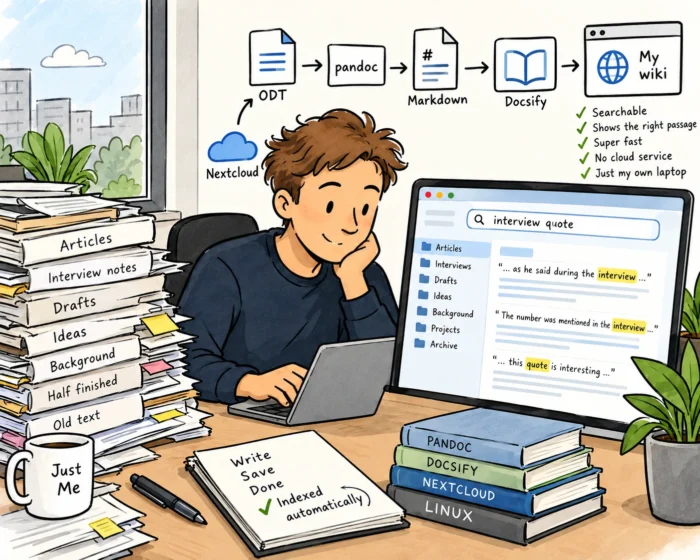
LibreOffice is my word processor, and it saves everything as ODT, the Open Document Format. All my texts end up in one place: my Nextcloud folder (https://nextcloud.com/), with its many subfolders. Every five minutes, a small script on my Linux laptop goes through that folder. Any new or changed ODT file is automatically converted to Markdown using Pandoc (https://pandoc.org/). The result is presented as a wiki using Docsify (https://docsify.js.org/#/), which runs in my own browser. No cloud service. No account. Just a page on my own laptop. Let’s call it what the broader trend calls it: local-first.
The wiki shows all my texts, grouped by folder, with the file name and the date. That date turns out to be surprisingly useful. At a glance, I can see whether something is fresh or not. And the whole thing is searchable. I type a word or part of a quote and the wiki immediately shows me where it appears. Not just which file, but the relevant passage. It is fast, too. Ridiculously fast, actually. Much faster than any operating system search I have ever used.
Small tools, big difference
The nice thing is that I don’t have to do anything. I write in LibreOffice, save my document in Nextcloud as usual, and a few minutes later it is simply there in my wiki. The original file stays exactly where it was. Nothing is moved or overwritten.
Is this a revolutionary piece of software? Of course not. It is a script, a converter and a free wiki tool glued together, built with a little help from Claude. But that is exactly what I like about it. It is yet another example of how small tools you build yourself can make a real difference to your own productivity. Not because they do everything, but because they do exactly the one thing you need.
As usual, this is n=1 research. But for me, it works.