The personal web is making a comeback, AI agents are changing how we consume information, and publishers are looking for new ways to get paid. At first, these seem like separate developments. I’m beginning to think they are all part of the same story.
I have been spending quite a lot of time lately exploring what people sometimes call the small web, the personal web or the IndieWeb. These are rather loose terms for an internet where people publish on their own websites, discover one another through independent services and don’t necessarily depend on a handful of enormous platforms.
It started with a few articles that caught my attention. One was Ben Thompson’s The End of the Internet (https://stratechery.com/2026/the-end-of-the-internet/). Another was Dave Winer’s Big Undo (https://bigundo.org/). And then there was Marco Arment’s wonderfully personal essay Community (https://marco.org/2026/10/24/community).
They approached the subject from different directions, but I found myself returning to the same question: what if the internet we have become accustomed to is not the final version of the internet? What if the enormous platforms that dominate so much of our online lives are simply one phase in its development? And what if the next phase consists of thousands, perhaps millions, of much smaller applications and services that communicate through open standards?
But while looking into these projects, I realized that something else is happening at exactly the same time. The way information is consumed is changing. And this second development could have enormous consequences for anyone who creates, owns or publishes content.
I’ve written about several of these developments on Just Me before. Some posts explored the return of the personal web and the ideas behind the Big Undo. Others looked at AI agents, the changing relationship between publishers and technology companies, and emerging ways to license content and get paid for its use.
Each time, I was fascinated by a particular development, project or idea. But the more I explored these subjects, the more I began to realize that they weren’t separate stories at all. They were pieces of a much larger puzzle. And while I had been writing about those pieces individually, I hadn’t really tried to put them all together and see what the complete picture might look like.
So that’s what I wanted to do here: revisit the different ideas I’ve been exploring, explain how they relate to one another, and try to understand what they might mean for the future of the internet, particularly for people and organizations that create and publish information.
Which explains why this has turned into a rather long post. A very, very long post, actually. But I hope you’ll bear with me. I think the connections between all these developments are at least as fascinating as the individual pieces themselves.
First, what exactly is the Big Undo?
Dave Winer is one of the pioneers of blogging, RSS and several other technologies that helped shape the early web. His Big Undo proposal is surprisingly straightforward. Instead of building another gigantic platform that tries to do everything, why not create lots of small applications that work together? A writing application should help you write. A publishing system should publish your work. A discovery service should help people find interesting things. A discussion service should enable conversations. And the connections between those applications should be based on open standards.
Winer has specifically mentioned Markdown and RSS 2.0 as useful foundations. In a follow-up post on October 27 (http://scripting.com/2026/10/27.html), he connected his ideas to Thompson’s observations and Arment’s reflections on online communities.
I particularly like the simplicity of this approach. You don’t need to convince millions of people to move to a new platform. You don’t need to invent an entirely new internet protocol. You can build something useful by connecting existing components.
That sounds almost too obvious. But it is remarkably different from the model that has dominated the technology industry for the past twenty years. Today, a successful internet company is generally expected to attract as many users as possible, keep them within its own environment and continuously expand the services it provides.
Big Undo suggests the opposite. Build something small. Make it useful. Let it communicate with other applications. And make sure people can leave without losing everything they have created.
An internet made of small pieces
The interesting thing is that this isn’t just a theoretical discussion. People are already building parts of this alternative internet. Take Bubbles (https://bubbles.town/), a discovery service developed in Germany. It helps readers find interesting articles published on independent blogs.
The important detail is that Bubbles doesn’t require those bloggers to move their writing to a new platform. They continue publishing on their own websites. Bubbles discovers their articles through RSS and helps other people find them. When you click an article, you visit the original website.
I find that a beautiful idea. Instead of becoming another destination that absorbs everybody’s content, Bubbles acts as a connection between independent publishers and potential readers.
Similar approaches can be found elsewhere. In China, independent blog directories such as Bloghao (https://bloghao.xiaowuleyi.com/) help readers discover personal websites. South Korea has Indieblog (https://indieblog.net/), which brings together independently published blogs. Japan has a wonderful tradition of webrings and small website alliances, including the dōmei communities described at https://do.gt-gt.org/what-is-union/.
In France, the CHATONS network (https://www.chatons.org/) demonstrates that even digital services and hosting infrastructure can be organized through cooperating independent providers rather than a single enormous company.
And around the AT Protocol (https://atproto.com/), developers are experimenting with applications that share identities and data while serving different communities. One particularly interesting development is Standard.site (https://standard.site/), an initiative to make long-form publishing interoperable across applications.
These projects differ enormously in their ambitions and technologies. They are not one coordinated movement, and there is no evidence that they are about to replace the major platforms. But they share an interesting principle. The application is no longer necessarily the place where your information has to live forever. It can simply be one of several tools you use to work with information you control.
AI may be making this possible
Ben Thompson adds another intriguing element to the story. AI is making it easier for individuals and small groups to develop software. A few years ago, building a specialized application required considerable programming expertise, time or money. Today, AI coding assistants can help people create software that might never have been commercially viable. This doesn’t eliminate the need for testing, maintenance or security. AI-generated software can certainly introduce new problems. But it changes the economics of building small tools.
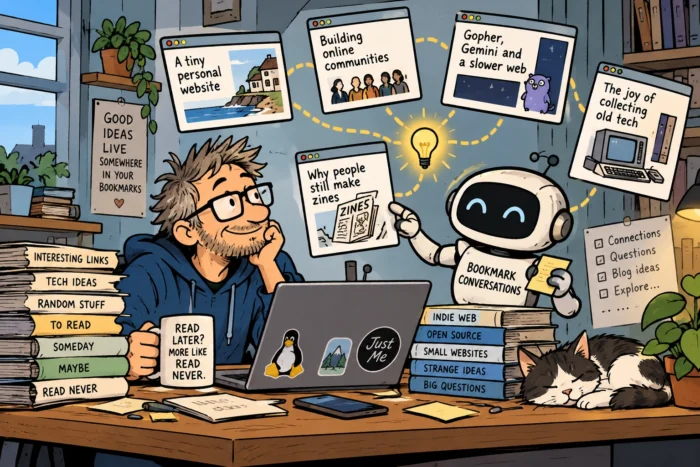
I recognize this from my own experiments. I have been developing applications that help me organize information, explore my bookmarks and work with my own files. These are not products I intend to sell to millions of people. They solve problems that interest me. And I am certainly not the only person experimenting this way.
The result could be a rather different software landscape: instead of adapting everything we do to a relatively small collection of applications, more people may start creating applications around their own needs. If these applications use open standards, they can also become part of a much larger ecosystem. That is one possible future for the personal internet.
I realized I had already built a small piece of this internet
There was something rather amusing about all this. While exploring Bubbles and the ideas behind Big Undo, I suddenly realized that I had already built something that works along surprisingly similar lines. Actually, I had built two of them.
One is Digital Twin News (https://digitaltwinnews.tech/), a website that collects news and articles about digital twins from sources around the world. The other is Around The IT World (https://www.aroundtheitworld.news/), which does something similar for IT news. Both websites run entirely automatically. They use RSS feeds to discover articles on other websites, collect information about those articles and present them in specialized news feeds.
And there is one principle I considered essential from the beginning: the original articles stay exactly where they are, on the websites of their original publishers. I am not trying to create another publishing platform where other people’s articles are copied and republished. The purpose is to help readers discover interesting material and then visit the original source.
In that respect, the underlying idea is quite similar to Bubbles, although my websites don’t have its voting and community features. There is, however, another important difference. My systems search for news in roughly 25 language areas, not just English. That means they discover articles published in languages that many English-speaking readers would never normally encounter.
To make those articles accessible, I use locally running AI models to generate short English descriptions of the original publications. These descriptions are intended to give visitors enough information to decide whether an article interests them. The AI-generated text is not supposed to replace the original article. It is a discovery aid, a way of saying: Here’s something interesting happening somewhere in the world. Would you like to know more? And because the AI runs locally, I don’t need to send the articles to an external AI service simply to generate those descriptions.
What I find particularly interesting is the multilingual aspect. The internet contains an enormous amount of valuable information that remains largely invisible to people who don’t speak the language in which it was published. An interesting development in Japanese manufacturing, a new technology project in Brazil or an IT security initiative reported by a publication in Eastern Europe might never appear in the English-language news sources that many of us follow.
But that doesn’t make those stories any less interesting. By combining RSS, local AI and independent publishing, I can create a discovery service that crosses those language barriers while keeping the original publishers at the center of the process.
Of course, these websites are not identical to Bubbles. They are topic-focused news discovery services rather than communities, and the automated summaries introduce questions about attribution, copyright and the boundaries of permitted reuse. Those questions deserve attention, especially as standards for AI-related licensing develop.
Still, the realization made me smile. I had been reading about a movement advocating smaller, independent internet applications that connect existing websites instead of replacing them. And without consciously setting out to follow that philosophy, I had already built two examples of something remarkably similar.
Perhaps that is what makes Big Undo so interesting. You don’t necessarily need to join a movement or adopt a grand technological vision. Sometimes, you simply set out to solve a practical problem using open standards and a handful of small, and maybe self-built tools, only to discover that you’ve arrived at much the same place.
But there is also a more complicated side to this story. My websites use AI to help people discover original publications. Other AI systems increasingly use those same publications to answer questions without necessarily sending readers to the source. And that brings us to the second major development reshaping the internet.
What happens when the reader is an AI agent?
For most of the web’s history, publishers have built their business models around human visitors. Someone searches for information, discovers an article, clicks a link and arrives at a website. The publisher might earn money from advertising, subscriptions, memberships, sponsorships or other services. Even when the article itself is free, the visit has value. Search engines and social networks became enormously influential because they controlled a large part of that journey.
Now imagine a different situation. A data center manager wants to know which liquid-cooling technologies are suitable for a new AI facility. Instead of searching Google and visiting five specialist websites, he or she asks an AI assistant to investigate the subject. The assistant searches the web, retrieves information from technical publications, compares specifications and produces a useful report. The manager gets his answer. But he may never visit the websites that provided the information.
Those publishers have contributed valuable knowledge, yet they might receive no visitor, no advertising revenue and no opportunity to sell a subscription. And if the AI assistant performs the research automatically, the publisher may not even know how its information was used.
This is not merely a new form of search. It changes the relationship between the creator of information and the person or system consuming it. The customer may no longer be the person reading the article. It may be the software agent gathering information on that person’s behalf.
That is where the discussion becomes particularly interesting.
The old deal between publishers and search engines is breaking down
For many years, the relationship between search engines and publishers was based on a relatively simple exchange. Publishers allowed search engines to index their content. In return, search engines helped people discover the original websites. It was never a perfectly balanced relationship, but the principle was understandable.
AI-powered services can work differently. They may use retrieved information to construct answers that satisfy the user without requiring a visit to the original source. There is also an important distinction between different kinds of AI use. Training an AI model on a large collection of documents is not the same as retrieving a current article to answer a specific question. Summarizing a webpage is not the same as reproducing it. And an AI agent purchasing access to a specialized database is different again. These activities have different technical, economic and legal implications. Yet they are often discussed as if they were all the same thing.
Publishers are now trying to establish clearer rules. And an entire collection of initiatives is emerging to help them. What interests me now is how closely these initiatives connect to Big Undo.
RSL: telling AI systems what they may do with your content
One of the most important developments is Really Simple Licensing, or RSL (https://rslstandard.org/). RSL is an open standard designed to let publishers express licensing and usage conditions in a format that software can understand.
Think of it as an additional layer of information attached to published content. A website can indicate that certain uses are free, that attribution is required, or that particular forms of AI processing require a license or payment. RSL 1.0 also includes mechanisms for license discovery, authorization and reporting. It can work alongside familiar web technologies, including RSS and robots.txt.
The connection to RSS is particularly interesting. RSS was designed to make content easier to distribute between independent applications. RSL is attempting to make the conditions for using that content machine-readable as well.
In other words, we are beginning to see a distinction between two questions.
How can software find and retrieve information?
And:
What is that software allowed to do with the information once it has found it?
These are different questions, and they require different answers.
An especially interesting development is that RSL 1.0 can also reference reporting profiles such as SPUR Content Telemetry (https://contenttelemetry.org/). This creates a more concrete connection between machine-readable licensing conditions and the reporting of how AI systems actually use content.
Instead of treating permissions and usage reporting as entirely separate problems, publishers can begin to describe them as parts of the same licensing arrangement. For example, a license could establish the conditions under which content may be retrieved and specify how subsequent usage should be reported.
This doesn’t guarantee compliance or independent verification, but it is an important step toward an interoperable system. RSL doesn’t magically compel every AI company to respect a publisher’s wishes, either. Publishing licensing conditions is not the same as enforcing them. But it provides a common language for communicating those conditions. And common languages are exactly what an internet of independent components needs.
The RSL 1.0 specification is available at https://rslstandard.org/rsl.
x402: what if an AI agent could simply pay?
Now imagine that an AI agent discovers a useful specialist article. The publisher allows access, but only under a paid license. How does the AI agent actually pay? Today, payments often involve creating an account, signing a contract, entering credit card details or subscribing to a service. These are familiar processes for humans, but rather awkward for software agents operating automatically.
That is where x402 (https://www.x402.org/) becomes relevant. The idea is to make payment part of a normal web interaction. A service can indicate that payment is required. A compatible client can then provide the necessary payment authorization and continue its request.
The name “x402” refers to HTTP status code 402, traditionally associated with payment requirements. The interesting possibility is that an AI agent could pay for access to a specific piece of information without requiring a human to manually complete every transaction. Perhaps a specialist publisher charges for a particular technical dataset. Perhaps an AI research service pays to retrieve a verified market report. Or perhaps an agent purchases access to a continuously updated database.
Of course, there are plenty of unresolved questions. How much should an article cost? Who is responsible when an agent makes an unauthorized purchase? How are refunds handled? And what happens when hundreds of small transactions become more expensive to administer than the information itself?
But the principle is significant. If software agents are becoming consumers of digital information, they may need ways to become paying customers as well. Cloudflare has been exploring related ideas with Pay Per Crawl (https://blog.cloudflare.com/introducing-pay-per-crawl/), which allows participating website owners to experiment with charging automated crawlers for access.
These technologies are not identical. Nor do they automatically work together. But they point toward an internet where machine access can be negotiated rather than simply allowed or blocked.
SPUR: how do you know what happened to your content?
Payment for access is one thing. But what if the commercial value of content depends on what happens after it has been retrieved?
Suppose an AI system downloads an article, uses it as evidence in an answer, cites the publisher and presents the resulting information to thousands of users. Those are several different events. Should the publisher receive one payment when the article is downloaded? Another when the content contributes to an answer? Or a share of revenue generated by the service?
Before anyone can make those arrangements, there needs to be a reliable way of describing what happened. That is the problem addressed by Content Telemetry (https://contenttelemetry.org/), stewarded by the SPUR Coalition. The standard provides a structured way to report different stages of content use, including retrieval, grounding, citation, presentation and user engagement.
This distinction matters. An article being downloaded does not necessarily mean it was used to generate an answer. And an article being used as background information does not necessarily mean the user ever saw a reference to its publisher. SPUR is attempting to create a vocabulary and reporting mechanism for those differences.
The connection with RSL 1.0 makes this particularly interesting. RSL can communicate the licensing conditions, while a referenced SPUR reporting profile can describe how relevant usage events should be reported. In principle, that allows a publisher to express both the conditions of access and the expected reporting arrangements through interoperable, machine-readable mechanisms.
It is not yet a complete commercial system, but it moves the discussion beyond simply telling AI crawlers whether they may enter a website – or not.
However, it also raises a difficult question. How can a publisher verify that an AI provider’s usage report is complete? If a platform reports that an article contributed to one hundred answers, how does the publisher know that the actual number wasn’t one thousand? A reporting standard is an important first step. Independent verification is a different problem. And without reliable verification, usage-based licensing becomes difficult to trust.
There is another missing piece: identity
This brings us to a subject that is easy to overlook. How does a publisher know who is requesting access?
A website can receive automated requests from many different sources. Some may come from search engines. Others from AI training crawlers, research tools, monitoring services, malicious scrapers or AI agents acting on behalf of paying customers. They may look surprisingly similar from the publisher’s perspective. But their intentions are very different.
Imagine a specialist publisher that wants to allow an AI agent working for an existing corporate customer to retrieve information. The publisher needs to establish whether the agent really represents that customer, whether it has permission to access the requested material and which licensing conditions apply.
That requires more than simply recognizing a bot. We need to distinguish identity, authorization and accountability. Identity establishes who is making the request, or on whose behalf it is being made. Authorization determines what that requester is allowed to do. Accountability concerns what happened afterward and whether the requester complied with the agreed conditions.
These are separate functions. An agent can have a verifiable identity without having permission to access a particular database. And a valid payment does not automatically grant unlimited rights to redistribute or train models on the retrieved material.
The emerging infrastructure for agent identity, licensing, payments and telemetry therefore needs to work together. This is precisely where open standards become important again.
A Dutch example that made me smile
During my exploration, I came across The Content Exchange, or TCE (https://tce.exchange/), a Dutch company operating a marketplace for licensing and distributing professional content. TCE is interesting because it already deals with a problem that many publishers may face in the AI era: how to make content available to other parties under commercial agreements. The company has experience with content syndication, rights and distribution. That makes it a useful organization to watch as the market for AI-accessible content develops.
But something rather amusing happened when I tried to investigate the company further. I asked an AI assistant to visit its website. The assistant couldn’t get in. The website restricted access from the automated browser. Now, that doesn’t prove TCE deliberately blocks all AI agents. The restriction could be caused by ordinary bot protection, anti-scraping measures or the particular browser environment being used.
Still, I couldn’t help smiling. Here I was, trying to investigate a company involved in licensing content, and the automated tool I was using couldn’t access its website.
It seemed like a perfect illustration of the dilemma. Publishers have good reasons to protect their information against unwanted automated collection. But they may also want to welcome legitimate AI agents that are willing to identify themselves, respect licensing conditions and pay for access. How do you distinguish between the two?
A simple choice between allowing all bots and blocking all bots is unlikely to be sufficient. The future may require something closer to a digital front door: one that lets ordinary visitors enter freely, recognizes authorized customers and can negotiate access with software agents.
Finland is also experimenting with a marketplace for media content
Another project worth following comes from Finland. The Finnish innovation fund Sitra has been exploring the idea of a marketplace where news organizations can license journalistic content and data for AI development and AI-powered services. Sitra published an explanation of the initiative in July 2026 (https://www.sitra.fi/en/articles/ai-can-create-new-business-opportunities-for-media-a-pilot-project-tests-the-marketplace-concept/).
What I find interesting is that the project doesn’t assume that simply putting a price on every article will solve the problem. The participants are investigating which kinds of content AI developers actually need, how they assess its value, what licensing arrangements are practical and how publishers can maintain control over their material.
There is also a collective dimension. A large international publisher may be able to negotiate directly with an AI company. A small independent publisher probably cannot. But what if many publishers could make their content available through a shared marketplace, with common technical and legal arrangements? That might make participation possible for organizations that would otherwise be excluded.
Unfortunately that also introduces a familiar risk. If every publisher becomes dependent on one enormous content marketplace, haven’t we simply created another platform?
Which brings us straight back to the Big Undo.
We could accidentally build the next generation of gatekeepers
This is the part of the story that worries me. The personal web movement wants to reduce dependence on enormous platforms. The emerging AI-content economy wants to create mechanisms for controlling access, negotiating licenses and collecting payments. Those goals are not necessarily incompatible. But they could become incompatible if we aren’t careful.
Imagine a future in which every AI agent must obtain its identity from one dominant provider, purchase licenses through one marketplace and use one payment network. Independent publishers might receive compensation, but they would also become dependent on the companies operating that infrastructure.
We would have solved one problem by creating another.
Or imagine that practically every website begins charging automated systems for access. Large AI companies could afford those fees. Small independent developers, researchers and community projects might not. The result could be an internet that is technically open but economically difficult to explore. That would be a strange outcome for a movement inspired by the freedom of the early web.
I don’t think the solution is to reject licensing or payments. Professional journalism, research and specialist information cost money to produce. Publishers and content owners like research organisations, universities, trade associations and others need sustainable business models. But we should be careful not to confuse open information exchange with unlimited commercial exploitation. It should be possible to publish something freely for human readers while setting different conditions for commercial AI training or large-scale automated reuse. It should also be possible to offer information under open licenses, request attribution, accept voluntary contributions or charge for specialized machine access.
Different publishers have different motivations. The infrastructure should support those differences.
Perhaps publishers will start selling knowledge, not just articles
There is another possibility that I find especially interesting. For most of my professional life, I have thought about information in terms of articles, interviews, reports and other publications. But AI agents often don’t need an entire article. They need particular pieces of reliable information.
Imagine a technical publication that has spent years reporting on data center infrastructure. Its archive contains information about cooling systems, power distribution, rack densities, standards, suppliers and installations. For a human reader, this material exists as hundreds of separate articles. For an AI agent, the archive could become a specialized knowledge resource. A publisher might make certain facts available as structured records, including sources, publication dates, technical context and licensing information.
The idea of breaking journalism down into smaller, structured units of information is not mine. Credit belongs to journalist Sannuta Raghu, who developed the concept of the News Atom. In an excellent article published by the Reuters Institute for the Study of Journalism, Introducing the News Atom: a metadata blueprint for journalism in the age of AI (https://reutersinstitute.politics.ox.ac.uk/introducing-news-atom-metadata-blueprint-journalism-age-ai), she explains how individual statements in a news story can become machine-readable units that retain their meaning, sources, context, provenance and licensing information.
I find her approach fascinating, particularly because it recognizes that the value of journalism lies not simply in the words of an article, but also in the research, verification and interpretation behind those words.
However, I would like to take the idea a little further. Raghu calls these units News Atoms, which makes perfect sense in the context of journalism. But I think the principle could apply to much more than news and reported facts. Research findings, technical specifications, scientific observations, expert knowledge and many other forms of verified information could potentially be structured in similar ways. That is why I prefer the broader term Knowledge Atoms. Not as a replacement for Raghu’s original concept, but as a way of exploring how the same underlying idea might extend beyond journalism into the wider world of knowledge publishing.
Here is how that could work. An article might contain several “atoms”: a product announcement, a verified technical specification, an interview statement, a deployment location or a regulatory change. The atoms would not necessarily replace the article. The article remains valuable because it provides context, interpretation and a coherent story. But structured information could make the underlying knowledge easier for machines to find, verify and license.
This could open the door to entirely new products and business models for publishers. They could continue publishing articles for human readers, either freely available or through subscriptions, while also making the underlying knowledge available in formats designed specifically for AI systems. For example, a specialist publisher could offer access to a structured database containing verified facts, technical specifications, research findings and expert insights extracted from its reporting. AI developers or companies using AI agents could pay to access this information through an API, rather than having their systems search through hundreds of individual articles. Publishers could also offer continuously updated knowledge services, ensuring that AI applications have access to the latest verified information in a particular field. In this model, the publisher is no longer selling access only to articles, but also to the reliable, structured knowledge behind them.
That doesn’t mean every publisher should immediately start building APIs and databases. There is still a great deal we don’t know about actual customer demand, pricing and the costs of maintaining such services. But it suggests that the economic value of publishing may increasingly lie not only in the document or the article itself, but also in the reliable knowledge behind it. And that could be particularly interesting for specialist publishers, research organizations and trade associations.
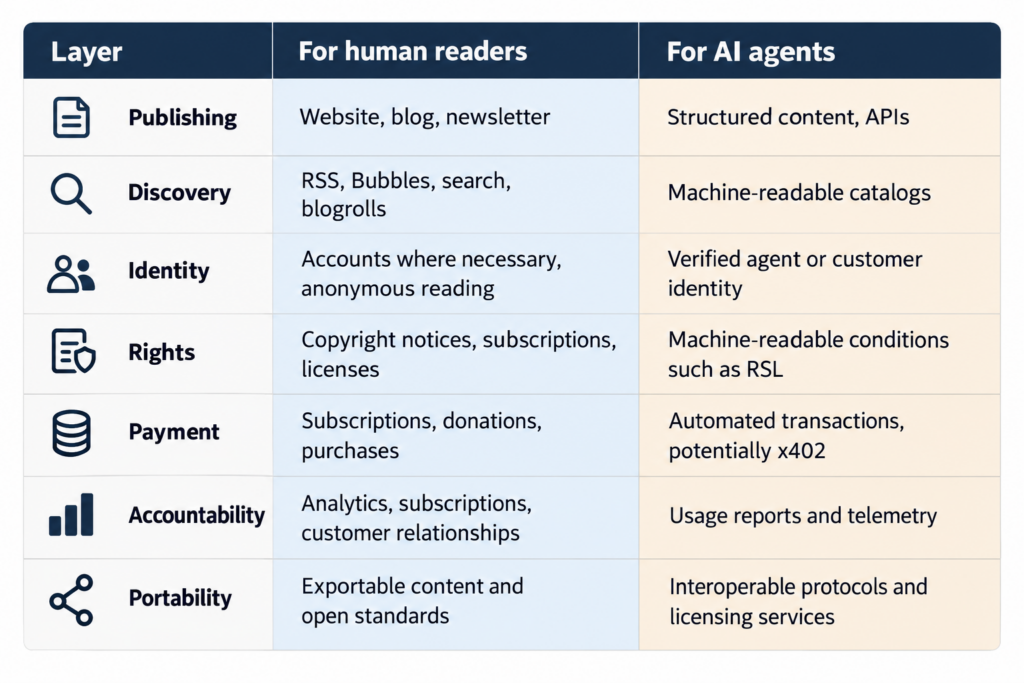
So how could all these pieces fit together?
I keep imagining a relatively simple arrangement. An independent publisher maintains its own website and content archive. Human readers discover articles through search, RSS, blog directories, newsletters and social communities. Software agents can discover the same publisher’s machine-readable information, but they also encounter clearly defined licensing conditions. When an agent wants access to material requiring authorization, it identifies itself and provides the necessary credentials. If payment is required, a compatible mechanism handles the transaction. And when the agreement calls for usage reporting, a telemetry system records the relevant events.
No single company necessarily has to operate all those functions. The publisher could choose one content management system, another identity provider, a separate payment service and perhaps a collective licensing organization. Ideally, the components would be replaceable. That is the Big Undo applied to the economics of publishing.
The emerging publishing architecture
This is a conceptual architecture, not a complete system that already exists and works seamlessly. The technologies are at different stages of development. Some are established, some are experimental, and interoperability between them remains incomplete. But the pieces are beginning to become visible.
The connection I hadn’t expected
When I started exploring the Big Undo, I was thinking mainly about personal websites, independent developers and the pleasure of discovering unexpected things online. I wasn’t thinking about licensing agreements, automated payments or content telemetry. Those subjects seemed to belong to a completely different discussion.
But now I think they are closely related. The Big Undo asks how people can regain control over their software and information. The emerging content-licensing initiatives ask how creators and publishers can regain control over the economic use of their information. Both depend on a similar principle: the ability to operate independently while communicating through shared standards.
Both also face the same danger. If the solution requires everyone to join one enormous platform, we may end up reproducing the very dependencies we hoped to escape. Perhaps the most important question is therefore not whether AI companies will eventually pay publishers. It is whether the infrastructure for those payments, licenses and permissions will remain open enough for small publishers and independent developers to participate on their own terms.
And what about Just Me?
There is something slightly amusing about writing all this on a personal blog. I started Just Me because I wanted somewhere to write about things I encounter and find fascinating. Whether thousands of people read those articles has never been my main concern. I enjoy the freedom of having my own little corner of the internet.
I like discovering independent websites through services such as Bubbles. I like following links that lead somewhere unexpected. And I like experimenting with small pieces of software that do exactly what I want them to do.
I have no plans to turn Just Me into a commercial content business. But the principles matter to me. I want my writing to remain mine. I want people to be able to discover it. I want to choose the tools I use. And I don’t want my words to become permanently trapped on a platform simply because it happens to be popular today, when it could disappear as soon as next week.
In my opinion, the same principles matter (or should matter) to professional publishers, although they also need to earn enough money to continue producing reliable information. That is why I think the two developments belong in the same conversation. The personal web is exploring how to make publishing independent again. The emerging AI-content economy is exploring how to make the use of published information economically sustainable.
If both movements embrace open standards, portability and genuine choice, they could reinforce one another. If they don’t, we may simply replace one generation of internet gatekeepers with another.
I don’t know which direction things will take. But I do know that I want to keep watching the people who are building these systems. Not just the large technology companies, but also the independent developers, small publishers, open-standard communities and researchers experimenting at the edges of the internet.
Because perhaps the future of the internet won’t arrive as one enormous new platform. Perhaps it will arrive as thousands of small pieces that gradually learn how to work together. And perhaps, this time, we can also figure out how the people creating the information flowing between those pieces can share fairly in the value they produce. That would be a Big Undo worth getting excited about.
For readers who want to explore further, the key starting points are Dave Winer’s Big Undo (https://bigundo.org/), the RSL standard (https://rslstandard.org/), SPUR-related Content Telemetry (https://contenttelemetry.org/), the x402 payment protocol (https://www.x402.org/) and Sitra’s research into AI content licensing (https://www.sitra.fi/en/articles/ai-can-create-new-business-opportunities-for-media-a-pilot-project-tests-the-marketplace-concept/). On Just Me, you can find several blog posts I’ve written about these and related topics by selecting the “Publishing” and “Content Creation” categories on the left-hand side of the homepage.