
There is something slightly strange happening in software development. For decades, one of the main challenges was writing the code. You had an idea, figured out how to translate it into software, wrote the code, discovered that it didn’t work, stared at it for half an hour, changed three characters and suddenly it did work.
AI changes that process dramatically. Today you can describe what you want and watch an AI coding agent produce hundreds or even thousands of lines of code. And it is only getting better at it. That sounds wonderful, but it also creates a problem that I find increasingly interesting: what happens when AI can write code faster than we can understand it?
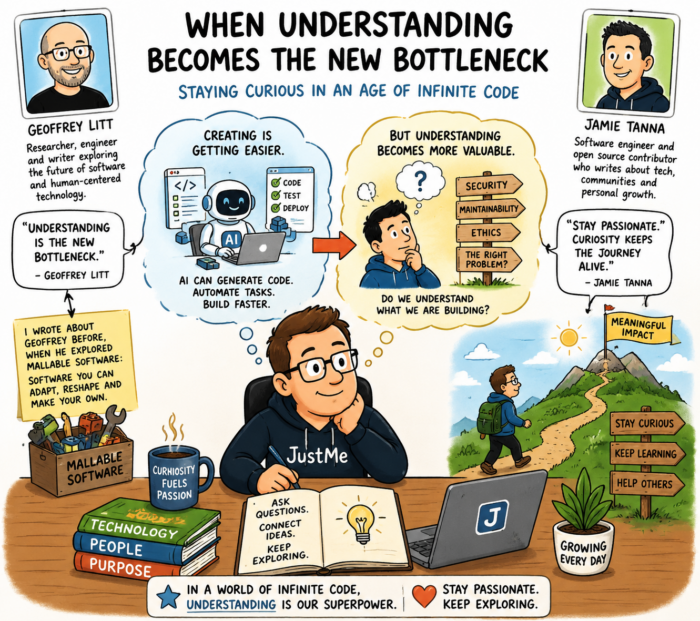
That is exactly the question Geoffrey Litt explores in his excellent article Understanding is the New Bottleneck. You can reda it here: https://www.geoffreylitt.com/2026/07/02/understanding-is-the-new-bottleneck. Geoffrey is a design engineer at Notion who writes and experiments extensively with new ways for humans to interact with software and AI. I have written about him before, especially when he was exploring the concept of malleable software: software that users can adapt, reshape and truly make their own instead of simply consuming it as a finished product. But also software you create when you need it and simply throw away when you don’t need it anymore.
In his new article, Geoffrey takes that thinking in an interesting direction. “It’s still important to understand the code that our agents write,” he argues. That sounds almost ridiculously obvious. Of course we should understand our software. But think about what happens when you actually start using AI coding tools seriously. You ask for a feature. The AI changes twelve files. It adds a library, modifies an API, creates some tests and changes part of the data model. Everything compiles. The tests pass. You run the application and it seems to work. Nice! On to the next prompt. And that is precisely where the danger begins.
The code works, so what?
Geoffrey Litt makes an important distinction between understanding code to verify it and understanding code so you can participate in developing it. Verification is basically asking whether the AI did its job correctly. Does the code compile? Do the tests pass? Does it match the specification? Is the architecture reasonable? AI is becoming increasingly capable of doing some of that verification itself.
But understanding has another purpose. If we really understand how a system works, We can think about what it should do next. We can see alternatives. We can recognise that a particular architectural choice will become a problem later. We can connect one part of the system with another. As Litt puts it, understanding allows us “to participate.”
I think that is an extremely useful way of looking at AI-assisted programming. If an AI agent has created half my application and all I can say about the result is, “Well, it seems to work,” I am no longer really developing that application. I am supervising its development.
Every time we accept code we do not understand, we also accumulate what Litt describes as cognitive debt. It resembles technical debt. You can ignore it for a while, particularly when everything is working. But sooner or later you need to change something and suddenly discover that you have lost your mental model of your own software.
So how do we prevent that? This is where Litt’s article becomes particularly useful, because he doesn’t just identify the problem. He experiments with practical ways of solving it.
Use a literate diff
One of the most obvious ways to review AI-generated code is to look at the diff. But imagine an AI agent has changed twenty files. Reading hundreds of changed lines from top to bottom is technically reviewing the work, but it isn’t necessarily a very good way of learning what happened.
Litt suggests turning the process around. Before looking at individual lines of code, ask the AI to explain the change. And not simply: What did you change? Ask it to teach you. What did the system look like before? What problem were we trying to solve? Which concepts do we need to understand? What architectural decision did you make? Which components interact with each other? What alternative approaches were possible? Why did you choose this one? Only then move towards the actual code.
Litt calls one version of this a literate diff. Instead of presenting changed files in whatever order Git happens to show them, the changes are presented as a story: first the background, then the idea, followed by the relevant pieces of code in an order that makes conceptual sense. That is an interesting idea. The AI wrote the code, so why not also make the AI write the manual that teaches us what it just built?
Ask for intuition
There is another subtle but important point in Litt’s approach: intuition before details. Suppose an AI has implemented a caching system. Before studying the implementation, we could ask: What exactly are we caching? Why will that make the application faster? When is the cache invalidated? What happens if it contains stale information? Where does the cache live? What happens after a restart?
Only once we understand those concepts does it make sense to study the classes, functions and data structures implementing them. The same applies to almost anything an AI creates. If it adds authentication, first understand the authentication flow. If it creates a database abstraction, first understand how data travels through the application. If it introduces asynchronous processing, first understand which things now happen in which order. If it creates an API, understand the contract before studying its implementation.
That sounds like basic software engineering. And I guess it is. The difference is that AI makes it extremely easy to skip these steps because the implementation can appear almost instantly.
Make the AI test you
This is perhaps my favourite suggestion from Litt. After the AI has explained the code, ask it questions about the system. Or even better: ask the AI to quiz you.
Litt actually does this. His code explainers contain five questions about the change, and he has a simple rule: he doesn’t send the code to other people until he can pass the quiz. That may sound a little like going back to school, but it solves an interesting problem. Reading something is not the same as understanding it. We can read a beautiful AI-generated explanation and think: yes, perfectly clear. Then somebody asks us five minutes later how the data actually gets from A to B and wemight very well discover that we don’t know.
So after an AI has generated something substantial, ask it: What are the five things I really need to understand about this implementation? Then close the explanation and try answering them yourself. Or ask the AI to give you scenarios. What happens if this API call fails? What happens when two users update this record simultaneously? Which component owns this data? What breaks if I remove this function? Where would I make a change if I wanted to add feature X?
If you cannot answer those questions, you probably don’t understand the software yet. says Litt. He describes these quizzes as a kind of speed regulator. AI can move much faster than human understanding, so occasionally we need to deliberately slow the loop down.
Tools for understanding AI code
Then comes an idea I hadn’t really considered before reading Litt. AI doesn’t only have to generate the application. It can also generate temporary software that helps you understand the application. Litt calls these micro-worlds. For example, while working on a Prolog interpreter, he had an agent create a debugger that allowed him to step through execution and see what was happening internally. In another project, an AI-generated interface let him migrate his website step by step while watching the old and new versions side by side.
That opens up all sorts of possibilities. Ask an AI to create a visualisation showing how data flows through the application. Ask it to build a tiny dashboard displaying internal state. Ask it for a stripped-down version of a complicated algorithm with sample data. Ask it to create a sequence diagram. Ask it to instrument the software so you can see which functions are being called. Or ask it to create a small playground where changing one variable immediately shows the consequences.
The important difference is that you do the exploring. As Litt notes, there is a big difference between asking an agent to debug something for you and using a tool created by the agent to investigate the problem yourself. In the second situation, AI hasn’t removed you from the process. It has given you better instruments.
Explain the code back to the AI
We could also add another simple technique: reverse the conversation. Don’t always ask the AI to explain things to you. Explain the software to the AI. Write down your understanding: As I understand it, request A enters here, is validated by B, stored through C and eventually triggers D. Component E is only used when… Then ask the AI: What have I misunderstood or missed?
This forces you to construct your own mental model instead of merely consuming the model’s explanation. You can do something similar by drawing the architecture yourself and asking the AI to check it against the codebase.
That distinction is important. The goal isn’t to have an AI that understands your software perfectly. The goal is for you to understand it.
Sometimes just write the code yourself
Which brings me to Jamie Tanna. Jamie is a software engineer and open-source maintainer who writes extensively about Go, open source, software engineering and his experiences with AI-assisted development. In his writing around GopherCon UK 2026, another question appears that fits remarkably well with Litt’s argument: how do you stay passionate about programming when increasingly powerful tools can do so much of the programming for you? You can read his report here: https://www.jvt.me/posts/2026/08/14/gophercon-uk-2026/.
That is a highly relevant question, because there is another risk here. You can understand perfectly well what an AI agent has built and still find the whole experience rather boring. For many developers, programming isn’t merely a mechanism for producing software. Solving the puzzle is part of the attraction. You try something. It fails. You discover why. You try something else. And somewhere during that process you learn something you didn’t know when you started.
If our interaction with software development becomes prompt, wait, accept, prompt, wait, accept, we may become extremely productive while slowly removing the thing that made programming interesting in the first place. That is why I think understanding and passion are closely connected.
Do not outsource all the interesting bits
There is no rule saying that because AI can do something, we have to let it. Let AI generate boilerplate, write repetitive tests, search through unfamiliar APIs and suggest solutions. But occasionally keep the interesting problem for yourself. Use AI as a teacher rather than a replacement. Ask it to give you hints instead of complete solutions. Ask it to explain an unfamiliar concept and then implement it yourself. Ask it to create an experimental environment where you can play with an algorithm. Or simply turn it off for an hour.
Efficiency isn’t always the objective. Sometimes learning is. Sometimes curiosity is. And sometimes spending an evening solving something that an AI could probably generate in thirty seconds is still worthwhile because we want to know how it works.
That is what I take away from these two authors. Litt’s argument isn’t really that we need to carefully inspect every line an AI generates. That would quickly become impossible. Instead, we need better ways of building and maintaining mental models of increasingly AI-generated systems. Explanations, literate diffs, quizzes, visualisations and micro-worlds can all help.
And Tanna’s thoughts about staying passionate add another line of thought. We shouldn’t only ask how AI can make us faster at programming. We should also ask how AI can make us better at understanding programming. That is a very different objective.
Perhaps the most interesting sentence in Litt’s article comes near the end: “The point was always to augment, not just automate.” I think that captures it perfectly. AI can write the code. It can test the code. It can explain the code. It can even write little tools that help us explore the code. But we still want to understand what is happening. Because the moment we stop understanding our, we also lose much of our ability to decide where it should go next.