
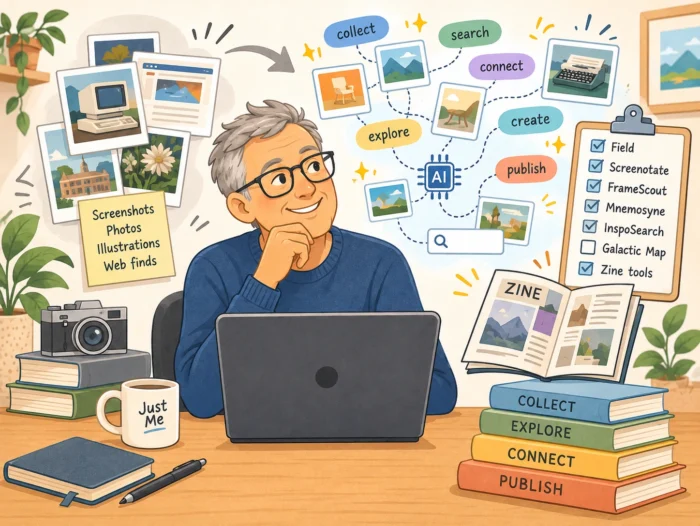
We collect photographs, screenshots, illustrations and other visual fragments of the internet, often without thinking much about what happens to them afterwards. But a growing number of independent software projects are exploring something interesting: what if these collections could become searchable, interconnected archives that help us rediscover things we have forgotten?
Over the years, I have collected quite a few photographs, screenshots, illustrations and other images that somehow caught my attention. Pictures of old computers, unusual buildings, interesting graphic designs, forgotten websites or simply things I liked looking at. Most of them ended up somewhere on my SSD, occasionally in a carefully organised folder, but more often in a place where I would probably never find them again.
Recently, I started wondering whether there might be a better way to deal with these collections. Not necessarily another Pinterest-like service, but something that would allow me to explore the images I have collected over the years. Perhaps even discover connections between them that I had never noticed myself. As it turns out, independent developers are experimenting with some rather interesting approaches, often combining self-hosted software, visual search and locally running AI models.
And while looking into these projects, I realised that I had actually explored part of this territory before. Some time ago, I wrote about a rather unusual event called Screenshot Conf (https://justme.website/content-creation/i-went-looking-at-a-conference-about-screenshots-about-what-and-found-a-filesystem-for-browser-tabs/), where people were experimenting with ways to turn screenshots into something much more useful than ordinary image files. At the time, I hadn’t really connected those experiments with moodboards, personal image collections or the emerging possibilities of local AI. But perhaps they are all part of the same story.
A Pinterest of your own
One of the nicest discoveries was a small project called Field, created by an independent developer who goes by the name Sol Nova. The idea behind Field is refreshingly straightforward: what if you could have something resembling Pinterest, but entirely under your own control?
Field is a self-hosted application for collecting images from websites, your computer or your phone. A browser extension makes it possible to save interesting discoveries while browsing. You can organise images using tags and boards, creating collections around whatever happens to interest you. There is no advertising feed to navigate, no algorithm deciding what you should look at next and no need to build an audience. It is simply a place to collect things.
What particularly caught my attention was that the developer also used one of these collections to create a gallery on a personal homepage. That small detail changes the nature of the project. Your image collection is no longer something locked away inside a platform. It can become part of your own little corner of the web.
Field was introduced in July 2026, so it is still a relatively young project. But I rather like the thinking behind it. Instead of asking how we can make a large platform better, someone has simply built a smaller alternative that does what they need.
You can read about Field at https://solnova.me/posts/field/ and find its source code at https://github.com/nolsova/field.
Remember Screenshot Conf?
Some time ago, I wrote about a rather unusual event called Screenshot Conf. I had stumbled upon it almost by accident, and what initially seemed like a conference about something as ordinary as taking screenshots turned out to be an exploration of what screenshots could actually become.
One of the interesting discoveries was Screenotate, a tool designed to make screenshots more useful by combining captured images with searchable text and contextual information. Instead of simply saving an image, the idea is to preserve some of the information that makes it meaningful. You can find the project at https://screenotate.com/.
This is an important distinction. When I take a screenshot of an interesting website, a technical explanation, an unusual interface or a particularly clever piece of software, I’m usually not interested in preserving a picture for its own sake. I’m trying to preserve something I discovered. The screenshot is simply the easiest way to capture it.
But once saved, that information often becomes surprisingly difficult to retrieve. Unless I give the file a meaningful name, put it in the right folder or add some kind of description, the screenshot may effectively disappear into my growing collection of digital stuff.
Screenshot Conf also led me towards other interesting experiments with screenshots and the way information is represented on our computers. One particularly memorable discovery was TabFS, created by Omar Rizwan. TabFS explores the idea of making browser tabs accessible through a filesystem interface. It is not a screenshot manager, but it challenges a related assumption: that information must always be accessed through the application interface in which it originally appears. You can find TabFS at https://github.com/osnr/TabFS.
What connects these experiments is the idea that information should not necessarily remain trapped inside the format or application in which we first encountered it. A screenshot could become searchable text. A browser tab could become something that other tools can inspect through a filesystem interface. And a collection of images could become a network of visual relationships.
That last possibility is where the new generation of AI-powered image tools becomes particularly interesting.
Finding pictures without remembering their names
Traditional photo management relies heavily on folders, filenames, dates and tags. These are useful, of course, but they require a certain amount of discipline. If you have thousands of images collected over many years, remembering where you put a particular photograph can become surprisingly difficult.
A project called FrameScout approaches this problem differently. It is an open-source application designed to search photographs and videos using ordinary language. Instead of remembering a filename, you describe what you are looking for.
Imagine typing something like “an old red car parked in the rain” or “a photograph of a room with green walls and a large window”. The software searches for images that correspond to your description, even when those words do not appear anywhere in the filenames or metadata.
The underlying technology is based on machine-learning models that analyse visual content and convert it into numerical representations known as embeddings. A text query can be converted into a compatible representation, allowing the system to compare the meaning of the words with the visual content of the images.
FrameScout uses technologies including SigLIP 2 and optical character recognition, or OCR. The latter makes it possible to search for text that appears inside an image, while the visual model helps identify images based on what they depict.
What I particularly like is that this processing can take place locally. Your collection does not have to be uploaded to a commercial cloud service simply to make it searchable.
You can find FrameScout at https://github.com/bobgsning/FrameScout.
Now imagine combining this technology with the ideas behind Screenshot Conf. You could search your screenshots for words that appeared on the screen, but also for the visual content of the screenshot itself. You might ask for all the screenshots showing unusual website navigation, old software interfaces or diagrams involving a particular technology.
This is already quite different from opening a folder and scrolling through hundreds of thumbnails.
Wandering through your own visual memories
Another project, Mnemosyne, takes the idea of visual searching in a slightly different direction. Mnemosyne is a local-first image management application with a Pinterest-like interface, but it also allows you to explore relationships between images.
You can select a picture and ask the application to find visually similar images. Then you can choose one of those results and continue exploring from there. The software uses several AI models, including CLIP, DINOv2 and SigLIP 2, to analyse different characteristics of images.
Depending on the model and the search method, similarities may involve objects, visual composition, shapes or other features. This makes it possible to discover relationships between images that have never been placed in the same folder or given similar tags.
This is where I began to get genuinely interested. Think about how we used to wander around the early web. You would find an interesting page, follow a link to another page and suddenly discover yourself reading about something you had never intended to investigate. The pleasure came partly from those unexpected connections.
Now imagine doing something similar with your own image collection. You start with a screenshot of an old personal website. The software finds other screenshots with similar visual characteristics. One of those leads you to an early graphical user interface, which in turn connects to a collection of computer magazine advertisements you saved years ago. None of these images necessarily shares a filename, folder or tag. Their connection emerges from visual similarities that the software has identified. It is a little like introducing hyperlinks into a collection of photographs.
Mnemosyne can be found at https://github.com/Capataina/Mnemosyne.
Of course, AI-generated similarities are not always meaningful. Two images may be mathematically close without having any interesting relationship from a human perspective. But that is also part of the appeal. Sometimes an unexpected connection is simply wrong. Occasionally, it might make you look at something differently.
When a collection becomes a landscape
A project called InspoSearch goes even further by experimenting with different ways of navigating visual collections. It was developed with cultural heritage and visual research in mind and combines image searching, moodboards and AI-supported exploration.
One particularly interesting feature is its three-dimensional constellation view. Rather than presenting every image in a conventional grid, the software can arrange images in a navigable three-dimensional space according to their visual relationships.
Imagine a cloud of photographs floating in front of you. Images with certain similarities appear closer together, while others occupy different regions of the visual landscape. You can move through this space, exploring clusters and discovering connections.
Technically, this involves reducing complex image embeddings to a smaller number of dimensions so that relationships can be visualised. Such a representation is inevitably an approximation, but it offers a very different way to explore a collection.
I find this particularly interesting when thinking about historical image archives. Museums, libraries and other cultural institutions have digitised enormous quantities of photographs, illustrations, posters and documents. Traditionally, we explore these collections through categories, dates, artists or keywords. But what if we could explore them visually instead?
Perhaps a nineteenth-century scientific illustration would lead us towards an early twentieth-century advertising poster because they share a peculiar visual structure. Or a collection of architectural photographs might reveal unexpected similarities between buildings from entirely different periods.
InspoSearch also includes a freeform canvas for organising and comparing images, bringing it closer to the traditional idea of a moodboard. The project can be self-hosted, although some AI features in its standard configuration depend on external services. It is therefore worth distinguishing between local control of the application and fully local AI processing.
More information is available at https://insposearch.org/docs/.
What if an AI assistant could explore the collection with you?
There is another technical development that makes this whole subject even more interesting. Most moodboard applications are designed around a human user who collects, moves, groups and arranges images manually. But what happens when an AI assistant can interact directly with the collection?
A project called Galactic Map offers an intriguing glimpse of that possibility. Galactic Map combines elements of a moodboard and a mindmap on an infinite canvas. You can arrange information spatially, connect different elements and share boards with other people.
What makes it particularly interesting from a technical perspective is its support for both a REST API and the Model Context Protocol, better known as MCP. MCP is a way for AI applications to communicate with external tools and information sources through a standardised interface. In this case, it can allow a compatible AI assistant to interact with the contents of a visual board, subject to the permissions provided.
Imagine asking an assistant to examine a collection of screenshots and identify recurring themes. Perhaps it could group screenshots according to the technologies they depict, find similarities between interfaces or suggest connections between ideas that appeared in entirely different contexts.
The presence of an API does not automatically mean that every imaginable workflow is already available or reliable. But it does create a technical foundation for experimenting with such ideas.
You can explore Galactic Map at https://galacticmap.app/.
For me, this is an important distinction. AI is not necessarily generating new pictures here. Instead, it can potentially help us understand, organise and rediscover images we already have. That is a rather different use of the technology from asking an image generator to produce yet another illustration.
From collecting images to publishing something new
While exploring these projects, I kept coming across another old internet tradition: the zine. Zines are usually small, independently produced publications, often assembled from photographs, drawings, found images, handwritten notes and experimental typography. They have a long history in music, art and alternative culture.
At first, moodboards and zines seem to serve different purposes. A moodboard is generally a collection of visual references, while a zine is something composed and published for others to experience. But the distinction becomes less obvious when digital tools enter the picture.
Consider Heos.Fanzine, a browser-based application for creating small zines, photo booklets and even cassette covers. It supports different paper formats and can export work as a printable PDF or a standalone HTML publication.
That last option is particularly appealing. You can create something that resembles a traditional paper zine and publish it directly on your own website. The application can also work offline after it has been loaded, which fits rather nicely with the independent, do-it-yourself character of zine culture.
You can find it at https://heosphorus.itch.io/heos-fanzine.
Another project worth exploring is Zine Studio, an open-source tool for creating printable mini-zines using HTML. Its source code is available at https://github.com/hunterirving/zine_studio.
These applications suggest an interesting progression. You begin by collecting photographs, screenshots and other visual fragments. You use search tools to rediscover forgotten material and perhaps uncover unexpected connections. You arrange selected images into something that expresses a particular idea or feeling. And eventually, you turn the result into a small publication.
A collection of screenshots showing forgotten websites, unusual software interfaces or strange internet experiments could become a visual history of a particular corner of the web. A collection of photographs of old computers might become a small illustrated essay about technological nostalgia. Or perhaps the connections discovered by an AI search tool could themselves provide the starting point for a new publication.
Not every collection needs to become a zine, of course. Sometimes collecting is enjoyable enough on its own. But I like the idea that the same personal archive could support both private exploration and public creativity.
Beyond folders
There is a broader idea running through all these experiments that I find particularly interesting: why do we still organise so much of our digital information primarily through files and folders? The hierarchical filesystem has served us remarkably well for decades. It is predictable, widely supported and relatively easy to understand. But it also assumes that we know where something belongs when we save it, and that we will remember where to look when we need it again.
That assumption does not always work particularly well for personal collections. An interesting screenshot might belong in a folder about web design, but also in one about unusual interfaces, early internet culture or a particular software project. A photograph of an old computer might be relevant to several different interests. A single image can have many meanings, depending on what we are looking for.
Tags help, but only when we remember to add them. AI-based visual and semantic search offers another approach. Instead of requiring us to decide in advance where every image belongs, the software can help identify relevant material when we need it.
This does not mean that folders should disappear. In fact, I would prefer these new tools to work with ordinary files rather than replacing them with proprietary databases that are difficult to export. The interesting possibility is to keep the reliability and portability of traditional files while adding entirely new ways to explore their contents.
Ideally, such a system would preserve the original image, its source URL, the date it was captured and any notes or tags I added. OCR would make visible text searchable, while visual embeddings would allow searches based on image content. A language model could then help investigate relationships between different discoveries. That would turn a collection of files into something closer to a personal visual knowledge archive.
A personal internet, made of discoveries
What I like most about these projects is that they suggest an alternative to the familiar pattern of collecting things inside large online platforms. For years, we have been encouraged to save, share and organise our interests through services that also want to keep us engaged, recommend more content and turn our attention into something commercially valuable. There is nothing inherently wrong with using a convenient online service. But it is refreshing to discover people building smaller tools with different priorities.
Field gives you a personal place to collect images. Screenotate demonstrates how screenshots can become searchable information rather than isolated picture files. FrameScout makes visual collections searchable without necessarily sending them to the cloud. Mnemosyne allows you to explore visual similarities. InspoSearch experiments with entirely different ways of navigating image archives. Galactic Map introduces the possibility of AI-assisted organisation. And small zine-making tools offer ways to turn selected images into independent publications.
These projects are not all connected, and they are certainly not components of one ready-made system. Some are experimental, some require technical knowledge and others are still developing. Nevertheless, together they point towards an interesting possibility.
What if our personal collections of images and screenshots could become something more than digital storage? What if they became small, searchable, explorable worlds of their own?
I have been building various little software tools for myself over the past few years, and one thing I have noticed is that a tool does not need to serve millions of people to be useful. Sometimes the most satisfying software is something designed around one very particular habit or curiosity.
Perhaps that is what attracts me to these image-collection projects. They are not necessarily trying to reinvent social media or become the next enormous platform. They are simply exploring different ways to collect, connect and revisit the things that catch our attention.
And I keep returning to one particular idea: a collection of screenshots and photographs that you can wander through, following unexpected visual connections, rather like browsing the early web.
There is something rather lovely about that. After all, I already have plenty of images saved for reasons I can no longer remember. It would be nice if, instead of simply sitting on my SSD, they occasionally surprised me.