Sometimes you find interesting software because you are looking for it. And sometimes you arrive there through a rather strange series of clicks. TabFS definitely belongs in the second category.
It started with a very short message I saw somewhere about something called Screenshot Conf (https://cristobal.arquipelago.org/writing/screenshot.html). My first reaction was more or less: a conference about screenshots?
Obviously, I had to know more. And yes, Screenshot Conf really was a conference entirely about screenshots. It was organised in New York by Cristóbal Sciutto and Omar Rizwan, with talks about things such as screenshot archives, information storage, image-based computing and the surprisingly important role screenshots play in the way we collect and share information. I will come back to Screenshot Conf in another post, because I have the slightly strange feeling that I have just discovered an entire world I didn’t know existed.
But Screenshot Conf also led me to the website of one of its organisers, Omar Rizwan (https://omar.website/). And that turned out to be another rabbit hole.
Turning browser tabs into files
Rizwan is interested in new computer interfaces and new ways of programming. His website contains a collection of experiments and projects that approach computers in ways that are often very different from the standard application-and-window model we are used to. One of those projects is TabFS (https://omar.website/tabfs/).
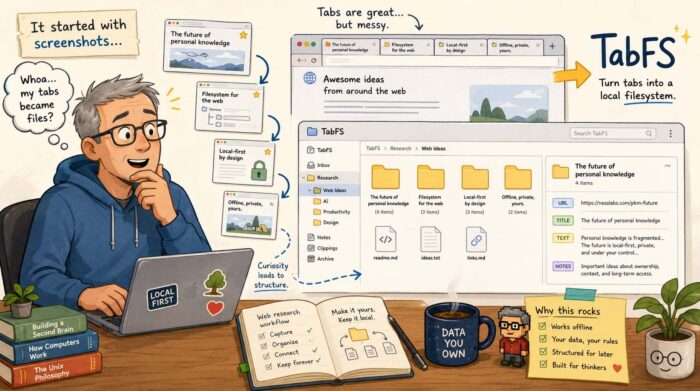
The idea is wonderfully strange: TabFS turns the tabs in your web browser into something that looks like an ordinary filesystem on your computer. Every open browser tab becomes a directory. Inside that directory are files representing things such as the URL, the title and the text of the page. Those aren’t simply exported copies. They reflect the current state of the browser tab. So suddenly your browser becomes accessible using all those boring old tools computers have been very good at for decades: files, directories, shell commands, scripts, text editors and file managers.
Your browser becomes scriptable
And that is where it becomes interesting. Suppose you have 40 tabs open while researching something. With TabFS, you can simply list the titles of those tabs as if you were reading files from a directory. You can also save the text of all your open tabs into one file. Or search those files. Or process them with Python. Or write a little shell script that selects certain tabs. Rizwan gives the example of closing every tab containing “Stack Overflow” in its title. Instead of building a special browser extension, you can essentially delete those tabs as if you were deleting files.
TabFS can go considerably further. It can expose images, JavaScript and other resources loaded by a page as actual files. You can evaluate JavaScript on a page through the filesystem, monitor values on a page and use scripts on your computer to interact with what is happening inside the browser.
It is experimental software, and some of the ideas Rizwan describes are explicitly still TODOs. But that almost makes it more interesting.
Browsing as information gathering
What particularly interests me is what this could mean for people who spend much of their day collecting information. That is basically what I do continuously. I open articles, reports, company websites, research papers, videos and all sorts of other sources. Some are immediately useful. Others might become useful several days or months later.
The browser is very good at finding and displaying all that information. It is much less good at turning it into something you can systematically work with afterwards. Bookmarks help, of course. So do read-later services and knowledge management tools. But they usually introduce yet another application and yet another database.
TabFS approaches the problem from an entirely different direction. It says: what if the browser simply became part of the filesystem?
Then you could write a script that periodically stores the text and URLs of your research tabs. You could sort them into project directories. You could use command-line tools to search through them. You could feed selected material into another processing workflow. You could create an archive containing the source URL, page title and extracted text. And because we are dealing with ordinary files, you could potentially combine this with almost anything else that understands files. That includes tools which haven’t even been designed to work with browsers.
I like this kind of software
TabFS probably isn’t something most computer users are going to install tomorrow. Its current setup requires a browser extension and a filesystem component, and Rizwan describes Chrome support as the main target, with more limited Firefox and Safari support. It currently runs on macOS and Linux.
But that isn’t really the point for me. What I like about projects like TabFS is that they question assumptions that have become so normal that we rarely notice them anymore. Why should information inside a browser be trapped inside a browser? Why shouldn’t my existing tools be able to access it? And why do we keep building separate applications for managing information when operating systems already have a perfectly good universal abstraction for storing and manipulating things?
I really like unpredictable journeys like that. I started out wondering why anyone would organise a conference about screenshots. A few clicks later, I found myself thinking about browsers as filesystems. Not a bad rabbit hole to fall into.