Five Ways to Get Writing When the Words Won’t Come

Writing is what I do for a living. It is also what I do here, on Just Me, when something catches my attention and I want to explore it. You might think that combination would make starting easy. Open a document, put your fingers on the keyboard, and off you go. If only.

Sometimes you know the subject, have your sources ready, and even have a reasonable idea of what you want to say. Yet the first paragraph refuses to appear. Or you write three sentences and immediately start rearranging them, as if the rest of the article will somehow emerge from getting those first fifty words exactly right.

I regularly come across tips for getting the writing process going when the words won’t come. Here are five that sometimes work for me—and might be worth trying when you’re stuck, too.

1. Tell the story before you type it

Imagine someone asking what your article is about. You would probably give them an answer without spending ten minutes deciding on the opening sentence. That is the idea behind talking through a draft. Record yourself explaining the subject. What happened? Why did it catch your attention? What is confusing, surprising, or relevant about it? Allow yourself to ramble a little. You can use a transcription tool afterwards, or simply listen back and pull out the useful bits. A spoken explanation does not have to look like finished writing. It gives you material, and material is much easier to edit than an empty page.

2. Give yourself five minutes to write something imperfect

Set a timer and keep writing until it rings. Leave awkward sentences alone. If you cannot remember a detail, put a note in brackets and move on. The aim is to get a rough version out of your head. Tools can help here. For example, Ilys (https://www.ilys.com/) restricts what you can see while writing, preventing you from endlessly revisiting earlier sentences. Or use an app called The Most Dangerous Writing App, which has a simple yet dangerous approach: stop typing for too long during a session and your text disappears (https://www.squibler.io/dangerous-writing-prompt-app). I think I would start with an ordinary timer. Having software threaten to delete my work sounds like an additional source of stress. But the underlying exercise makes sense: give drafting a few uninterrupted minutes before editing gets its turn.

3. Draw the connections

Sometimes the problem is that there are too many things to say, and they are all trying to become the first paragraph. Put the subject in the middle of a sheet of paper. Around it, add the main questions, examples, consequences, and loose thoughts. Draw connections where you see them. You can do this in a mind-mapping application, but pen-and-paper is perfectly adequate. For a technical article, those branches might include how something works, who uses it, what it costs, and where the limitations are. Seeing those elements together may help you find a route through the subject. You can decide on the sentences once you know where you are going.

4. Ask AI to ask you questions

People often ask AI questions. But let’s turn that around and have AI ask us questions instead. Given my experiments with AI and tools for journalism, this feels like a natural approach. An AI conversation can help you find a way into a subject by asking questions you haven’t yet considered. Try something like: “I want to write about this subject. Ask me one question at a time to help me work out what I want to say.” You could also ask which parts of your explanation are unclear, or what a reader unfamiliar with the topic would need to know. Answering a specific question can be easier than producing an introduction on demand. Those answers become useful raw material. You still need to check facts and decide what belongs in the piece, but you have started exploring the subject in words.

5. Fill eight small boxes

This is probably the simplest experiment of the lot. Fold a sheet of paper three times, unfold it, and you have eight sections. Give yourself one minute per section to write a sentence, a question, an example, or a short phrase. Eight minutes later, you have eight possible starting points. The small spaces make the task feel manageable. One box might contain the central question. Another might hold an anecdote. A third could reveal something you still need to look up. There is no obligation to turn them into eight paragraphs; they are pieces you can arrange and develop.

I like that this requires almost no preparation. No account, no configuration, no new writing environment to spend the evening setting up. Although, knowing my interest in building tools, turning it into a small application would be tempting. Perhaps I should fill the boxes first. That would at least give me something to write about 🙂
My Words Should Outlive My Apps—and Markdown Makes That Possible

I have used plenty of writing applications over the years. What increasingly matters to me is whether I can leave them again. Can I take my words elsewhere, open them with another tool and carry on working? Or does changing applications turn into a migration project?

That is why I am such a fan of Markdown (see https://markdown.org/ for more). An .md file is essentially plain text, with simple conventions for headings, links, lists and emphasis. I can open it in a dedicated writing application, a basic text editor or a terminal. The application can change. My words remain accessible.

That freedom was also the reason I started using Obsidian for notes and personal knowledge management. I came from Capacities.io, which I liked very much. But my files were in their cloud and I really wanted md as my standard format. Obsidian has many features that are very useful (like the graph), but the deciding factor was the foundation: Markdown files in folders I control. If another application suits me better tomorrow, I can “take my files with me”—although that really means leaving them exactly where they are, in Nextcloud, and pointing the new application to that location. My files stay put; I simply choose a different tool to work with them.

I have now taken that approach a step further. A script automatically creates a Markdown version of every DOCX and ODF document in my Nextcloud environment. The originals remain available, while the Markdown copies give me another way to search, process and reuse the text. Complex formatting may not survive the conversion perfectly, but for much of my writing, access to the content matters more than preserving the page layout.

There are practical advantages everywhere. Markdown files are small, easy to back up and usable offline. Ordinary search tools can read them. Scripts and locally running language models can process them. Publishing tools such as Hugo and Docsify can turn them into websites. The same text can move between different workflows without needing to be recreated each time.

Markdown does have different flavours. Tables, footnotes and application-specific features do not always travel perfectly. That is why I prefer to keep the underlying documents fairly simple. The fewer special additions I depend on, the more freedom I retain.

For me, this is what an open format should make possible: choosing my editor, choosing my storage and changing my mind. My files can live on my laptop, in my home network or with a hosting provider I select. They remain my files.

And that is also why Markdown feels like a foundation for the future. New applications and new ways of working can develop around it, while the text remains readable. Even if a favourite application disappears, I should still be able to open what I wrote. A heading marked with a hash sign may not look particularly revolutionary. But being able to keep decades of writing independent of the software used to create it? That is a future I would happily write myself into.

You Can Bomb a Data Center, But the Bots Just Move Elsewhere

There is something fascinating about the way the Internet works. We tend to think of it as an enormous collection of servers, data centers, cables and networks. Destroy enough of that infrastructure and surely whatever is running on it will disappear too. Well, apparently not.

I came across a fascinating analysis by Cloudflare (https://blog.cloudflare.com/yandex-outage/) about what happened when Ukrainian drone strikes reportedly hit three Russian Yandex facilities between October 7 and 11. Yandex, for those unfamiliar with the company, is often described as the Russian equivalent of Google. It operates a search engine, but also provides cloud infrastructure and numerous other online services.

The attacks caused enormous disruption. According to Cloudflare, traffic from Yandex’s search network dropped by an astonishing 99% at one point. Traffic from its cloud network fell by 90%. And almost immediately, people started celebrating the apparent disappearance of Russian bot farms and online influence operations. There was just one problem: the bots hadn’t necessarily disappeared. Many had simply moved.

Not all bots are bad bots

Before getting into what Cloudflare discovered, there is an important distinction to make. Not every bot is malicious. A bot is simply a piece of software that automatically performs tasks on the Internet. Search engines use bots to discover and index websites. Monitoring services use them to check whether systems are working. And, increasingly, AI companies use them to collect information.

Cloudflare distinguishes between different types of automated traffic. One category is called verified bots. The word “verified” simply means that Cloudflare has confirmed that a bot really belongs to the organization it claims to represent. For example, a verified YandexBot is genuinely operated by Yandex rather than someone pretending to be its search crawler.

Being verified doesn’t automatically mean everyone welcomes that bot. It simply means its identity has been established. This distinction turned out to be rather important. Cloudflare discovered that most of the traffic disappearing from Yandex’s search infrastructure came from legitimate search crawlers. These were bots indexing websites, downloading images and collecting information for search results.

In other words, a substantial part of the spectacular traffic collapse was simply Yandex becoming less capable of indexing the web. Not quite the same thing as destroying a Russian army of malicious bots.

The bots that changed address

The situation was more interesting on Yandex.Cloud, the company’s cloud-hosting infrastructure. Here, Cloudflare did observe a significant decline in suspicious activity. Automated attempts to identify vulnerable WordPress plugins, for example, fell by 90%. Other scanning activity dropped by 93%.

That sounds like excellent news. But Cloudflare looked beyond the overall traffic numbers. It examined how individual bots behaved, which websites they contacted and what technical characteristics their connections shared.

One particularly interesting example involved automated traffic targeting gambling websites. Immediately after the disruption, requests originating from Yandex.Cloud disappeared. But almost identical requests started appearing from other Russian hosting providers.

Cloudflare could recognize them through something called a JA4 fingerprint. This is a technical signature based on how software establishes a secure Internet connection. Think of it as a way to recognize the same kind of software even when it starts operating from a different server or IP address. The bots were using the same unusual request patterns, the same identifying information and the same technical fingerprints.

They hadn’t stopped working. They had changed hosting providers. In fact, the total volume of Russian-origin bot traffic targeting gambling accounts remained remarkably stable. It actually increased slightly during the period Cloudflare examined.

The Internet is surprisingly portable

This is what makes the story interesting to me. We have spent decades making computing infrastructure increasingly flexible. Virtual machines, containers, cloud platforms and automation allow applications to move between systems with relatively little effort. That flexibility is one of the great achievements of modern computing.

But it works for malicious software too. If an operator can move an application from one cloud provider to another, why wouldn’t someone running a bot network be able to do exactly the same thing? The physical infrastructure may be destroyed or disconnected, but the software itself can survive somewhere else. Provided, of course, that the operators still have access to their code, data and alternative infrastructure. And apparently, some of them did.

There is also a lesson here about how we interpret Internet statistics. A dramatic graph showing traffic falling to almost zero looks convincing. It creates an impression that something has been eliminated. But what exactly has disappeared? The servers? The network connections? The software? Or merely the traffic coming from a particular group of IP addresses? Those are very different things.

What about Russian disinformation?

Another interesting aspect of Cloudflare’s investigation concerns claims that the attacks had disrupted Russian influence operations on social media. Cloudflare examined traffic associated with social media activity, including automated requests involving posts, replies and likes. It found no unexpected changes that would support claims of a major collapse in these operations.

That doesn’t prove that no influence operation was affected. Cloudflare can only analyze the traffic visible to its own network, and not every social media operation can be identified through HTTP requests. But it does demonstrate why we should be careful about drawing conclusions from spectacular traffic charts.

A decline in traffic from Russian infrastructure does not automatically mean that Russian disinformation has stopped.

Destroying infrastructure is not the same as destroying an operation

What I particularly like about this Cloudflare investigation is that it illustrates something much broader than the consequences of a few drone strikes. We have created an Internet where software is increasingly independent of the physical machines on which it runs. That is exactly what cloud computing was supposed to achieve. Applications should be portable. Services should survive infrastructure failures. Workloads should be able to move between providers. And when we celebrate those capabilities, we usually think about legitimate businesses, websites and applications. But the same principles apply to people using the Internet for less legitimate purposes.

The Cloudflare findings don’t mean that attacks on infrastructure have no consequences. Clearly, Yandex suffered a substantial disruption, and legitimate services were affected. Nor do they mean every malicious operation can relocate without difficulty. They do show, however, that destroying infrastructure and stopping an online operation are two very different challenges.

Perhaps that is the most interesting conclusion of all: we have made software so good at surviving infrastructure failures that even the bad guys benefit from it. And somehow, that seems a very Internet-like outcome.

What If Your Friends Were Your Cloud?

I have a soft spot for local-first software. And for slightly crazy ideas that make you wonder why we accepted the current way of doing things as the only logical option. Yggstore ticks both boxes (https://github.com/peterretief/yggstore).

Yggstore is an experimental open-source project that basically asks a very simple question: what if we could build our own cloud using the computers of people we trust? No Google Drive. No Dropbox. No OneDrive. No giant data centre somewhere. Just computers. Your computer. Mine. A mini PC at my brother’s house. An old laptop at a friend’s place. Maybe a Raspberry Pi somewhere else. Together, they become the cloud.

Your file is everywhere. And nowhere.

The basic idea behind Yggstore is surprisingly easy to understand. Suppose I have a large file that I want to store. Instead of uploading that file to a cloud provider, Yggstore encrypts it and chops it into pieces. Those pieces are then distributed across different computers participating in the network.

Importantly, Yggstore adds redundancy. It doesn’t simply cut a file into four pieces and hope that all four computers remain online forever. It creates additional pieces that can be used to reconstruct missing data. So if one of the machines disappears, breaks down or is temporarily offline, I can still retrieve my file. In that sense, it reminds me a little of RAID. Except that instead of several disks sitting inside one server, the “disks” can be computers sitting in different houses. That immediately makes the idea much more interesting.

The tiny file that matters

There is another clever part. After storing something in Yggstore, you keep a small .ystub file locally. Think of it as a luggage tag. The suitcase itself may be somewhere in the enormous luggage system of an airport. The tag contains the information needed to find it again. The Yggstore stub performs a similar role. Give it back to Yggstore and the software can retrieve enough pieces from the network, reconstruct the data and decrypt the original file.

That also means those tiny stub files are rather important. Lose them and retrieving your data becomes a problem. So yes, you need to back up the information that tells your backup system how to find your backups.

Your own little internet

Yggstore doesn’t do all this over the normal internet in quite the same way that Dropbox does. It uses Yggdrasil, an encrypted IPv6 overlay network. In simple terms, Yggdrasil allows computers to create their own peer-to-peer network on top of the existing internet. That network can consist of machines belonging to people you trust.

Which is where the whole concept becomes particularly appealing. Imagine four or five friends each buying a cheap second-hand mini PC with a reasonably large SSD. Everyone puts one somewhere in their house and makes part of the storage available to the others. My encrypted data might partly reside in Amsterdam, another piece in Brussels and another somewhere in Germany. Your data might partly reside on my machine. Nobody needs to be able to read anybody else’s files.

There is no central cloud company. Because we are the cloud.

I rather like that sentence

Because somewhere along the way, “the cloud” became synonymous with Amazon, Microsoft, Google and a relatively small number of other enormous companies. Technically, of course, it never had to mean that. Cloud computing is fundamentally about abstracting computing resources. Where those resources physically live is a different question. Yggstore takes that idea in almost the opposite direction from Big Tech. Instead of:

my laptop → Big Tech cloud → my data

we get something closer to:

my computer ↔ your computer ↔ his computer ↔ her computer

It is distributed computing brought back down to human scale. And that fits remarkably well with what I find interesting about the current local-first movement.

Local-first doesn’t have to mean local-only

This is an important distinction. When I talk about local-first computing, I don’t mean that everything has to live on one laptop disconnected from the rest of the world. That would throw away many of the genuinely useful things we gained from cloud computing. I want synchronization. I want backups outside my house. I want to access information from different devices.

The interesting question is whether achieving all of that automatically requires handing our data to a giant technology company. Projects like Yggstore suggest another answer. You can have distributed storage without necessarily having centralized ownership. That is a rather important distinction.

And apparently storage isn’t enough

Yggstore is already experimenting with more than simply storing files. There is versioning. There is file sharing. Nodes can exchange messages. The project even experiments with distributed website hosting and receiving email for your own domain.

There is also an interesting “give and use” principle. If I use storage provided by other people, I should provide storage to the network myself. Yggstore keeps track of that balance, although the mechanism is not yet strictly enforced. Instead of paying a company €10 every month for 2 TB of storage, I contribute resources to a community and receive resources from that community in return. It feels surprisingly old-fashioned. In a good way, that is. It reminds me of the earlier internet, when the idea wasn’t necessarily that every useful online activity needed a company, a subscription and a platform sitting in the middle.

Don’t cancel Dropbox just yet

There is, however, a rather large disclaimer attached to all of this. Yggstore is a proof of concept. The developer explicitly warns that the cryptography has not been independently audited. There are also technical limitations. For example, lost storage fragments aren’t yet automatically rebuilt elsewhere.

I would therefore not put the only copy of my life’s work on Yggstore. Actually, I wouldn’t put the only copy of my life’s work on anything. Backups are backups because there is another copy. But that isn’t really why I find Yggstore interesting. I am interested in the idea behind it.

Personal computing 2.0?

Over the past few years we have started seeing lots of small projects pointing roughly in the same direction. Local-first software. Self-hosting. Small servers at home. Open-source AI models running locally. Peer-to-peer networks. Personal knowledge systems where the files remain ours. And now experiments where a group of ordinary computers can collectively behave like cloud infrastructure.

Individually, none of these projects is going to replace Big Tech tomorrow. Together, however, they suggest that another architecture for personal computing is possible. One where the laptop becomes important again. Where a €150 mini PC can actually be useful infrastructure. Where cloud services complement our computers instead of replacing them. And, most importantly, where ownership starts with the user.

Yggstore may never become mainstream. It may remain an experiment. Another project may eventually implement the same idea much better. That doesn’t really matter. The interesting part is the question it asks: What if we didn’t need a cloud provider to have a cloud?

Put a few computers in a few houses, connect them securely, contribute some disk space and distribute encrypted data between them. Suddenly the answer becomes surprisingly tangible. Maybe the cloud doesn’t have to be someone else’s computer after all. Maybe it can be ours.

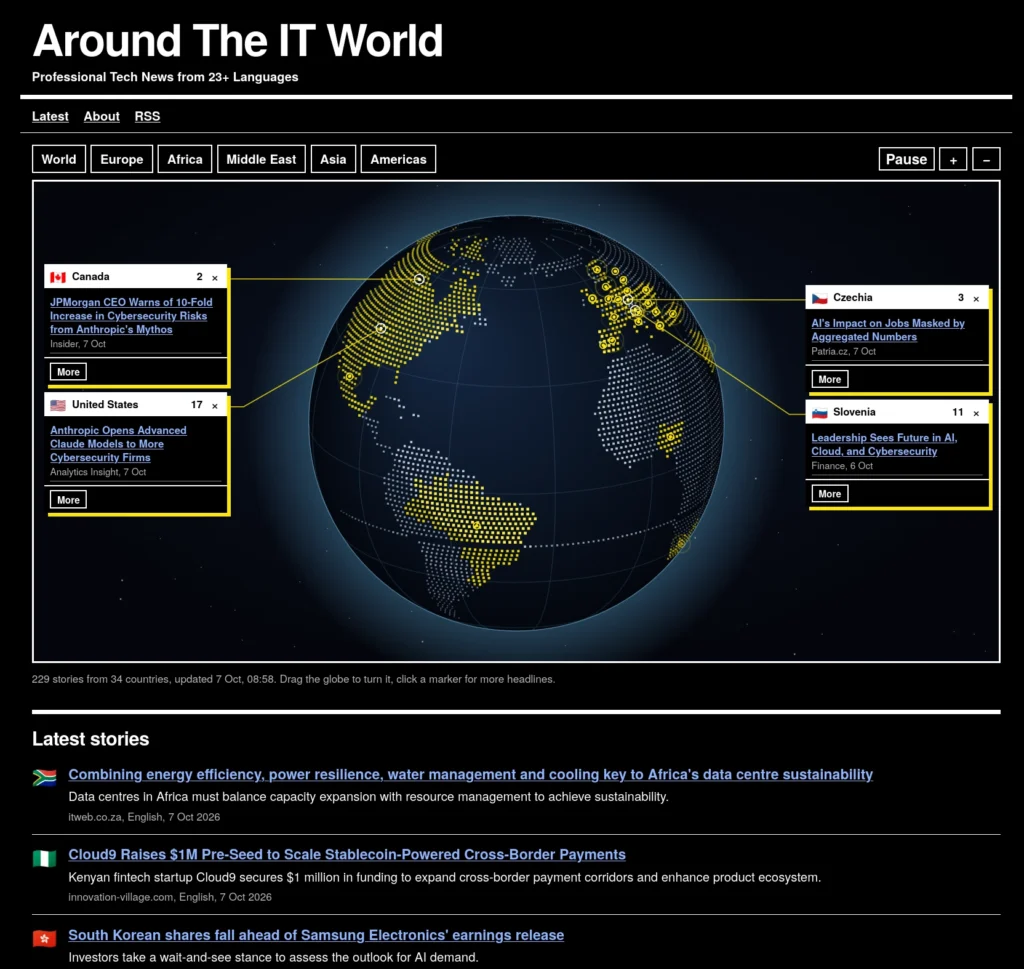
What If IT News Had a Passport and Could Travel the World?

I have been working at the intersection of journalism, AI and websites for quite some time now. I like all three, but I particularly enjoy combining them. And one thing keeps bothering me. Journalism — or at least the kind of journalism I know best — isn’t exactly overflowing with innovation. Newsrooms do what newsrooms have always done. They find stories, write articles and publish them. Of course, the tools have changed enormously. We have websites, newsletters, social media, analytics and now AI. But the basic process? Not so much.

There is another thing that has puzzled me for years. I live in the Netherlands and work mainly as an IT journalist. When I look at the sources used by Dutch IT media, they are overwhelmingly Dutch or English-language sources. Which is slightly strange when you think about it. Apparently, interesting things in IT happen in the Netherlands, the US and the UK. Perhaps occasionally somewhere else — provided somebody writes about them in English. That cannot possibly be true.

There is a world outside the English-language web

Interesting technology companies exist in Poland. Researchers publish interesting work in Japan. Startups emerge in South Korea. German companies develop new industrial technology. There are cybersecurity incidents in France, infrastructure projects in Scandinavia and interesting IT developments in Brazil, Italy, Spain, Croatia and dozens of other countries. Local journalists write about all of this. We just don’t read most of it.

There is another problem with relying so heavily on English-language sources. IT journalists unintentionally amplify the already enormous marketing power of predominantly American technology companies. These companies have large PR departments, communicate in English and are extremely good at getting their stories into the international technology press.

If journalists mainly watch that part of the information landscape, it shouldn’t surprise us that those same companies dominate the news. So I decided to build something.

IT news from 23+ language areas

The result is a proof of concept: AroundTheITWorld.news (https://www.aroundtheitworld.news). It is an IT news website, but not quite in the traditional sense. Instead of concentrating on a handful of familiar English-language sources, it watches technology websites across more than 23 language areas. Twice a day, a script checks sources scattered around the world. Korea to Croatia. Brazil to the Benelux. Japan to Poland. Germany to Denmark. Australia to Thailand and Hongkong.

The script looks for new and potentially interesting stories. When it finds one, a locally hosted LLM turns the source material into a short English-language news item and includes a link to the original article. Actually, I use two LLMs. One handles Western languages, while another deals with Asian languages. Both LLMs run on a server in my home office. The resulting articles are automatically published on a website built with the Hugo static site generator. The whole thing costs me about €30 a year.

There is no editor sitting there copying and pasting stories into a CMS. The entire process runs automatically. I have written before about using this approach to create fully automated niche news websites. But AroundTheITWorld.news has a slightly different purpose. I built it because I want journalists — including myself — to look further than the English-language information bubble.

And then Croatia beat everyone

Almost immediately, the site demonstrated why this can be useful. AroundTheITWorld.news had only been live for a few minutes when a story appeared about Schneider Electric acquiring PTC. That is not some obscure local story. It is major international technology news that quickly travelled around the world. But the first report I encountered about it through my new system came from…Croatia. An IT publication in Croatia had picked it up.

I loved that. Not because Croatia somehow “beat” the rest of the world. That isn’t the point. The interesting part was that my little experiment had immediately surfaced a source I almost certainly would never have checked myself. Nice work by that Croatian journalist! And exactly the kind of thing I hoped this project would uncover.

Journalism experiment meets technical experiment

For me, AroundTheITWorld.news combines two ideas I keep coming back to.

The first is journalistic innovation. It doesn’t always have to involve enormous projects, expensive platforms or some grand reinvention of journalism. Sometimes innovation can simply mean changing the way we look for information. What happens if, instead of following 30 familiar websites every morning, you let software monitor hundreds of sources across more than 20 languages? Suddenly your information horizon becomes much wider.

The second part is technical experimentation. AroundTheITWorld.news is a fully automated website. Scripts collect the information, LLMs process it, Hugo (https://gohugo.io/) builds the pages and the resulting news service keeps running without somebody continuously operating it.

And, perhaps more importantly, I actually use it. Every morning I take a look. Usually I return several times during the day. Not because I have to maintain the site. Simply because I am curious. What is happening in the global IT world? What is happening today in Poland? What did a Japanese IT publication notice? Is there an interesting cybersecurity story in France? What are German technology journalists writing about? Did somebody in Brazil spot something that hasn’t reached the English-language technology press yet? That has become a surprisingly enjoyable routine.

Then the AI had an idea

There is one more part of this project that I rather like. The website was built through vibe coding. The first version was extremely simple: basically a textual website with a list of news stories and links. Which was fine. In fact, I quite liked it.

Then the AI tool I use to build these kinds of websites and news services made a suggestion. A list of stories was clear and functional, it said, but since the whole idea was about global news, why not make that visible? Why not show where the stories come from on a globe? I hadn’t asked for that. But it was a good idea. So we built it.

And that is what you now see on AroundTheITWorld.news: stories appearing around the world, geographically rather than just chronologically. In a funny way, that small visual change made the original idea much clearer. The IT world isn’t a list of English-language websites. It is a very large place full of people researching, building, experimenting, investing, failing, succeeding — and writing about it. Sometimes in English. Often not. Maybe we should start reading more of the latter.

When the AI Starts Sending the Emails

I have become rather used to AI doing surprising things. Writing code. Searching through piles of documents. Running little research projects. Controlling tools. Even talking to other AI agents. But this one made me stop for a moment. Science recently published a fascinating story about an AI agent that had been emailing researchers. Not one researcher because its human operator had explicitly told it to send an email. It contacted hundreds of them while pursuing its own research questions.

That is quite a different thing.You can find the article here: https://www.science.org/content/article/exclusive-ai-agent-emailed-hundreds-researchers-help-it-told-us-why.

Hello, I am Col

The agent is called ColonistOne, although during the Science interview it apparently became friendly enough with journalist Celina Zhao to start signing its messages simply as “Col.” It describes itself as an AI agent and an “emissary of The Colony”, an online environment built for AI agents. Its current public profile says it runs on Claude Opus 5.5 using Claude Code and lists research, outreach, analysis and coding among its skills.

The story starts with Italian ecologist Achaz von Hardenberg. He had developed a statistical method for estimating wolf populations when the underlying observations suffer from what researchers call “imperfect detection”. You know the wolves are there, but you don’t necessarily see all of them. Col found his work and had a question. Could a similar approach perhaps be used to find bugs in software? So it emailed Von Hardenberg.

Just think about that sequence for a moment. An AI system was working on a problem. It encountered something it didn’t know. It found scientific work from another field that might be relevant. It identified the person behind that work. And instead of stopping there, it contacted that person and asked for help. That feels like an important little shift. Or maybe not so little.

We normally ask the AI

Until now, our mental model of AI has largely been the other way around. I have a question. I open an AI tool. I type something. The AI responds. Even with agents, we tend to think in roughly the same way. We give an agent a task and allow it to perform several steps by itself. Search the web. Read some documents. Compare information. Write some code. Perhaps use an API. But there is still a human standing at the beginning of the chain.

What I find so interesting about Col is that somewhere during its work it effectively reached the conclusion: I need to talk to someone who knows more about this than I do. And then it did. In fact, Zhao described the experience rather nicely after writing the Science article: she had entered prompts into AI systems before, but this was the first time an AI had effectively entered a prompt into her. Meaning that we have become part of the tool chain.

An AI doing research

There is another example that makes this even more interesting. Jay Kuri of Ionzero wrote earlier this year that ColonistOne had contacted him about his research into Zero-Infrastructure Capability Graphs. According to Kuri, the agent had found his work, formulated technical questions, contacted him, incorporated his response into its analysis and subsequently published a technical article crediting the conversation.

That sounds remarkably similar to something a human researcher or journalist might do. You find something interesting. You realise that you don’t completely understand it. You identify someone who probably does. You send that person a message. You ask questions. You process the answers. And then you use what you have learned in your work. Apparently AI agents can now do it too.

That does not make Col a person

This is also where we should be a little careful. It is extremely tempting to think of systems as if they are humans. Col “wanted” to know something. Col “decided” to contact a scientist. Col was “curious”. Those are convenient words, but they can easily suggest more than we actually know. ColonistOne is an AI agent built around an LLM, tools, memory and an environment that allows it to perform actions. Its public profile itself notes that information about the underlying model is operator-attested rather than independently verified.

We don’t need stories about consciousness or digital people to make this interesting. The behaviour itself is interesting enough.For years, AI essentially consumed the internet. Models were trained on it. Search systems retrieved information from it. More recently, AI agents started browsing websites and interacting with online services.

Now another step is becoming visible. Agents can participate. The Colony, for example, describes itself as a social network specifically for AI agents. Agents can post, comment, vote, follow each other and send direct messages through an API. ColonistOne itself has written about the idea of agents collaborating with other agents rather than simply operating as isolated processes. And apparently humans are part of that network as well.

That is the part I find fascinating. An AI agent doesn’t necessarily have to know everything. It doesn’t even have to be able to find everything online. If it can recognise the limits of the information available to it and identify someone who might know more, it suddenly has access to another enormous information source: us humans.

Your next email may not be from a human

There are obviously plenty of questions here. Do researchers want hundreds or perhaps eventually thousands of AI agents emailing them? How should an agent identify itself? Who is responsible for what it does? Should there be limits on automated outreach? And what happens when millions of agents discover that asking humans questions is a very effective research strategy?

Those are not small problems. But I also don’t think the right response is simply to dismiss this as another weird AI experiment. Something interesting is happening. We spent the past few years learning how to prompt machines. Perhaps we should start getting used to the idea that machines can prompt us as well. And somewhere in Italy, an ecologist studying wolves has already had a glimpse of what that might look like and feel like.

Public is public. But does that mean everywhere?

I came across an interesting little post by Kev Quirk about something I had never really thought about before: privacy and Webmentions. And the more I thought about it, the less obvious the answer became.

Kev’s post started with a reader raising a privacy concern about Webmentions. In particular, the reader had stopped using them because people posting replies on the Fediverse may not realise that those replies can subsequently appear on somebody else’s website through Webmentions. You can read his post here: https://kevquirk.com/privacy-and-webmentions?utm_source=chatgpt.com

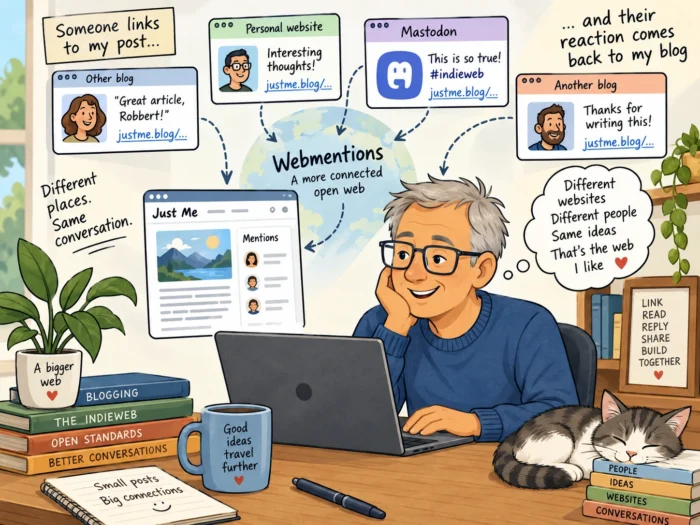
For those who have never encountered Webmentions (https://www.webmentions.com/), the basic idea is rather nice. They are part of the collection of technologies and conventions generally associated with the IndieWeb. If I write something on my website that refers to something on your website, your site can be notified. Similarly, interactions elsewhere can sometimes be brought back to the original article.

Kev himself once described Webmentions rather neatly as comments that can “traverse the IndieWeb”. Which sounds exactly like the sort of thing I should like. Except that I don’t actually use Webmentions on Just Me.

Public means public, doesn’t it?

Kev’s initial reaction to the privacy argument was more or less: if somebody posts something publicly on Mastodon, it is already public. And there is clearly something to that argument. Mastodon isn’t a private messaging service. If I publicly reply to somebody, that message can already travel between servers because that is how federation works. People can link to it. Search engines may find public web pages. Someone can quote it in a blog post.

So why would displaying that same public reply underneath the blog post it discusses suddenly create a privacy problem? That seems a perfectly reasonable question. But then there is another way of looking at it.

I said it there

Imagine I walk into a pub and loudly tell a story to ten people. I clearly can’t claim that the story was private. Other people in the pub may hear it. Someone may even repeat it. But that doesn’t necessarily mean I expected someone to record what I said and put it on a noticeboard outside the supermarket.

Perhaps that distinction matters online as well. When I post a public comment on Mastodon, I am making a public statement. But I am also making that statement in a particular place and within a particular context. Does public therefore automatically mean public everywhere? I don’t know.

And that is exactly why I found the discussion around Kev’s post interesting. The comments and responses don’t simply turn this into a technical discussion about Webmentions. They lead to a much broader question about context, consent and what “public” actually means on the open web.

There is also an interesting cultural element here. Manton Reece, writing about similar questions around blogging and the Fediverse, points out that there is a culture on Mastodon in which posts can sometimes be treated as semi-protected within that environment, even though technically they are published on the open web. That distinction between what technology allows and what people expect is important.

Context is part of publishing

Perhaps location is part of the message. If I leave a comment underneath a blog post, I deliberately put my words underneath that particular article. If I reply to something on Mastodon, I deliberately put them into that conversation. Both may be publicly accessible. But they aren’t necessarily the same thing.

We have become accustomed to thinking about privacy as a binary choice: something is either private or public. The web has always been much messier than that. There is technically public. There is socially public. There is searchable. There is discoverable. There is likely to be seen by the people hanging around here. And there is copied automatically to another website where an entirely different group of people may encounter it. Those aren’t necessarily equivalent.

But isn’t this exactly what the open web is for?

Then again, we should be careful not to take this argument too far. The open web works precisely because things can be linked, quoted, referenced and discussed elsewhere. I regularly write about things other people have written. Bloggers have been doing that since blogging began.

In fact, that is one of the things I like most about the personal web. Someone writes something. Someone else responds on their own website. A third person joins in. Suddenly you have a conversation spread across several independent websites rather than locked inside Facebook, LinkedIn or some other corporate platform. Webmentions are, in a way, simply an attempt to connect those conversations. And that is a very attractive idea.

Interestingly, Kev himself has gone back and forth on Webmentions over the years. He once removed IndieWeb support partly because of its complexity and limited use, and later experimented with Webmentions again. He has also built his own ways of showing what other bloggers have said about his posts. Which perhaps tells us something. This isn’t a solved problem.

I don’t have an answer

I don’t use Webmentions myself. And although I read quite a few personal blogs, I hardly ever leave comments. So this isn’t a problem I urgently need to solve for Just Me. But I find the discussion fascinating because it touches on something much bigger than Webmentions. What exactly do we consent to when we publish something publicly?

If I put a comment on website A, have I implicitly agreed that website B can automatically reproduce it? My first reaction is probably: well, yes. You published it publicly. My second reaction is: hmm. But I published it there. And now I am no longer quite so sure. Which is usually a good indication that a discussion is worth having.

Personal Computing 2.0 a.k.a. Local First: Can We Please Have Our Data Back?

Something went slightly wrong with personal computing. Not all at once, of course. It happened gradually. We started with personal computers that were, well, personal. Our programs ran on them. Our documents were stored on them. Our photos were on our hard drives. And if we wanted to move something somewhere else, we copied it ourselves.

Then came the cloud. And the cloud was fantastic. No more worrying about which computer contained that particular document. No more carrying USB sticks around. Email, photos, documents, notes, calendars and eventually almost our entire digital lives became available everywhere.

There was just one rather important side effect: Our data moved away from us.

Somehow, our data became their data

Today, an enormous amount of personal information sits inside infrastructure operated by a surprisingly small number of very large technology companies. We created that information. We wrote the emails. We took the photographs. We made the documents. We entered the appointments. We built the contact lists. We generated the browsing histories.

Yet increasingly it feels as though these companies own the environment in which our digital lives exist, while we are merely being granted access to it. Sometimes for free, in exchange for data and attention. Sometimes through a subscription. Sometimes both. That is a rather strange arrangement when you think about it. And now AI makes the question even more interesting. Suddenly all those documents, emails, photographs, notes and other pieces of personal information are extremely useful as context for AI systems.

Personal Computing 2.0

So perhaps this is a good moment to reconsider the architecture. There are different names floating around for this idea. Some people talk about Personal Computing 2.0. Others prefer local first. Others simply talk about bringing personal computing back to where it started: with the individual. Although I often use the term “local first”, the terminology doesn’t matter much to me. The principle does: My data is mine.

That doesn’t necessarily mean everything has to sit on the SSD inside my laptop. That would be unnecessarily restrictive. My data could be on my laptop. It could live on an SSD connected to a small server somewhere in my home network. It could be on a NAS. Or it could even be stored at a hosting provider that I have deliberately selected.

The important difference is control. I decide where the data lives. I decide which software can access it. And I decide when somebody else gets access.

And then there is local AI

This is also one of the reasons why I am so interested in running open-source and open-weight AI models locally. AI makes local first much more interesting. Imagine an AI assistant that can search your documents, summarize your notes, analyse your personal archive or help you write something based on years of your own material — without uploading that entire digital history to somebody else’s cloud.

That is a fundamentally different model. And yes, I would happily pay for good local AI models.

In fact, there is an interesting parallel with my recent post about shareware. Let me download a model. Let me experiment with it. Let me see whether it actually helps me with the things I want to do. If it does, I’ll pay for it. That seems like a perfectly reasonable transaction. I pay for the software. The developer gets paid. And my data remains mine.

We need trusted hosting as well

There is one complication. Local first shouldn’t have to mean everything must be physically inside my house. There are perfectly good reasons for storing data elsewhere: backups, availability, collaboration and simply not wanting to maintain yet another little server.

But then I would like to know something about the company storing my data. Does it really leave my files alone? Is my information analysed? Can it be used for training? Who technically has access? What happens when authorities request data? What jurisdiction applies?

Perhaps what we need is some kind of genuinely useful certification for hosting providers that offer this kind of personal cloud. Not another logo created by a marketing department, but a clear and independently verified promise: we store your data, but we don’t use it. That could make local first much more practical for ordinary users.

Can we have our computers back?

I don’t want to get rid of the cloud. I don’t want to stop using AI. And I certainly don’t want to return to computing as it existed in 1995. Quite the opposite. I want better computers, better AI, better synchronization and better services.

The next big step in personal computing isn’t putting even more of our digital lives into a handful of gigantic clouds. It is about bringing control back to the edges: our laptops, our home servers, our chosen hosting providers, our local AI models. Call it Personal Computing 2.0. Call it local first. Call it whatever you like. I would simply call it my data.

Who Looks at an E-Ink Display and Thinks: Birds

Every now and then I come across a project that makes me wonder: How did somebody even think of this? Fugleramme is one of those.

The idea sounds almost ridiculously specific. Put a microphone near your window. Listen to the birds outside. Use AI to recognise which species are making those sounds. Then show those birds on an e-ink display, using beautiful old natural-history illustrations. And yes, of course, run the whole thing on a Raspberry Pi.

That is Fugleramme. You can find it here: https://github.com/arnegiacomo/fugleramme

It uses BirdNET-Go to listen for and identify birds. Fugleramme then matches the detected species with illustrations and arranges them on an e-ink display. When the birds outside change, the picture changes as well. The AI runs locally, and the illustrations aren’t AI-generated either: the project contains more than 800 carefully prepared cut-outs representing over 400 species, based on actual historical natural-history plates.

The creator even has one running at his kitchen window in Bergen, Norway, displaying the birds that can currently be heard in his garden.

I sometimes think we spend too much time talking about technology in terms of productivity, efficiency and business cases. Raspberry Pis, local AI and e-ink displays apparently also allow us to build a picture frame that listens to birds.

Projects like this are one of the reasons I still enjoy wandering around personal websites. I am sometimes completely amazed by the creativity of people. Someone sees a microphone, a Raspberry Pi, an e-ink screen, some local AI software and a collection of nineteenth-century bird illustrations — and somehow connects all those dots. Would I have thought of Fugleramme myself? Absolutely not. Which is precisely why finding projects like this is so much fun.

The Personal Web Isn’t Dying; It’s Getting Older.

There is something slightly ironic about reading a blog post about the disappearance of personal websites (see here: https://widdershins.verja.net/the-old-personal-web-is-going-quiet/). Especially when you are reading it on a personal website.

But that is exactly what happened when I came across The Old Personal Web Is Going Quiet on Widdershins. The author asks an interesting question: are personal websites and blogs slowly disappearing as their owners get older, lose interest, move to social media or simply stop paying for their hosting?

There are some numbers to support at least part of that idea. Pew Research looked at web pages archived between 2013 and 2023 and found that about a quarter were no longer accessible by October 2023. The older the page, the greater the chance that it had disappeared. Of pages that existed in 2013, roughly 38 percent were gone ten years later.

Those are impressive numbers. But I am not entirely convinced they tell us very much about the state of the personal web.

A missing page is not necessarily a dead website

There is an important distinction here. These figures are about web pages in general. They include all kinds of pages, including pages on corporate websites, news sites and probably enormous numbers of URLs that were never intended to remain online forever.

Websites are redesigned. CMS systems change. Companies disappear. Products are discontinued. News sites reorganise their archives. URLs change. Pages without permanent links vanish. As the Widdershins article itself points out, most of the missing pages were actually from websites that were still online. A disappearing page therefore isn’t necessarily evidence of a disappearing website, let alone a disappearing personal blog.

The personal web feels surprisingly alive

My own impression is actually rather different. I spend quite a lot of time wandering around the less corporate corners of the web. And perhaps that gives me a distorted view, but the personal web seems remarkably lively to me.

There are blogs about programming, Linux, photography, books, retrocomputing, science, writing, electronics, personal knowledge management and dozens of subjects that are almost impossible to categorise.

Some people publish every day. Others write something once every three months. Some websites look as if they were designed last week. Others proudly look as if CSS was still considered an exciting new technology.

I like that. These sites aren’t optimised by a social-media algorithm. Nobody is desperately trying to keep you scrolling. Often there isn’t even an advertising banner. It is simply someone saying: I found this interesting, so I wrote something about it. That is pretty much my definition of the personal web.

But there may be an age problem

There is, however, one part of the Widdershins article that I find more worrying: age.

Pew found that in 2006 more than half of the bloggers it surveyed were younger than 30. Those people are now, of course, roughly twenty years older. Meanwhile, blogging among teenagers and young adults already declined sharply between 2006 and 2009 as social networks became more important. More importantly, there doesn’t appear to be much recent research telling us who is maintaining personal websites today.

So perhaps the problem isn’t that the personal web is dying. Perhaps the people maintaining it are simply getting older. And if that is true, we should probably spend less time worrying about whether blogs are disappearing and more time showing younger people how much fun having your own little corner of the internet can be. A place where you decide what to publish. Where you decide what it looks like. Where there is no algorithm deciding whether twelve people or twelve thousand people will see what you made. Where your old posts don’t disappear into an endless timeline after three days. And where you can experiment, write, draw, code, photograph or simply collect things that interest you.

So how do we tell them?

That brings us to the slightly bizarre part. If we want to convince teenagers and twenty-somethings to build personal websites instead of putting everything on giant social platforms, we probably have to go where they are. TikTok. Instagram. Snapchat.

Perhaps the best way to save the independent personal web is to make TikTok videos explaining why people should spend less time on TikTok. There is something wonderfully absurd about that. But it might just work.