I Went Looking at a Conference About Screenshots (About What?) and Found a Filesystem for Browser Tabs

Sometimes you find interesting software because you are looking for it. And sometimes you arrive there through a rather strange series of clicks. TabFS definitely belongs in the second category.

It started with a very short message I saw somewhere about something called Screenshot Conf (https://cristobal.arquipelago.org/writing/screenshot.html). My first reaction was more or less: a conference about screenshots?

Obviously, I had to know more. And yes, Screenshot Conf really was a conference entirely about screenshots. It was organised in New York by Cristóbal Sciutto and Omar Rizwan, with talks about things such as screenshot archives, information storage, image-based computing and the surprisingly important role screenshots play in the way we collect and share information. I will come back to Screenshot Conf in another post, because I have the slightly strange feeling that I have just discovered an entire world I didn’t know existed.

But Screenshot Conf also led me to the website of one of its organisers, Omar Rizwan (https://omar.website/). And that turned out to be another rabbit hole.

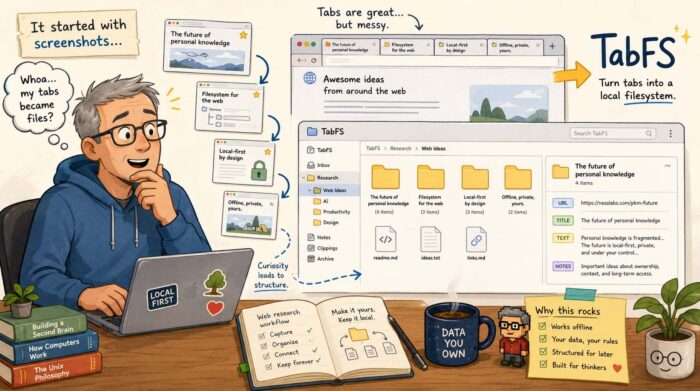
Turning browser tabs into files

Rizwan is interested in new computer interfaces and new ways of programming. His website contains a collection of experiments and projects that approach computers in ways that are often very different from the standard application-and-window model we are used to. One of those projects is TabFS (https://omar.website/tabfs/).

The idea is wonderfully strange: TabFS turns the tabs in your web browser into something that looks like an ordinary filesystem on your computer. Every open browser tab becomes a directory. Inside that directory are files representing things such as the URL, the title and the text of the page. Those aren’t simply exported copies. They reflect the current state of the browser tab. So suddenly your browser becomes accessible using all those boring old tools computers have been very good at for decades: files, directories, shell commands, scripts, text editors and file managers.

Your browser becomes scriptable

And that is where it becomes interesting. Suppose you have 40 tabs open while researching something. With TabFS, you can simply list the titles of those tabs as if you were reading files from a directory. You can also save the text of all your open tabs into one file. Or search those files. Or process them with Python. Or write a little shell script that selects certain tabs. Rizwan gives the example of closing every tab containing “Stack Overflow” in its title. Instead of building a special browser extension, you can essentially delete those tabs as if you were deleting files.

TabFS can go considerably further. It can expose images, JavaScript and other resources loaded by a page as actual files. You can evaluate JavaScript on a page through the filesystem, monitor values on a page and use scripts on your computer to interact with what is happening inside the browser.

It is experimental software, and some of the ideas Rizwan describes are explicitly still TODOs. But that almost makes it more interesting.

Browsing as information gathering

What particularly interests me is what this could mean for people who spend much of their day collecting information. That is basically what I do continuously. I open articles, reports, company websites, research papers, videos and all sorts of other sources. Some are immediately useful. Others might become useful several days or months later.

The browser is very good at finding and displaying all that information. It is much less good at turning it into something you can systematically work with afterwards. Bookmarks help, of course. So do read-later services and knowledge management tools. But they usually introduce yet another application and yet another database.

TabFS approaches the problem from an entirely different direction. It says: what if the browser simply became part of the filesystem?

Then you could write a script that periodically stores the text and URLs of your research tabs. You could sort them into project directories. You could use command-line tools to search through them. You could feed selected material into another processing workflow. You could create an archive containing the source URL, page title and extracted text. And because we are dealing with ordinary files, you could potentially combine this with almost anything else that understands files. That includes tools which haven’t even been designed to work with browsers.

I like this kind of software

TabFS probably isn’t something most computer users are going to install tomorrow. Its current setup requires a browser extension and a filesystem component, and Rizwan describes Chrome support as the main target, with more limited Firefox and Safari support. It currently runs on macOS and Linux.

But that isn’t really the point for me. What I like about projects like TabFS is that they question assumptions that have become so normal that we rarely notice them anymore. Why should information inside a browser be trapped inside a browser? Why shouldn’t my existing tools be able to access it? And why do we keep building separate applications for managing information when operating systems already have a perfectly good universal abstraction for storing and manipulating things?

I really like unpredictable journeys like that. I started out wondering why anyone would organise a conference about screenshots. A few clicks later, I found myself thinking about browsers as filesystems. Not a bad rabbit hole to fall into.


The Web Has a Memory Problem

I recently came across a post on Ctrl+Shift+3 from someone who had found an old backup of their del.icio.us bookmarks (https://ctrlshift3.com/post/cQHW0GSYNypR). The conclusion was concise and predictable: roughly 75 percent broken links and 80 percent obsolete technology. It made me sigh, because it reminded me of something I’ve been thinking about for quite a while: link rot.

Link rot is simply what happens when links that once worked stop taking you to the information they originally pointed to. A website disappears, an article is removed, a company changes its CMS, pages get reorganised or an entire domain simply vanishes. The result is the familiar 404 page, a redirect to somewhere irrelevant, or sometimes a completely different page at the same address.

And it happens a lot. A recent 20-year study of almost 2900 web citations found that accessibility dropped from 87 percent for citations less than five years old to only 38 percent for those more than ten years old. You can find the study here: https://www.sciencedirect.com/org/science/article/pii/S2050380626000220. That is quite a problem for something we tend to regard as permanent.

Why I don’t use URL shorteners

Link rot is also one reason why I prefer using the actual URL when I link to another website instead of putting a URL-shortening service in between. There is a very practical advantage: you can immediately see where you are going. A link beginning with w3.org, github.com or the website of a newspaper tells me considerably more than an address such as bit.ly/3Xf92Kd.

But there is another reason. A URL shortener adds an extra dependency. Instead of:

my website → source

you get:

my website → shortening service → source

That shortening service now controls all those redirects. If it disappears, changes the way it works, gets acquired, loses data or simply decides to discontinue the service, a potentially enormous collection of links can stop working overnight. It seems “slightly” strange to me to deliberately introduce another possible point of failure into something that is already rather fragile.

Of course, using the original URL doesn’t solve link rot either. If the original page disappears, the link still breaks. But at least there is one less organisation involved in keeping the link alive.

Keeping your own URLs boring

The Unattributed article “Digital Legacy: Link Rot Mitigation Issues” (https://unattributed.cc/2026/08/23/digital-legacy-link-rot-mitigation/) approaches the problem from the perspective of preserving a website over a long period. That is an interesting way of looking at it, because preventing link rot isn’t only about the sites we link to. It is also about the links other people create to us.

One of the most useful principles is actually very boring: don’t unnecessarily change URLs. If an article lives at a particular URL today, keeping it there for the next ten or twenty years is probably one of the best things you can do. The US Library of Congress makes the same recommendation: maintain stable URLs and, when a URL really has to change, redirect the old address to the new one. (https://www.loc.gov/programs/web-archiving/for-site-owners/creating-preservable-websites/)

That sounds obvious, but website redesigns have a remarkable ability to destroy perfectly good URL structures. A new CMS gets installed, /blog/interesting-article.html suddenly becomes /posts/2026/interesting-article, nobody bothers to create redirects, and thousands of old bookmarks and incoming links instantly become useless overnight.

Archive what matters

Another important defence against link rot is archiving. If I refer to something that is particularly important to an article, I can save the page in the Internet Archive’s Wayback Machine (https://web.archive.org/) or use a service such as Perma.cc (https://perma.cc/). That gives readers another route to the information if the original disappears.

This is especially useful for pages that are likely to change while keeping the same URL. Think of government policy pages, documentation, company announcements or so-called living documents. In those cases you can have something slightly different from link rot: content drift. The URL still works, but the information behind it is no longer what you originally referred to.

For sources like these, preservation guidance increasingly recommends keeping both the live URL and an archived snapshot. Have a look here for an interesting article about this topic: https://casrai.org/guides/link-rot-in-citations-and-how-to-prevent-it

For academic papers, reports and datasets, there is another option: use a persistent identifier such as a DOI whenever one exists (https://en.wikipedia.org/wiki/Persistent_identifier). The entire idea behind these identifiers is that the identifier remains the same even when the actual location of the document changes.

Give readers enough information to recover a link

There is also a wonderfully low-tech solution: don’t make the URL the only information you provide. When referring to an interesting article, mention its title, author and website. If the link dies in five years, someone can still search for it. If all I write is “read this” behind a hyperlink, the reader has almost nothing to work with once that link disappears.

The same applies to my own bookmarks. Saving only a URL isn’t particularly useful if that URL later breaks. A title, short note and perhaps publication date make the bookmark much more valuable as a record of what was actually there. Perhaps that old del.icio.us backup illustrates this perfectly. A dead URL on its own is almost meaningless. A dead URL combined with a title and description can still tell you what you once found interesting.

Check your old links

There is one final, rather mundane solution: occasionally check links. There are plenty of tools that can crawl a website and report broken external and internal links. Examples are LinkChecker (https://github.com/linkchecker/linkchecker) or Broken Link Checker (https://github.com/stevenvachon/broken-link-checker). For a small personal website you could run such a check every now and then and repair the links that matter. Sometimes the article simply moved. Sometimes there is an archived version. Sometimes another reliable source covers the same information.

But I wouldn’t turn this into an endless maintenance project either. Because ultimately link rot cannot be solved completely. Someone else’s website can disappear tomorrow. A company can close. A domain registration can expire. An organisation can deliberately remove twenty years of old material. Even archives cannot preserve everything, particularly today’s highly dynamic websites.

Perhaps the goal therefore shouldn’t be to create a Web in which no link ever dies. It should be to make links less disposable. Use stable URLs. Avoid unnecessary intermediaries. Redirect old pages when you move them. Archive important sources. Use persistent identifiers when they exist. And leave enough context around a link so somebody has a chance of finding the information again. Because the Web may look permanent when we use it every day. That old del.icio.us backup suggests otherwise.

AI and Art: Maybe the Interesting Part Is Somewhere in the Middle

Every now and then I watch a presentation about AI that actually adds something to the discussion. Jack Conte’s recent talk at SXSW is definitely one of those. Conte is not only the CEO and co-founder of Patreon, but also a musician and filmmaker himself, which probably explains why his presentation feels so personal. And passionate. Very passionate.

His SXSW session took place in Austin in March 2026, and the video has since been published as The future of creativity on the internet in a world with AI. Conte clearly struggles with AI himself. He is excited about what the technology could make possible, but at the same time angry about what is happening to artists and their work. That conflict is exactly what makes his presentation so interesting.

We have been here before

Conte spends quite a bit of time looking back at previous technological changes. Film initially copied theatre. Recorded music disrupted musicians playing live in cinemas. Synthesizers created fears that orchestras and musicians would become unnecessary. New technology repeatedly destroys existing business models, after which artists start figuring out what they can do with the new technology that simply wasn’t possible before.

He believes generative AI is currently going through a similar phase. Much of what we now see is what he describes as AI “slop”: technology being used mainly to imitate things we already know. Generate another picture. Another song. Another video. Another piece of text. Faster, cheaper and in almost unlimited quantities.

I think that distinction is important.

The debate about AI and creativity has become incredibly black and white. On one side are people who want nothing to do with AI-generated music, images or text because a human didn’t make it in the traditional sense. On the other side are people who seem determined to use AI for virtually everything.

I don’t find either position particularly useful.

Making more isn’t necessarily creating more

I use AI myself, including when writing. So obviously I don’t believe that using AI automatically makes something worthless. But there is a big difference between using AI as a creative tool and simply switching on some sort of content machine that produces hundreds of songs, articles or images because you hope to make money from the volume.

That doesn’t particularly interest me. What does interest me is someone taking these new tools and trying to do something genuinely new with them.

This is also where Conte makes an interesting point about creativity. Today’s AI models have learned from enormous amounts of existing human work. They are extraordinarily good at recognising patterns and recombining what already exists. That can produce impressive results, but it is fundamentally different from a human artist deliberately taking a creative risk, developing an unusual idea or deciding to make something nobody asked for.

Conte puts a lot of emphasis on precisely that human element. Art, in his view, is connected to difficulty, scarcity, risk and the person behind the work. We don’t just listen to music because certain sounds have been arranged correctly. We are also interested in the person who made it and what that person was trying to express.

Use AI to make your ideas possible

That is a much more useful way to look at AI and creativity. Don’t ask AI to come up with as much stuff as possible. Come up with ideas yourself and see whether AI can help you realise ideas that previously would have been too difficult, expensive or perhaps even impossible.

That applies to music, photography and video, but just as much to writing. AI can help me research, experiment, restructure, translate, challenge an argument or try a completely different approach. But there still has to be an idea. A reason for creating something.

That is why I like the double feeling in Conte’s presentation so much. He doesn’t pretend everything about AI is wonderful. Far from it. He is highly critical of how creators have been treated, including the use of their work for AI training without permission, attribution or compensation. At the same time, he refuses to conclude that the technology itself can therefore bring nothing worthwhile to art.

That middle ground is where this discussion becomes much more interesting to me. AI can produce more. Much, much more. But producing more isn’t the same thing as having a new idea. And perhaps the artists, musicians and writers who understand that difference will eventually do the most interesting things with AI.

Blogging from Your Phone: A Small Idea with Big Practical Value

Writing a blog post usually starts with a familiar setup: a laptop, a comfortable keyboard, a large screen and access to all the tools you need. But what if you could simply write and publish from the device that is almost always in your pocket? The idea of phone blogging may sound simple, but it is actually a fascinating concept.

In his article “Phone Blogging”, Brennan Day explores the idea of using a smartphone as a complete blogging tool. Instead of seeing the phone merely as a device for reading, communicating and consuming content, he looks at it as a possible platform for creating content as well. You can read the original article here: https://brennan.day/phoneblogging/.

The idea immediately caught my attention because it addresses a situation many content creators recognize. Sometimes inspiration arrives when you are away from your desk. You may be travelling, sitting in a café, waiting at an airport or enjoying a holiday. In those moments, you might suddenly think of something that would be useful to add to a website or blog.

I experience this myself. Even during vacations, I sometimes add content to some of my business websites. A new idea comes up, there is a relevant development in the market, or I want to publish a short update while it is still timely. Having the possibility to do this from a phone is attractive because it removes the need to wait until you are back behind a computer.

At the same time, phone blogging is not always easy. The obvious challenge is the screen. Writing longer texts on a small display requires more concentration, and editing paragraphs, checking formatting or moving between different elements of a website can quickly become frustrating. Adding a photo is a challenge as well. A laptop still offers a much more comfortable working environment for serious writing.

Another practical issue is access. When managing several websites, you do not always have all the required credentials available. Password managers help, but sometimes the right login details, security codes or administration access are not immediately at hand. A theoretically simple task — publishing a short article or making an update — can suddenly become much more complicated.

Nevertheless, the idea behind phone blogging is interesting because it changes the way we think about content creation. The smartphone is no longer just a communication device or a window into the digital world. It can also become a lightweight production tool.

Perhaps the future of blogging is not about replacing laptops completely, but about having more flexibility. A phone allows creators to capture ideas at the moment they appear and publish wherever they happen to be. For people who create content regularly, that freedom can be valuable.

Brennan Day’s experiment with phone blogging highlights an important point: sometimes the best tool is simply the one you already have with you.

The Digital Footprints We Leave Behind: Preserving Our Stories Beyond the Web

Blogs are strange things. They are personal, sometimes deeply personal, collections of thoughts, experiences, ideas and observations. Unlike a printed diary that can disappear into a drawer, a blog lives somewhere on the internet. It can remain accessible for years, even decades, long after the person who wrote it has stopped adding new stories.

This raises an interesting question: what happens to the digital stories we leave behind?

That is exactly the topic explored by Michael Harley in his thoughtful blog post about the future of our online writings and the question of digital legacy. It is a fascinating reflection on what happens to the content we create once we are no longer actively maintaining it.

For many bloggers, writing is not just about publishing information. A blog is often a digital extension of ourselves. It contains memories, opinions, lessons learned, discoveries, frustrations and moments of inspiration. In many ways, it is comparable to the letters, notebooks and diaries that previous generations left behind. The difference is that digital content can potentially survive forever — but only if someone takes care of it.

Harley’s article made me think about my own blog.. Here I publish articles, observations and personal stories there. Some are about technology, digital sovereignty, open source and the future of IT. Others are much more personal reflections about music, travel, creativity and the small moments that make life interesting. But what happens with all that content in ten, twenty or fifty years?

A Periodic ePub Version of My Content

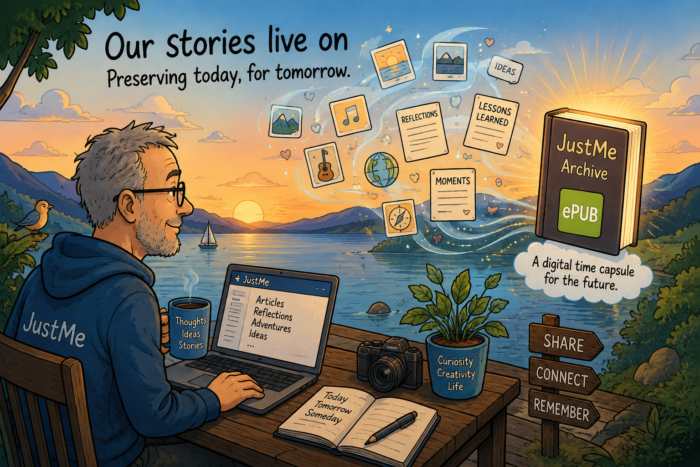
One idea that particularly appeals to me is creating a periodic ePub version of the content published on JustMe. Perhaps every month, every quarter or once a year, the latest articles could be collected into a digital book. An ePub is a simple but powerful format: it can be stored, copied, read on different devices and preserved much more easily than a constantly changing website.

Such a digital “JustMe Archive” would create a kind of time capsule. It would not only preserve the texts themselves, but also capture a specific moment in time. Reading old blog posts often reveals more than just the subject being discussed. It shows how people thought about technology, society and the world around them at that particular moment.

Of course, no digital archive is completely future-proof. Websites disappear, platforms change, domains expire and file formats become outdated. Preserving digital content requires some attention. But perhaps that is exactly the point: our digital memories need the same care that previous generations gave to photo albums, letters and physical documents.

The question of digital legacy is becoming increasingly relevant. Many of us have created a substantial online presence, whether through blogs, social media, photographs or other digital projects. Yet we rarely think about what happens to these creations when we are no longer around.

A blog is more than a collection of web pages. It is a record of curiosity, creativity and human experience. Creating regular ePub archives could be a simple way to ensure that this record does not disappear.After all, perhaps the most valuable thing we leave behind is not the technology we used to create our stories, but the stories themselves.

Can AI Really Learn to Write Like Me?

For anyone who writes regularly, the rise of generative AI creates an interesting dilemma. AI can produce text remarkably quickly. It can summarize information, suggest headlines, rewrite paragraphs and help turn a collection of ideas into something coherent. But can it actually learn to write like you? That is the question behind a fascinating experiment by Feather in his blog post Teaching AI My Writing Voice. Instead of simply asking AI to generate more content, Feather tried to teach it something much harder to define: his personal writing voice.

More than copying a style

At first sight, teaching AI how you write might sound relatively straightforward. Give it a collection of previous articles and tell it to imitate them. But a writing voice is much more complicated than that. It is partly vocabulary and sentence structure, of course. Some writers prefer short sentences. Others use long paragraphs in which ideas gradually develop. Some use humour frequently, while others prefer a more factual approach. Some start almost every article with an anecdote or personal observation.

But voice is also about the choices behind the words. What do you consider important? What deserves an explanation? When do you add context? Which subjects do you approach critically? And perhaps equally important: what kind of language would you never use?

That is what makes Feather’s experiment so interesting. He isn’t merely trying to make an AI reproduce the superficial characteristics of his writing. He wants to see whether it can understand the patterns behind it. As he explains in his original blog post, the process becomes an exercise in defining what actually makes his writing his own.

AI as an apprentice writer

One useful way of looking at this is to think of AI as an apprentice rather than an automatic content generator. Imagine working with a new editor who has never seen your work before. Initially, that person might make perfectly reasonable suggestions that nevertheless don’t sound like you.

Over time, however, an editor learns. They discover that you dislike certain expressions. They notice that you prefer examples over abstract explanations. They understand that you don’t want every article to end with a grand conclusion. Eventually, they start anticipating your preferences.

Something similar can happen when working with AI. The difference is that we need to make many of those preferences explicit. And that can be surprisingly difficult. We often know immediately when a piece of text doesn’t sound like us. Explaining why is much harder.

Your archive becomes valuable

There is another interesting aspect to Feather’s experiment: the value of an existing writing archive. Someone who has been blogging for years may have hundreds or even thousands of articles online. Together, those posts contain an enormous amount of information about that person’s interests, language, opinions and writing habits.

Until recently, that archive was primarily intended for human readers. AI changes that. A collection of old blog posts can also become reference material for a personal writing assistant. Instead of starting every conversation with an empty AI system and explaining your preferences again, the technology could potentially learn from years of previous work. For bloggers and other people who write frequently, that is an intriguing possibility.

But imitation isn’t identity

There is an obvious limitation. AI can recognise patterns in writing, but those patterns are ultimately the result of something the AI doesn’t possess: a life. A personal blog reflects conversations, travel, work, mistakes, discoveries, books, music, people and countless other experiences. Those experiences influence how someone writes.

An AI can learn that a writer frequently connects technology with everyday experiences. It can recognise that personal anecdotes often appear at the beginning of articles. It might even become remarkably good at reproducing that pattern. But it didn’t have those experiences. That distinction matters, particularly with personal publishing.

A different way of thinking about AI

Perhaps that is also why Feather’s experiment points towards a more interesting role for AI in writing. The discussion around generative AI often focuses on replacement: can AI write an article instead of a journalist, blogger, copywriter or author? But that may be the less interesting question.

A much more useful question is whether AI can become sufficiently familiar with an individual writer that it can help that person write better and more efficiently without removing the personality from the result. It could remember previous stories. It could point out that you wrote about a similar subject three years ago. It could suggest connections between ideas. It could produce a first draft that already resembles your normal writing instead of delivering the familiar, polished-but-generic AI prose. The writer would still decide what is worth saying.

Making AI more personal

That is ultimately what makes Feather’s experiment worth reading. It turns the usual AI-writing discussion around. Instead of asking how writers should adapt themselves to AI, the question becomes: how can we make AI adapt itself to the writer? That sounds like a subtle difference, but it is an important one. The most interesting future for AI-assisted writing may not be a world in which machines generate enormous quantities of anonymous content. It may be one in which our tools become increasingly familiar with the way we think, write and communicate.

Not an AI that writes for us, in other words. But one that gradually learns how to write with us.

Why I Started Just Me

As a journalist, there are many subjects I write about professionally. Technology is an obvious one. So are cloud computing, data centers, cybersecurity, AI and industrial technology. But there are also many subjects that fascinate me personally and that do not always fit neatly into one of the websites, magazines or other platforms I write for.

That is one of the reasons I started Just Me. I wanted a place where I could simply write about the things I find interesting. And there are quite a few of those.

Technology, but not only technology

Technology will certainly be an important part of this blog. I have always been interested in new technologies and in the way they change the world around us. AI is an obvious example, but I am just as interested in developments around open source software, European technology and the growing discussion about digital sovereignty and autonomy.

I find it fascinating to look beyond the individual product or announcement and ask what a development actually means. Who controls the technology we use? Where is our data stored? How dependent have we become on a relatively small number of technology companies? And what alternatives are emerging?

Sustainability is another subject that regularly catches my attention. Particularly when it intersects with technology. Energy, data centers, renewable power, more efficient computing and smarter use of resources are all subjects I expect to return to regularly. European companies are actually at the forefront of developments like these.

Looking a little further away

I have been fascinated by spaceflight for as long as I can remember. And right now, space is becoming particularly interesting again. New launch companies, satellites, lunar missions, reusable rockets, space-based infrastructure and an increasingly important European space industry are creating an enormous number of stories worth following.

Space technology is also becoming much more closely connected to everyday life on Earth. Satellites help us understand climate change, monitor agriculture, improve communications and respond to natural disasters. At the same time, ideas that sounded highly futuristic only a few years ago are gradually becoming serious engineering projects. That makes space exactly the sort of subject I enjoy writing about.

Building my own knowledge system

Another recurring subject will probably be personal knowledge management. I read a lot. I save articles. I make notes. I bookmark websites. I collect ideas for future stories. And, like many people who do this, I am constantly trying to find better ways to organise all that information. That has led me to tools and concepts such as digital notebooks, knowledge graphs, linked notes, RSS, self-hosted services and personal archives. At the moment, I’m using Capacities.io for this. It has quite a steep learning curve, but I have to say: it really works for me!

I am interested not only in the tools themselves, but also in the underlying question: how do you build a useful collection of knowledge without simply creating an enormous digital pile that you never look at again?

Music, blogs and the small internet

Then there is music. I enjoy streaming, but I also like CDs, vinyl records and even cassettes. There is something interesting about the different ways in which we discover, collect and listen to music. Sometimes the technology becomes part of the experience: the crackle of vinyl, the mechanical sound of a cassette player or simply rediscovering an album you had forgotten about for decades.

The same is true for blogs on the indyweb. I have become increasingly interested in personal websites and independent blogs. In a web dominated by enormous platforms, algorithms and automatically generated content, there is something refreshing about discovering a small website maintained by one person who simply writes about things he or she cares about. One post might be about software development. The next about a record they bought. Another about a walk through a city, a book they read or a strange technical problem they finally managed to solve.

There does not always have to be a content strategy behind it. Sometimes somebody simply has something interesting to say.

A place for curiosity

That is roughly what I want Just Me to be. Not a tightly defined technology publication. Not a personal diary either. And certainly not a blog that tries to stay within one carefully selected niche. It is simply a place where I can follow my curiosity. One day that may result in a story about European technology or digital autonomy. Another day it might be about a spacecraft, a useful open source application, a personal knowledge management experiment, an interesting blog I discovered or an old record that suddenly sounds wonderful again.

There is plenty to write about. And that is exactly what I intend to do.