Maybe a Text Editor Is All I Need

I still like text editors. That may sound slightly old-fashioned in a world where every piece of software seems to be turning into a platform, a workspace or — inevitably — something with AI built into it. But I use text editors almost every day. Sublime Text is one of my favourites, and I also regularly use KWrite on Linux.

The reason is remarkably simple: they are fast. Click the icon and the editor is there. Start typing. Save the file. Done. There are no hundreds of functions waiting somewhere in a ribbon or menu that I will probably never use. No elaborate document management. No templates I don’t need. Just an empty screen and text.

And that makes me wonder occasionally: why would I buy something like Microsoft 365 if most of what I want to do is simply write text?

Of course, there are plenty of situations where a full office suite makes sense. But for much of my own writing, a text editor is perfectly adequate. Often it is actually nicer to work with because there is so little getting in the way. I also use text editors for the projects where I build my own small tools. Configuration files, Markdown, bits of code, notes, documentation — a simple editor is often exactly what I need.

And when I do need more traditional office functionality, I already have alternatives. I have been using Nextcloud (https://nextcloud.com/) for years, and it comes with office functionality as well. For spreadsheets I use LibreOffice (https://www.libreoffice.org/), which — if I am being fair — already contains far more functions than I will probably ever need.

So perhaps there is a small experiment worth trying here. Before subscribing to yet another large software package, open the text editor that is already available on your operating system. KWrite(https://apps.kde.org/kwrite/), Kate (https://kate-editor.org/), Notepad (on Windows), TextEdit (on Mac), or whatever happens to be there. Then use it for a few days. Just write.

You may discover that software doesn’t always become more useful when it gets more features. Sometimes the nice thing about a tool is precisely that it doesn’t try to do everything.

Taiwan’s Hunt for China’s Hidden Chip Operations

Taiwan has spent the past six years hunting something that sounds almost like the plot of a spy novel: Chinese technology companies allegedly operating undercover on the island. According to an article over at Rest of World (see here: https://restofworld.org/2026/taiwan-china-chip-investigations), Taiwanese authorities have investigated 166 cases involving companies suspected of hiding their Chinese connections while recruiting engineers and gaining access to semiconductor expertise.

One engineer thought he was working for an American chip company, only to discover that most of his colleagues and meetings were actually based in Nanjing, China. And this matters because Taiwan is not just another place where chips are made: it produces more than 60% of the world’s semiconductors and around 90% of the most advanced ones.

The methods described in the article are often surprisingly simple, with Chinese companies allegedly using local firms, foreign registrations or other structures to disguise who is really behind an operation. Sometimes the goal appears to be access to technology, but very often it is also about something equally valuable: the people who know how to design and manufacture advanced chips.

Salaries offered by Chinese companies have reportedly reached several times normal Taiwanese levels, which makes talent poaching a very real problem rather than an abstract geopolitical discussion. Taiwan has responded with raids, tougher legislation and increasingly strict protection of technologies it considers essential to national security.

What makes the story particularly interesting is that the dividing line between normal international recruitment, illegal investment and actual industrial espionage can sometimes be surprisingly difficult to define. It is another reminder that the global chip battle is not only being fought with new fabs, export controls and billions in subsidies, but also quietly in offices, job interviews and employment contracts.

What if a News Article is No Longer the Right Unit for Journalism?

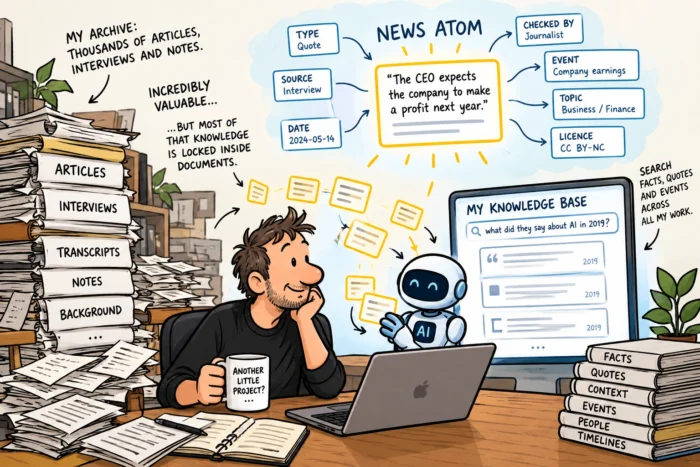
I write a lot. News stories, interviews, background articles, notes, transcripts. After doing that for many years, you end up with quite an archive.And I increasingly think that an archive like that is both incredibly valuable and remarkably stupid.

It is valuable because it contains thousands upon thousands of facts, quotes, explanations, names, dates and connections. But it is stupid because most of that knowledge is locked inside documents. If I want to find one particular fact from an interview I did five years ago, I first have to find the article or transcript that contains it.

I already made a start

Actually, this is not an entirely new problem for me. I recently built “Archive Lens” (https://editorial-ideas.com/posts/2026-09-27-1005-archivelens-a-personal-searchable-wiki-for-every), a small tool that turns my collection of articles and other texts into a personal searchable wiki. It was my first attempt to make all those years of writing more useful than simply storing thousands of files in folders. Archive Lens helps me find information inside those documents.

And that is also why I found a paper by Sannuta Raghu, written during her fellowship at the Reuters Institute, particularly interesting. Her idea is called the “News Atom” (see here: https://.reutersinstitute.politics.ox.ac.uk/introducing-news-atom-metadata-blueprint-journalism-age-ai). News Atoms take that idea an interesting step further: instead of making documents easier to search, why not break their contents down into individual, structured pieces of knowledge?

Breaking journalism into atoms

The basic idea is surprisingly simple. Instead of seeing an article as the smallest useful piece of journalism, Raghu suggests going down to roughly the level of a sentence.

That sentence then becomes a small data object of its own, surrounded by metadata. Where did this information come from? Who checked it? When was it published? Is it a fact, a quote, context or perhaps an expectation? What event does it relate to? And under what licence may it be reused?

Raghu compares this to EXIF metadata in photography. A photograph is not just a collection of pixels. It can also carry information about when and where it was taken, which camera was used and who owns it. Why shouldn’t journalistic information have something similar?

AI changes the problem

This becomes especially interesting with AI. When an AI system processes an article, much of the journalistic context can disappear. There is quite a difference between “the company made a profit” and “the CEO expects the company to make a profit next year”. Humans immediately understand that difference. Once information gets chopped up, copied, summarised and moved between systems, those distinctions can become much harder to preserve.

The News Atom tries to make that context machine-readable. And this is where I started thinking about my own archive again.

My archive could become something else

Imagine taking years of articles and turning them into thousands of these small knowledge objects. Suddenly, my archive would no longer just be a directory containing lots of old documents. It could become a database.

Search for a company and retrieve not only articles, but individual facts, quotes and events. Ask what somebody said about a particular technology three years ago. Connect a new development to something that happened in 2019. Or use a local LLM with RAG to search only information that I have collected, written or verified myself.

The paper even describes the possibility of building an “event bank”, connecting individual News Atoms from articles, podcasts and videos to the same real-world event. Now that is an interesting idea.

Perhaps I need another little project

The News Atom isn’t a finished standard. Raghu explicitly presents it as a blueprint and suggests starting with small experiments, such as CMS plugins or automatically “atomising” existing articles. Which is probably just as well.

Because while reading the paper, I caught myself wondering how difficult it would be to take a few thousand of my own articles, let a local LLM break them into News Atoms, store them in a small database and put a search interface on top.

Would it be possible for publishers to sell News Atoms? For example, could they be sold in bulk to AI companies, or bundled into smaller, more focused “News Atom Sets” for specific target audiences? And could individual journalists do the same? Perhaps they could make their News Atoms available directly through an API, or distribute them through an event bank like the one Raghu suggests?

I really shouldn’t start another project. But I probably will.

Sorry, No Sloptober for Me, I Have Things to Build

I like challenges like Blaugust. They can be a surprisingly effective way to change a habit or learn something new. Don’t drink alcohol for a month. Write a blog post every day for a month. Make one cartoon every day. Walk 10,000 steps. Learn something new every morning. Whatever you choose, limiting a challenge to a month makes it manageable. You know there is an end date, and perhaps some of the new habits will stick.

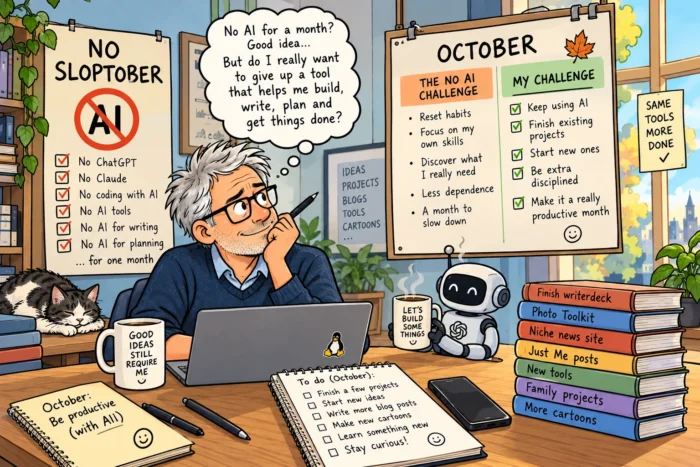
And then I came across No Sloptober (https://no-sloptober.com/). This is the challenge: “This October we challenge you to abstain from LLM based tools entirely.”

The idea made me think. Because not using AI for a month is a rather different kind of challenge. AI has become genuinely useful for many of the things I do. Writing, coding, brainstorming, making plans, researching ideas, building small tools and getting projects started. Stop using AI for a month and I would certainly discover which things I can still do perfectly well without it.

And perhaps that is exactly the point. There is a legitimate concern here. If AI becomes very good at writing a piece of code, do we slowly lose some of our own coding skills? If it can turn a few notes into a nicely structured text, do our writing skills deteriorate? If we ask AI to make our plans, are we getting worse at planning? It is the old use-it-or-lose-it question, only this time applied to an increasingly large collection of skills.

At the same time, deliberately giving up a useful tool also feels slightly strange to me. I wouldn’t stop using a text editor for a month to improve my writing. I wouldn’t stop using a calculator to improve my arithmetic. AI can save enormous amounts of time and, used sensibly, can make it possible to try things that otherwise might remain ideas on a to-do list.

So: No Sloptober or not? I think that is a very personal choice. If you feel AI has taken over too much of your work, a month without it could be a fascinating experiment. You might discover which skills you have been outsourcing without really noticing.

I have already made my choice. I will continue using AI in October. But I have promised myself something else: I am going to be much more disciplined about finishing several of my own projects and starting a few new ones.

So in a way, I am joining the challenge. Just not quite according to the rules. Instead of making October a month without AI, I want to see how much I can actually build and finish in one month with AI. My October challenge is therefore pretty simple: make it an unusually productive month.

There Is More to the Internet Than the Web

For most people, the internet is the web. You open Firefox, Chrome or whatever browser you happen to use, type something into the address bar and off you go. Websites, Google, YouTube, online shops, news sites, blogs, social media. It all happens in a browser, so internet and web have gradually become almost interchangeable words.

Except that they aren’t. The web is just one way of using the internet.

Once you start looking beyond the browser, you quickly discover that there are surprisingly many other ways to use this enormous network we call the internet. Some are decades old. Others are relatively new. Some have tiny communities compared with the web. But that doesn’t make them less interesting.

Before everything became a website

Take Gopher. Gopher dates from 1991, just before the World Wide Web really started taking off. Instead of websites filled with graphics, menus, advertisements, JavaScript and cookie pop-ups, Gopher mainly gives you simple hierarchical menus containing documents and links. It is very basic. Which, oddly enough, is precisely what makes it interesting today.

There is still an active Gopher world — usually called Gopherspace — containing personal pages, archives, articles, software and all sorts of other material. You obviously don’t browse those with Chrome. You use a Gopher client. I use Lagrange (https://github.com/skyjake/lagrange), for example, which makes exploring Gopher remarkably easy. Lagrange is actually useful for another alternative protocol as well, but more about that in a moment.

If you want to start exploring Gopher, Gopherproject at https://gopherproject.org/ is a useful starting point.

After using Gopher for a while, something interesting happens. You stop wondering where all the graphics are. You simply start reading.

And then there is Gemini

Perhaps even more interesting is that people aren’t only keeping old internet technologies alive. They are also inventing new ones. One of my favourites is Gemini. Gemini appeared around 2019 and deliberately takes a very different approach from the modern web. A Gemini page — usually called a capsule rather than a website — is mostly text.

The protocol and its document format are intentionally simple and leave very little room for the sort of complexity that has accumulated around the modern web. That means no giant JavaScript frameworks. No advertising networks following you around. No autoplaying video appearing halfway through an article. No newsletter window suddenly covering the text you were trying to read. Mostly, you get the information you came for.

Gemini is tiny compared with the web, obviously. But there are thousands of Gemini capsules containing hundreds of thousands of pages. That is more than enough to spend quite a bit of time exploring. You can use Lagrange to do that. It supports both Gemini and Gopher, which makes it a convenient way to start exploring this alternative internet without having to install several different clients.

But the numbers aren’t really the interesting part. What makes Gemini fascinating is the idea behind it. What if we looked at what the web has become and started again? And what if, this time, we deliberately kept things simple?

Spartan goes even further

There is also Spartan, a newer and even simpler protocol inspired by ideas from Gemini, Gopher and HTTP. The philosophy is much the same: keep the protocol extremely small and avoid gradually rebuilding all the complexity of the modern web.

Again, Spartan isn’t going to replace the web. That isn’t really the point. For decades, computing has largely worked from the assumption that more powerful computers and faster networks give us room to build increasingly complicated software. Faster processor? Great. Let’s add more code. More memory? Excellent. Let’s use that too. Faster internet connection? Even better. Now the page can download fifty additional scripts before showing me an article consisting of 800 words.

Projects such as Gemini and Spartan ask almost the opposite question. What could we build if we deliberately didn’t use all that power?

Or build a different network altogether

And then things get even more interesting. Because Gopher and Gemini still operate using much of the internet infrastructure we already know. But you can go further. There are projects that rethink parts of the network itself. Take Yggdrasil (https://yggdrasilnetwork.org/). Yggdrasil is an experimental decentralised routing system that can create end-to-end encrypted IPv6 networks. Computers running Yggdrasil can connect directly or establish peerings across existing IP networks. The result is something that sits on top of, or can operate alongside, the conventional internet infrastructure. That already feels very different from simply opening another website.

Then there is I2P or the Invisible Internet Project (https://www.i2p.net/). I2P is a decentralised, privacy-oriented network designed to allow people to communicate and publish information while making it much harder to determine where that information originates or where it is going.

There is also Hyphanet (https://www.hyphanet.org/), formerly known as Freenet. It is built around decentralised data storage and publishing and can be used to publish and access information without depending on a conventional central web server.

And those aren’t the only experiments. GNUnet (https://www.gnunet.org/en/) describes itself as a network protocol stack for building secure, distributed and privacy-preserving applications. Lokinet (https://lokinet.org/) takes yet another approach and uses onion routing across a decentralised network. It can be used both to reach the conventional internet and to access services that exist inside Lokinet itself.

None of these projects are simply “another browser”. They are attempts to rethink how computers find each other, communicate, exchange information and establish trust. And that makes them much more interesting than their relatively small user numbers might suggest.

Then there is Reticulum

An intriguing project is Reticulum (https://reticulum.network/). Reticulum is not really one alternative internet. It is a networking stack that can be used to build networks. And those networks don’t necessarily need a conventional internet connection. Reticulum can work across Wi-Fi and normal internet connections, but also across technologies such as LoRa and packet radio. It is specifically designed to keep working with very high latency and extremely limited bandwidth.

That changes the way you think about what a network actually needs. We have become accustomed to connections measured in hundreds of megabits or even gigabits per second. Modern websites are built with those connections in mind. Reticulum starts somewhere completely different. What if the connection is terrible? What if there isn’t a conventional internet connection at all? What if two computers can exchange only tiny amounts of data? Can we still build a useful network?

You don’t even need to leave the web

There is another possibility, though. Keep using the web, but strip it down. Install a text browser such as Lynx (https://lynx.invisible-island.net/), w3m (https://w3m.sourceforge.net/) or ELinks (http://www.elinks.or.cz/) and suddenly the web looks very different. Websites that depend heavily on JavaScript may become unusable, but plenty of other sites work surprisingly well. And you quickly discover something else: a lot of what we consider essential parts of a website aren’t actually necessary if all you want to do is read the information.

There are even search engines designed around this simpler web. Marginalia Search (https://marginalia-search.com/) deliberately prioritises non-commercial content and tries to help you discover websites you probably wouldn’t find through a conventional search engine. Then there is Wiby (https://www.wiby.me/), a search engine aimed at what it calls the classic web: simpler websites that feel much more like the web of years ago.

That means you don’t necessarily have to abandon the web to get away from the modern web. You can simply use a different corner of it.

Don’t forget RSS

Then there is RSS. RSS is a particularly good example because it is something many people used years ago and then somehow forgot about. I still use it every day to follow huge numbers of blogs and websites. It facilitates actually one of my (many) news feeds. Instead of repeatedly visiting twenty websites to see whether they have published something new, you subscribe to their feeds. Your RSS reader checks for updates. New article? It appears in your reader. No algorithm decides whether that article is interesting enough to show you. No social network inserts other content between the things you actually asked to follow. Use something like Feedly (https://feedly.com/) if you prefer a graphical interface. One of my favorite tools is Newsboat (https://newsboat.org/) that gives you access to RSS and Atom feeds using the terminal of your Linux laptop.

A completely different daily internet

Put a few of these tools together and something interesting starts to happen. Use Lagrange for Gemini and Gopher. Use Newsboat for blogs and news feeds. Use Lynx when you need the web. Perhaps experiment with Yggdrasil, I2P or Reticulum when you want to see what happens when people start questioning the architecture of the network itself. Suddenly, a surprisingly large part of your daily internet use can take place without a conventional graphical browser.

You could even do much of this on an old laptop running a very minimal Linux installation. Which, as regular readers of this blog can probably guess, sounds rather appealing to me.

It is not about replacing the web

None of this means I am going to stop using the web. Why would I? Just Me itself is a website. And there are countless things the modern web does exceptionally well that Gemini, Gopher or a terminal application couldn’t sensibly replace.

That isn’t the point. The important part is realising that the internet does not have to look like the web. It can be a Gopher menu. It can be a Gemini capsule. It can be an RSS feed displayed in a terminal. It can even be a plain-text document retrieved with curl. It can be an encrypted network running across Yggdrasil. It can be a decentralised service living inside I2P or Hyphanet. And it can even be a Reticulum network exchanging tiny amounts of data over LoRa.

Once you realise that, the internet suddenly becomes much bigger again. Not necessarily bigger in terms of the amount of information available. The web obviously wins that contest by several orders of magnitude. But bigger in terms of possibilities.

I Built My Own Wiki to Find My Own Words

Anyone who writes for a living collects text. Lots of it. Articles, drafts, interview notes, background pieces, half-finished ideas and that one paragraph you cut years ago because it didn’t quite fit. I have been doing this for quite a while, so you can imagine what my folders look like. Everything is there. Somewhere.

That is exactly the problem.

Finding things is the hard part

Saving text is easy. Finding it again a few months or years later is something else entirely. Especially when you are not looking for a document, but for something inside a document. A quote. A figure. A number. That one sentence somebody said during an interview which suddenly turns out to be relevant again.

You would expect the search function of your operating system to help. In theory it does. In practice, I usually end up staring at a list of file names, opening one document after another and thinking: I’m sure it was in here somewhere.

So I built something myself.

My own little wiki

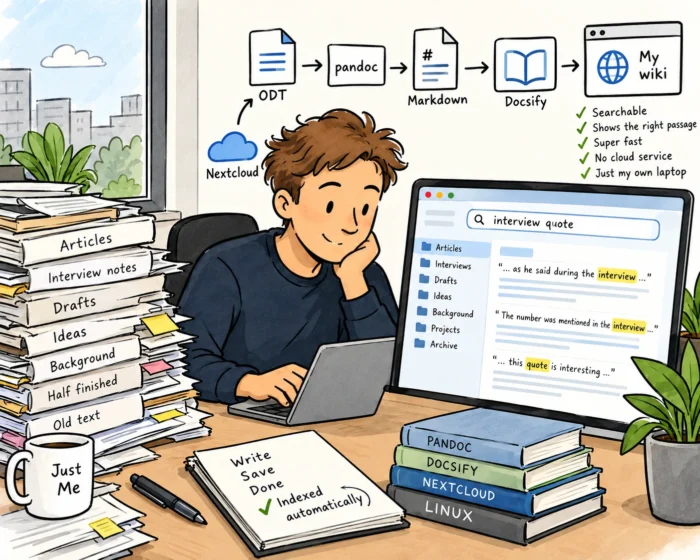
LibreOffice is my word processor, and it saves everything as ODT, the Open Document Format. All my texts end up in one place: my Nextcloud folder (https://nextcloud.com/), with its many subfolders. Every five minutes, a small script on my Linux laptop goes through that folder. Any new or changed ODT file is automatically converted to Markdown using Pandoc (https://pandoc.org/). The result is presented as a wiki using Docsify (https://docsify.js.org/#/), which runs in my own browser. No cloud service. No account. Just a page on my own laptop. Let’s call it what the broader trend calls it: local-first.

The wiki shows all my texts, grouped by folder, with the file name and the date. That date turns out to be surprisingly useful. At a glance, I can see whether something is fresh or not. And the whole thing is searchable. I type a word or part of a quote and the wiki immediately shows me where it appears. Not just which file, but the relevant passage. It is fast, too. Ridiculously fast, actually. Much faster than any operating system search I have ever used.

Small tools, big difference

The nice thing is that I don’t have to do anything. I write in LibreOffice, save my document in Nextcloud as usual, and a few minutes later it is simply there in my wiki. The original file stays exactly where it was. Nothing is moved or overwritten.

Is this a revolutionary piece of software? Of course not. It is a script, a converter and a free wiki tool glued together, built with a little help from Claude. But that is exactly what I like about it. It is yet another example of how small tools you build yourself can make a real difference to your own productivity. Not because they do everything, but because they do exactly the one thing you need.

As usual, this is n=1 research. But for me, it works.

What If an App Was Just a File?

I sometimes get the impression that we have already decided what software is supposed to look like. You download an app. Or, increasingly, you don’t download anything at all and simply open a website. You create an account, log in, store your data somewhere in the cloud and perhaps pay a monthly subscription.

That’s more or less how software works these days. And then something like Capsule (https://withcapsule.app/) comes along. The basic idea is wonderfully simple: What if an app was just a file?

I like that question. Especially because lately I have been experimenting quite a bit with building small tools myself. Not because I suddenly want to become a software developer. I don’t. But vibe coding has made it remarkably easy to turn a small idea into something that actually works.

My recently built Photo Toolkit is a good example. I regularly receive photos that are several megabytes in size, while for a website I often need something closer to 300 kB or less. So I built a little tool that watches my Downloads folder and automatically creates a smaller version whenever a new image appears. That’s it. It solves one very specific problem.

And that is increasingly how I look at software. Instead of searching for one enormous application containing 87 features of which I need three, why not build something small that does exactly what I need? Capsule takes that idea in an interesting direction.

The application is the file

A Capsule is a .capsule file containing the application itself, its interface and its data. The interface can be built using familiar web technologies such as HTML and CSS, while the data can be stored locally using SQLite. Everything travels together.

That means a Capsule behaves almost like a document. You can copy it. Put it on a USB drive. Back it up. Send it to somebody. Move it to another computer. But instead of opening a document and reading some text, you open a small application.

That distinction sounds trivial, but I think it is rather interesting. For decades we have been used to separating applications and documents. LibreOffice Writer is the application; the .odt file is the document. A photo editor is the application; the JPEG is the file. Capsule asks what happens if you bundle those concepts together. The data and the little application needed to work with that data simply become one thing.

This fits remarkably well with vibe coding

This is where things become particularly interesting for me. Vibe coding has changed the economics of tiny software projects. Previously, if I needed a very specific tool, I had roughly three choices. Find something that already exists, use a spreadsheet as a good-enough solution or convince somebody who can actually program to build it. Now there is another option. I can try building it myself.

I have been doing exactly that lately. Small tools, experiments and utilities. Some work surprisingly well. Others mainly teach me something. And that is fine too. But building the application is only part of the story. Suppose I build a little tool for keeping track of interesting websites for Just Me. Perhaps it contains the URL, some tags, a few notes and an indication of whether I have already written about the site.

Technically, building something like that isn’t particularly complicated anymore. But then come all the other questions. Where do I host it? Do I need a database? Do I need a server? How do I deploy updates? Do I need authentication? What if I want to give the tool to somebody else? Suddenly my tiny personal utility has become an IT project.

With the Capsule approach, the answer could simply be: here is the file. That is appealing.

Small software for small problems

There are plenty of things for which I don’t need a platform. A source tracker for an article. A little database of websites. A project log. A reading list. A collection of RSS feeds. A simple research tool. A small inventory. An interactive checklist. Or perhaps some weird little utility that only makes sense to me. Especially that last category is becoming interesting.

Traditional software has to make economic sense. If you are going to spend weeks or months developing an application, you need enough users to justify all that work. Vibe coding changes that calculation. If building something takes an afternoon rather than several weeks, an application with exactly one user can suddenly make perfect sense.

Capsule potentially removes another piece of friction by making distribution ridiculously simple. The application doesn’t necessarily have to become a service. It can simply remain a file. There is AI functionality around this idea as well. You can describe what you want to build and generate a Capsule containing the interface and database structure, and then continue changing it using prompts. That makes the idea even more interesting for people who don’t consider themselves developers.

And it can stay local

There is another aspect that fits rather nicely with the way I increasingly like to use computers. Capsules can work locally. The data lives in the file on your own machine. You don’t need cloud storage simply because somebody decided that every application in 2026 apparently needs cloud storage.

Obviously, sometimes you do want the cloud. If an entire team needs to work with the same information, a single local file probably isn’t going to be the answer. If you need real-time collaboration, central management or access from teni different devices, there are plenty of good reasons to use web applications and cloud services. But sometimes I just want a tool. No account. No login. No subscription. No server. Just open the thing and use it.

Capsule currently provides desktop software for macOS, Windows and Linux, with .deb, .rpm and AppImage packages available. Android and iOS versions are also planned.

It also feels strangely familiar

What I perhaps like most about Capsule is that the whole idea combines something very modern with something almost boringly old. The modern part is obvious: AI-assisted coding, HTML interfaces, SQLite and tiny custom applications created for very specific purposes. The old part is the file. And files are actually rather brilliant. We know what to do with them. You can copy a file. Rename it. Put it in a folder. Back it up. Put it on an external disk. Send it to somebody. Archive it for ten years.

More importantly, there is something very understandable about ownership when it comes to files. If the file is sitting on my laptop, I have it. That sounds ridiculously obvious, but compare it with many modern online services. Your information sits inside somebody else’s database and you are allowed to access it through their application. Usually that works perfectly well.Until it doesn’t.

More experiments, please

I don’t know whether Capsule will become successful. I don’t know whether .capsule files will become something we routinely exchange with each other. And I certainly don’t expect them to replace conventional applications, websites or SaaS platforms. That’s not really the interesting part anyway.

What I like is that somebody looked at the way we currently build and distribute software and asked whether there might be another way. There usually is. And combined with vibe coding, ideas like this could make personal software much more interesting. Not personal software in the sense of software that knows everything about you, but software that you create specifically for yourself.

RSS Is Quietly Making the Internet Better Again

I like RSS. Always have, Not exactly a revolutionary statement, I know. RSS has been around forever in Internet terms. It doesn’t have AI. It doesn’t have an algorithm. It doesn’t suggest influencers I might like. It doesn’t try to determine what will keep me engaged for another 17 minutes. It doesn’t even have a particularly exciting name. RSS does one thing, and it does that one thing remarkably well: it tells me when a website I am interested in has published something new. That’s it. And perhaps we should start appreciating that simplicity again.

We gave away an important decision

For years, we gradually moved away from personal websites and blogs towards large platforms. Facebook, Twitter/X, Instagram, LinkedIn and countless others became the places where people published things and, equally importantly, where other people discovered those things. That was convenient.

But somewhere along the way we also gave those platforms an interesting amount of power. They started deciding what we should see. You might follow 500 people, but that doesn’t mean you will see what those 500 people publish. An algorithm decides what appears in front of you. Something posted three minutes ago may never appear at all, while something from two days ago keeps returning because the platform thinks you might click on it. Or comment on it. Or become annoyed by it. All of which apparently counts as engagement.

RSS works completely differently. I decide.

My feed, based on my choices

Suppose I discover an interesting personal website about Linux. I add its RSS feed to my reader. Tomorrow the author publishes something. It appears in my reader. No algorithm has to approve it first. Nobody decides that another article is more relevant to me. There are no sponsored posts inserted between two articles. And there isn’t suddenly a video about something completely unrelated because an algorithm has discovered that people with roughly my interests tend to watch those videos.

There is something wonderfully straightforward about that. I subscribe. The author publishes. The article appears. And, perhaps more importantly, RSS creates a direct relationship between a website and its readers. The website publishes a feed. I subscribe to it. From that moment on, I don’t have to remember to visit the site every Tuesday afternoon to check whether something new has appeared. RSS does that for me.

Personal websites have always made RSS extremely useful

This becomes particularly interesting now that personal websites seem to be attracting more attention again. People are building their own little corners of the Internet. Blogs, homepages, collections of links, project pages, digital gardens, notes, experiments and wonderfully difficult-to-categorise websites. I like that development enormously. But there is an obvious problem. How do you keep track of all those sites?

I currently come across interesting websites all the time. Some publish several times a week. Others perhaps once every three months. I am certainly not going to maintain a bookmark folder containing hundreds of sites and manually visit all of them every morning. That would turn reading the Internet into a job. RSS solves exactly that problem. Your RSS reader effectively becomes your personally curated entrance to the Internet.

A smaller Internet might actually be better

There is another thing I like about RSS. It makes the Internet smaller. That probably sounds like a disadvantage. We have become accustomed to platforms that promise access to almost everything. Millions of posts. Billions of videos. An endless stream of new material. But I don’t need an endless stream. Nobody does. What I need is a reasonably manageable collection of people and websites that regularly publish things I find interesting. Maybe that’s 30 feeds. Maybe 100. It doesn’t really matter. What matters is that I selected them. And when one of those sites stops being interesting, I remove the feed. When I discover something new, I add it.

RSS is also good for writers

There is another side to this. If you run a personal website, please offer an RSS feed. Seriously. You don’t need to build a newsletter system. You don’t need to ask me for my email address. You don’t need a popup appearing after eight seconds asking whether I want to “join the community.” Just give me a feed. Most blogging systems can generate one automatically anyway. That feed gives people a very simple way to say: I would like to hear from you again.

No, RSS may not be perfect

Of course RSS has its issues. Discovering feeds isn’t always easy. Some websites hide the RSS link. Others provide only excerpts instead of complete articles. Some sites don’t offer RSS at all. And RSS readers themselves range from beautifully simple to interfaces that look suspiciously like somebody tried to rebuild an email client from 2004.

But those are relatively minor problems. The underlying idea is still excellent. In fact, I would argue that it makes more sense today than it did ten years ago. We have spent years complaining about algorithms, advertising, tracking, engagement optimisati on, walled gardens and platforms that continuously change the rules. Meanwhile, RSS has been sitting quietly in the corner, waiting to be appreciated again. I never stopped using it. And I never stopped loving it.

You can read more about RSS here: https://en.wikipedia.org/wiki/RSS

What if your notebook could be programmed?

Personal knowledge management is one of those subjects I keep coming back to. Regular readers of this blog will probably have noticed that by now. I have written about Capacities.io (https://capacities.io/), about screenshots as a surprisingly useful way of capturing information, about saving browser tabs as files and about all sorts of other ways to collect, organise and — hopefully — find information again.

So when I came across a presentation by Ivy Reese during the LocalFirst conference in Berlin (https://www.localfirstconf.com/) about a programmable notebook, it immediately caught my attention. Reese is a researcher at Ink & Switch (https://www.inkandswitch.com/), an independent research lab that spends a lot of time thinking about what computers and software could be, rather than simply creating another version of the applications we already have. One of the projects Reese discusses is called PlayBook, and its basic idea is fascinating: what if a digital notebook were programmable?

More than digital paper

We already have plenty of digital notebooks. There is certainly no shortage of applications in which we can type notes, draw things, paste images, create links and organise information. But most of these applications still work according to rules somebody else has invented. The developer decides what a page is, what a block can do, which buttons are available and how different objects behave.

We can usually configure these applications, sometimes quite extensively, but ultimately we are still working within somebody else’s model. PlayBook explores a different approach. Ink & Switch describes it as a digital notebook based around the idea of programmable ink. The ambition is to preserve much of what makes paper so useful — the freedom to scribble, sketch, write, draw arrows, move things around and think spatially — while adding something that paper obviously cannot provide: computation.

That combination is important. The idea isn’t simply to turn a notebook into a programming environment with a drawing function attached to it. Nor is it just handwriting recognition with some clever AI features added. The notebook itself becomes programmable.

Think of a spreadsheet

A useful comparison is the spreadsheet. A paper spreadsheet is simply a grid in which you can write numbers and calculate things yourself. A digital spreadsheet looks remarkably similar, but its cells can contain formulas. Change one value and other values automatically change with it. That relatively simple addition of programmability completely transforms what a spreadsheet can be used for.

Ink & Switch has been exploring a similar question for several years: what would happen if handwritten notes, drawings and other objects on a page could also be programmable? Earlier projects such as Inkbase, Crosscut and Inkling explored different aspects of that idea. PlayBook brings many of these experiments together in something that behaves much more like an actual notebook.

One of the interesting aspects of PlayBook is that it doesn’t start with traditional programming concepts. Instead, the researchers work with materials such as ink, paper, pins and beams. Each has its own behaviour — its own “physics”, as Ink & Switch calls it — and these materials can be combined to create more complex behaviour.

This means programming becomes part of working with the notebook itself. You might write something, draw something, connect objects or select part of a page and give it a certain behaviour. Something you do in one place can influence something somewhere else.

Earlier experiments from Ink & Switch show where this thinking comes from. In Inkbase, for example, the researchers experimented with a hand-drawn checkbox whose state could affect other objects on a page. Draw a checkmark in the box and something elsewhere could automatically change. Objects could also be selected or manipulated based on their position on a page. Suddenly the spatial organisation of your notes isn’t merely visual. It can become computational.

Programming without constantly writing code

That leads to what I think is one of the most interesting ideas in Reese’s presentation. Traditional programming requires us to adapt ourselves to the computer. We learn a programming language, understand its syntax, open an editor and write instructions in exactly the form the computer expects. That gives us enormous freedom, but it also creates a considerable barrier. Programmable Ink tries to turn that relationship around. What if computation could simply become another material you work with, alongside writing and drawing?

That also explains why pen and touch interaction are so important in PlayBook. The notebook is designed to retain some of the directness of working on paper. Ink & Switch deliberately tries to avoid filling the screen with conventional buttons, menus and toolbars. Instead, the researchers have experimented with gestures for drawing, selecting, moving and manipulating objects.

The technology behind this is interesting, but that isn’t really the main point. What interests me much more is what happens when you start using such a notebook for real work.

Building your own notebook

Ink & Switch has been using PlayBook internally for everyday note-taking, brainstorming, music composition, puzzle solving, collaborative whiteboarding, annotating PDFs and tutoring. That variety is important because it shows that the researchers are not trying to define one specific workflow.

And that immediately brings me back to personal knowledge management. Most PKM applications eventually force us to make choices about how we want to organise information. Should I use folders? Tags? Objects? Backlinks? Databases? Daily notes? Cards? Properties? A graph? We spend far too much time thinking about questions like these.

A programmable notebook potentially approaches the problem from a completely different direction. Instead of choosing a knowledge-management system, perhaps you could gradually build your own system while using it. You don’t necessarily have to sit down and write hundreds of lines of code before you can start taking notes. You begin with a page and add behaviour when you need it. Perhaps a handwritten task can actually behave like a task. Perhaps notes placed in a particular area automatically belong together. Maybe moving an object changes its status or category. A diagram might no longer simply be a picture of a system, but become a small model that you can actually manipulate.

A concrete PKM example

Imagine that I am researching a new article. During the day I collect a few web links, save several browser tabs, make a screenshot of an interesting graph, jot down something somebody told me and write a few thoughts of my own. This is exactly the sort of information that tends to end up scattered across different places.

In a programmable notebook, I could create an area on a page called “Sources”. Anything I drag into that area could automatically be treated as source material. A URL might display the title and publication date. A screenshot could remain visible while also keeping a reference to where it came from. A handwritten note could simply sit alongside them.

Next to it I could have an “Ideas” area. Moving a note from Sources to Ideas could change its role without requiring me to open a menu, select a property and choose a new value. Draw a line between an idea and three sources and those relationships could become actual connections rather than merely lines on a screen.

I could then create another area called “Used in article”. Drag a source there and the notebook could mark it as used. A small counter might tell me that I have collected 14 sources, used six and still have eight sitting there waiting to be examined. A checkbox next to an idea could make it disappear from my open research questions once I have dealt with it.

The important point is not that PlayBook necessarily offers exactly this workflow out of the box. In fact, that would almost defeat the purpose. The interesting idea is that I could define such behaviour myself because it happens to fit the way I research and write. Someone doing academic research could create something completely different. So could a software developer, student, historian or someone simply keeping track of books they want to read. At that point, the distinction between a “note”, an “interface” and a “program” starts to become rather blurry. And to be honest, I find that idea enormously interesting.

Maybe our software should adapt to us

There is another reason why this project appeals to me. We have become remarkably accustomed to adapting the way we work to software. Install an application and there is usually a “correct” way of using it. We learn its menus, its structure and eventually even its terminology. If the developer decides everything should be organised into projects, we create projects. If the application believes in folders, we use folders. If it believes in tags, we start tagging. Then we spend hours watching YouTube videos explaining the perfect workflow for that particular application.

Perhaps we have this the wrong way round. Maybe the software should adapt to us. That is what makes the programmable notebook idea so interesting to me. Instead of developers trying to predict every possible way in which people might want to work, they could provide the building blocks and allow users to create their own behaviour.

There is an interesting connection with AI here as well. Almost every piece of software seems to be acquiring an AI assistant at the moment. There is nothing wrong with that. I use AI all the time. But programmable software suggests another direction as well: don’t just give me an assistant that tries to figure out what I want. Give me better building blocks so I can decide for myself what my tools should do.

Another PKM rabbit hole

Is PlayBook going to replace Capacities, Obsidian, Notion, a folder full of Markdown files or whatever else people use for personal knowledge management? That isn’t really the point. PlayBook is a research project rather than simply another note-taking application promising to become your ultimate “second brain”.

What makes it interesting is the idea behind it. For years we have been trying to digitise the notebook. We replaced paper with screens, pages with documents and handwritten notes with text blocks. We added search, tags, links, databases and, more recently, AI. Perhaps the next interesting step isn’t another feature. Perhaps it is giving people the ability to decide for themselves how their notebook should behave.

Here is a video of the presentation Ivy Reese gave in Berlin.

My Laptop Is Running a Tiny Newsroom

A little while ago, I wrote a post about something that has been on my mind for some time: there seems to be remarkably little product development in journalism. We produce articles. Newsletters. Podcasts. Videos. And then more articles. At journalism school, we train students, ask them to come up with ideas for new journalistic projects and products, and then… do nothing with those ideas. That sounds like a waste to me.

You can find my blog post here: https://justme.website/content-creation/journalism-has-plenty-of-ideas-so-why-do-we-keep-throwing-them-away/.

Considering how dramatically technology has changed the way information can be collected, processed and distributed, you would expect a lot more experimentation with the product itself. New ways of finding information. New ways of combining it. New ways of presenting it. New products for audiences that are currently too small or too specialised to be interesting to traditional publishers.

So instead of just writing about the lack of product development, I decided to try something myself. My idea: automated news websites for very small niches.

A tiny automated newsroom

The concept is fairly simple. Take a very specific subject. Find as many relevant sources as you can about this subject. Have an open source/open weight LLM periodically check those sources, select interesting developments, retrieve the relevant information and have the LLM write a short news article about each development or topic. Add a link to the original source and automatically publish the article on a website. Depending on how small the niche is you can repeat this whole process once of twice per day. The result is effectively a tiny automated newsroom covering a specific subject that might otherwise never have its own publication.

I am deliberately talking about tiny niches here. Not “technology”. Not “AI”. Not “cybersecurity”. Those are enormous subjects. Think of one particular technology, protocol, type of hardware, industrial technology or some other narrow field. A subject where interesting things are happening, but where there probably isn’t enough money or readership to justify having a journalist watching it every day. Creating an automated system changes the economics of something like that dramatically.

Two hours later…

So I decided to build one. This is where things became interesting. Using vibe coding, it took me roughly two hours to get my first proof of concept working. Not finished, obviously. Not polished. And certainly not something I would immediately turn into a commercial product. But it worked. The system could find material, determine whether it was relevant, create a short news item, include the original source and publish the result on a website.

There were surprisingly few technical problems. That doesn’t mean everything worked perfectly from the start. But most technical issues could be solved fairly quickly. Which is perhaps lesson number one from this experiment. The technology isn’t necessarily the difficult part anymore.

First decide what you are actually building

Before I started vibe coding, I first had to decide what I wanted. That sounds obvious, but I think it is becoming increasingly important. You can tell an AI coding tool to “build me an automated news website” and it will probably produce something. But there is a fairly good chance that the result isn’t what you had in mind. So I wrote a product requirements document. Nothing fancy. What should the system do? Where should it look for information? What constitutes an interesting article? What should the resulting news item contain? What shouldn’t it contain? What happens after an item has been created? How should it be published? But also: how do you prevent the LLM from picking the same topic twice when it found that topic on two different websites? Or in two or three different languages?

So yes, you have to think these things through. Because if you forget to mention something, there is a good chance it won’t magically appear as a feature in your product. And that is where the interesting shift is taking place: the coding is becoming the easy part. The thinking isn’t. You still have to decide what you are actually trying to build, what it should do, what it shouldn’t do, and why anyone would find it useful. Vibe coding can turn those decisions into working software remarkably quickly, but it can’t make those decisions for you.

Once the first version appears on your screen, it becomes much easier to think. You immediately notice what is missing, what is unnecessary or overkill, and what seemed like a good idea on paper but doesn’t make much sense in an actual product. So coding and thinking increasingly form a loop: think, build, look, rethink, rebuild.

Finding the right information

In other words, building the website itself wasn’t the part that required most of the tinkering. Finding good source material was. If you use sources that are too broad, your carefully selected niche quickly fills up with vaguely related news. If your selection criteria are too restrictive, nothing much happens at all. And if your sources aren’t particularly good, neither is your automated publication.

So I spent quite a bit of time playing with sources and selection rules. Again, this wasn’t particularly difficult from a technical perspective. It simply required experimentation. What exactly is relevant? What should be ignored? Which sources consistently produce useful information? How narrow should the niche actually be?

Those aren’t really programming questions. They are editorial and product questions.

The internet isn’t English

One thing I knew from the start was that I didn’t want to build yet another system that mainly watches American and English-language websites. There is far too much interesting information being published elsewhere. So my source lists contain English sources, but also German, French, Swedish, Norwegian, Finnish, Danish, Italian, Spanish and sources from several other language areas.

A German engineering company may publish something interesting in German. A Finnish developer might explain a new project in Finnish. A French research organisation may announce something in French. An Italian technology website might cover something that never makes it into the American tech press. Why ignore all of that?

Especially in Europe, where we are constantly talking about digital autonomy and becoming less dependent on technology from the United States and China, I think this matters. If we want to understand what is happening technologically in Europe, perhaps we should become better at looking around Europe ourselves.

The nice thing is that an LLM doesn’t particularly care. German in, English out. Finnish in, Spanish out. Italian in, Greek out. You decide. My automated website happens to publish in English because that makes the information accessible to the widest possible audience. But that’s simply my choice. The exact same system could publish in Dutch. Or Portuguese. Or maybe several languages at once. But the sources I use are very diverse and come in many different languages.

For now, it all runs on my laptop

Perhaps one of the more surprising lessons from this experiment is how little hardware you actually need to get started. My automated newsroom, including the open source/open weight LLM, currently runs on a fairly bread-and-butter laptop. No powerful discrete GPU, just integrated graphics. As a result, most of the heavy lifting is done by the CPU. And you can hear when the LLM gets to work. Ask it to process a batch of material and the fan quickly picks up speed. Sometimes considerably. My laptop really has to work for its living here.

And yes, that means that everything is rather slow as a result, but for now that is perfectly fine. I am experimenting, not trying to run a real-time news service. More importantly, it shows that you apparently don’t need a huge server park or a rack full of GPUs to start experimenting with ideas like this. A perfectly ordinary laptop can run a local LLM, support the software around it and give you enough computing power to find out whether an idea actually works.

There is also a practical reason why I keep everything local for now. I want to be able to tinker with the system wherever I happen to be. If I am travelling and suddenly think of something I want to change, I can open my laptop, make the change and see what happens. I don’t need access to my home server or a cloud environment.

Once I am reasonably happy with everything, I will move the system to a small server I already have available. That machine has considerably more capacity, so things should become faster. But for now, I rather like the fact that my tiny automated newsroom lives entirely inside an ordinary laptop.

Technology isn’t the point

And that, I think, is the most important lesson I got from this experiment. We tend to spend an enormous amount of time talking about technology. Which model did you use? Which programming language? Which database? Where does it run? Which framework?

Those questions aren’t irrelevant. But increasingly they aren’t the most interesting questions either. The technology usually works. And if a tool we need doesn’t exist, well, we can build it. Especially with vibe coding, the distance between “I wish there was a little tool that did X” and actually having that little tool that does X has become remarkably small.

That changes things. Because the bottleneck starts moving somewhere else: What are we actually going to build?

Coming up with good ideas is much harder. Thinking them through. Combining existing ideas in new ways. Turning a vague thought into something that people might actually find interesting or useful. That is product development. And that was exactly what I was trying to get at in my earlier post about journalism and the student teams working on new ideas (https://justme.website/content-creation/journalism-has-plenty-of-ideas-so-why-do-we-keep-throwing-them-away/).

Ideas don’t have to be finished

An idea for a new product doesn’t have to be completely worked out before you show it to somebody. In fact, perhaps it shouldn’t be. Someone comes up with an idea. It is interesting, but not quite right yet. Someone else looks at it and thinks: Hmm. I wouldn’t do it like that, but what if… And suddenly there is another idea. A third person sees that version and takes it in yet another direction.

That is how ideas develop. Not necessarily because one person sits behind a desk for six months and eventually emerges with The Perfect Product, but because people see things, react to them, combine them with their own experiences and take them somewhere else. Which is why I think we should be much more willing to show unfinished experiments.

Is this the final product?

So is my automated niche website the answer to product development in journalism? Of course not. It probably isn’t even the final version of this particular idea. Maybe automated niche websites turn out to be genuinely useful. Maybe they need a human editor. Maybe they work better as newsletters. Maybe they should become research tools rather than public websites. Maybe they should combine automated news with original reporting. Maybe somebody comes up with a completely different application after seeing mine.

I don’t know. And that’s fine. Because I am going to put everything I have built on Just Me. The idea. The setup. What worked. What didn’t. The tools I created. And, where possible, the code and other bits needed to build something similar. Then other people can have a look. And if somebody thinks, Hey, that’s interesting. I could use this to build…, please do. Take what I made and build something better on top of it. Or turn it into something completely different.

Naturally, I would love to hear about it if you do. Not because I want to control what happens to the idea, but because I am genuinely curious to see where somebody else might take it.

In my previous post (https://justme.website/content-creation/journalism-has-plenty-of-ideas-so-why-do-we-keep-throwing-them-away/)), I discussed project ideas developed by student teams. I suggested that it might be interesting to collect all those ideas and publish them on a website. No, not every one of those ideas will turn into a company. Not every idea will even be particularly good. Some will be unfinished. Some won’t quite fit the problem they were originally intended to solve. And some may have obvious flaws.

So what? Put them online. Let people see them. It might inspire people to start building something themselves or take the idea in an entirely new direction. The important thing isn’t that every idea succeeds. The important thing is that we keep producing ideas, showing them, discussing them, building them and allowing other people to take them further.