What If the Web Became Simple Again?

Dave Winer recently wrote about something he calls the Web of Markdown (http://scripting.com/2026/10/06/005559.html). The basic idea is almost absurdly simple: instead of wrapping everything we publish online in increasingly complicated websites, why not publish documents directly as Markdown files? A title, some text, a few links, perhaps an image. That’s basically it.

I like ideas like this, especially when they sound slightly too simple at first. Quite often that means they are questioning assumptions we have stopped noticing. And when it comes to the web, we have accumulated quite a few of those assumptions over the years.

Take this blog post. I write some text, put it into WordPress, and from that moment the text becomes part of a much larger technical system. WordPress stores it in a database, a theme turns it into a page, CSS decides how that page looks, plugins add functionality, other plugins add security, and still more software handles caching, analytics, image optimisation and search engine optimisation. All of that may be useful, but it is still remarkable how much machinery is needed simply to put a few hundred words on the internet.

That is probably why Winer’s idea appeals to me. The early web was largely about documents and links between documents. Today, the document itself often feels like just one small component inside a much bigger software environment. The Web of Markdown turns that around and asks a much simpler question: what if the document becomes the main thing again?

The file itself becomes the publication

Imagine that I write this post as a file called web-of-markdown.md and put that file online. In this model, the file is not just source material that eventually gets turned into a website. It is the publication itself.

A Markdown reader could display it nicely. Another application could show it in dark mode or with larger text. An RSS reader could discover it. A search tool could index it. An AI system could analyse it. I could download it, archive it locally or move it to another server. The same document could be used by all of those tools without changing the original content.

That is a subtle but important difference. The article is no longer trapped inside one presentation layer. The Markdown file contains the actual content, while different applications decide how that content should be displayed or processed.

Content first, presentation second

I find that very appealing, partly because it fits with something I keep returning to: content should not be too tightly coupled to the software that happens to present it today. On the current web, publishers decide almost everything about how readers experience an article. Fonts, colours, spacing, menus, sidebars, pop-ups and page width are all part of the website. That can be useful, but it also means the content and the presentation are tightly connected.

Markdown changes that relationship. The publisher mainly defines structure: this is a heading, this is a paragraph, this is a link and this is a quotation. The reading application can then decide what those elements should look like.

At first, that may sound like a step backwards. We have spent decades making websites prettier and more sophisticated, after all. But perhaps separating content from presentation again would actually be useful. The same Markdown document could appear on a normal website, in an RSS reader, in an e-book, in a local knowledge base or in some future reading application that does not exist yet. The content itself would remain the same. Only the way we look at it would change.

And yes, I immediately thought about RSS

Anyone who has read this blog for a while will not be surprised by that. I never stopped using RSS, and the Web of Markdown feels like a very natural companion to it. RSS essentially says: here are my new articles. Markdown could then say: and here is the article itself. That combination is almost beautifully simple. A feed handles discovery, Markdown carries the content and hyperlinks connect everything together.

A reader could see a new item in a feed, retrieve the Markdown file and display it. Or store it. Or index it. Or pass it to another application. The traditional website would still be useful, but it would no longer be the only meaningful way to access the content.

That distinction matters. The website becomes one possible interface, rather than the place where the content fundamentally lives.

Then I started thinking about AI

This is where the idea becomes much more interesting in 2026 than it might have been ten years ago. Large language models are very good at working with clean, structured text, while modern websites are often anything but clean. A typical web page may contain menus, advertisements, cookie notices, recommendation boxes, tracking elements and all kinds of other material that has little to do with the actual article. Software first has to work out which part matters before it can process the text itself.

Markdown is almost the opposite. The content is already there in a simple and predictable structure. Headings are obvious, links are obvious, quotes are obvious and the text is easy to extract.

Suppose a few hundred technology publications offered their articles as Markdown. A local script could monitor their RSS feeds, retrieve new Markdown files and store them on my own machine. A local LLM could then analyse that collection without having to fight its way through hundreds of different website layouts.

I could ask what has been written about European cloud sovereignty over the past two weeks, or which developments around private 5G appeared in German, French, Korean and Italian sources. The system would not necessarily need Google or a conventional web search at all. It would simply work with the documents I had chosen to collect. For me, that is where the idea stops being merely interesting and starts feeling practical.

It also connects to the tools I have been building

Over the past few months, I have been experimenting quite a bit with what I call automated editorial products, multilingual news monitoring and local LLMs. One thing I keep running into is that finding and retrieving information is often harder than processing it.

The web was designed for people to visit pages. It was not necessarily designed for software to reliably extract the actual article from every site. Every website is different. Some provide useful RSS feeds, others provide only partial feeds, some depend heavily on JavaScript and others wrap the actual story in large amounts of unrelated material.

At the same time, I have also been experimenting with much simpler ways of publishing journalistic websites. I have been playing with tools such as Hugo (https://gohugo.io/) and Docsify (https://docsify.js.org/#/), precisely because they allow me to strip away much of the usual CMS complexity. Instead of constantly thinking in terms of databases, plugins and admin dashboards, I can work much closer to the actual text files themselves.

That may seem like a technical detail, but for me it is really about changing the publishing model. With Hugo, Markdown files can become the source for a complete site. With Docsify, a collection of Markdown documents can effectively become the site itself. In both cases, the content remains much more visible and portable than when everything disappears into a CMS database.

So when I read about the Web of Markdown, it immediately clicked for me. It did not feel like some abstract or theoretical idea at all, because in a way I am already experimenting with parts of it myself. I am trying to see how far you can simplify an editorial or journalistic website before you start losing something important, and so far I increasingly find that you can remove quite a lot.

Now imagine a world where publications simply say: here is the feed, and here is the Markdown. That would make building independent news-monitoring tools much easier. It would also make those tools less dependent on large search engines and other intermediaries.

Your own little web

That part interests me a lot. Because then my local-first preference comes into play. Suppose I follow 500 publications and automatically store their Markdown articles locally. Over time I would build my own searchable information collection. Not Google’s index. Mine.

I could run normal full-text search across it, add embeddings, use a local LLM, organise documents by subject, country, language or source, and keep an archive of material I consider useful. If I wanted to move everything to another computer, I could simply copy the files. No complicated export process would be required. No proprietary format would stand in the way. I would not have to wonder whether some service would still exist five years from now. Just files.

I have written before that I increasingly like software that leaves me with something boring when the software itself disappears. Plain files are excellent at being boring, and Markdown files are particularly good at it.

The website becomes one possible view

None of this means I suddenly want websites to disappear. I like websites. I run websites. And Markdown obviously cannot replace everything we do online. Shops, web applications, interactive visualisations and elaborate multimedia experiences need more than plain text files. That is fine. The interesting part is not that Markdown should replace the web, but that the website may no longer have to be the primary version of every piece of content.

Imagine writing an article once as Markdown. That same file could be used to generate the website version, appear in an RSS reader, become part of an e-book, feed a local archive or be processed by an AI system. The website then becomes one presentation of the content rather than the content itself.

That may sound like a small architectural difference, but it changes the relationship between content and platform quite fundamentally. Instead of publishing into WordPress, Drupal or whatever system comes next, you publish a document. The CMS merely decides how one audience sees it.

It feels almost like the old web

What I like most about the Web of Markdown is that it does not actually feel very futuristic. In some ways, it feels old. A document has an address. The document contains links to other documents. Readers follow those links. People publish things and other people read them. Software helps with navigation and discovery. That was more or less the basic idea of the early web before we surrounded every article with platforms, algorithms, analytics and increasingly complex software stacks.

Of course, a Markdown web would not remain simple forever. Spam would appear. Search engines would index it. AI-generated rubbish would probably flood parts of it. People would invent extensions, standards and frameworks, and eventually someone would undoubtedly find a way to make Markdown complicated too. That is what we do. Still, the underlying principle remains attractive.

Maybe the document should matter again

For years we have treated the website as the basic unit of online publishing. Perhaps that assumption deserves another look. Maybe the fundamental unit should simply be the document: something I can create in any text editor, store anywhere, move between systems and keep independently of the software that happens to display it today. A document that humans can read and machines can process. A document that does not care which CMS I use. A document that may still be perfectly usable twenty years from now. And preferably one that I actually own.

The funny thing is that none of this requires some revolutionary new technology. Markdown already exists. RSS already exists. URLs already exist. Hyperlinks already exist. And tools like Hugo and Docsify already show that publishing on top of plain text files is not some nostalgic fantasy. It can work today. Perhaps we do not need to invent the next web. Perhaps we only need to remove a few layers from the one we already have.
Kids Will Always Find Another Way to Talk

A few years ago, French media reported on a rather clever trick being used by schoolchildren. Like in many European countries, French schools were trying to reduce smartphone use during lessons. Social media could be blocked, phones could be put away and teachers could keep an eye on what was happening on school computers.

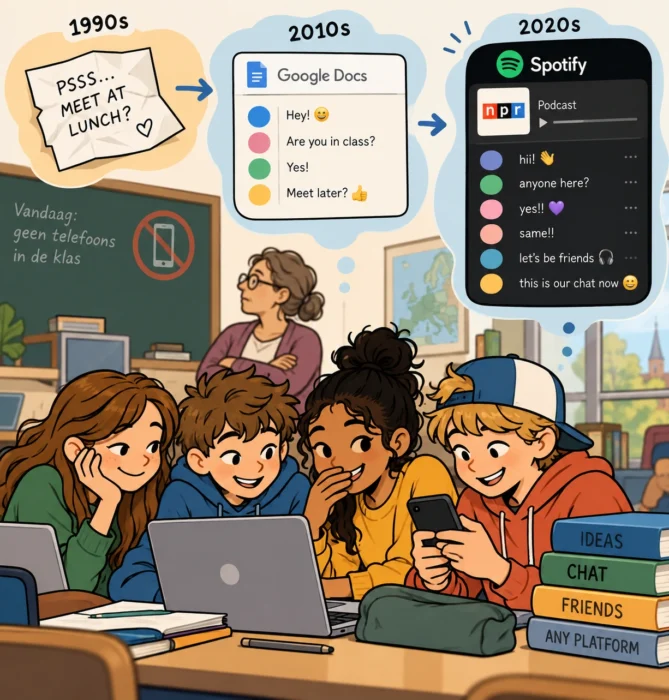
But there was one application that was rather difficult to ban. Google Docs. After all, students were supposed to use it for schoolwork. So some of them discovered that a shared Google document could quite easily become something else entirely. Instead of writing an assignment together, they could all type into the same document and use it as a chatroom. See here for more: https://www.kidssearch.com/what-parents-should-know-about-kids-using-google-docs-to-chat.php

From the outside, everything looked perfectly respectable. A group of students was working in Google Docs. Inside the document, however, the digital equivalent of passing notes underneath the desk was taking place. Sometimes they would even type their messages in white text on a white background — nobody would notice.

I remembered that French story when I came across a wonderful recent episode of “This American Life” (https://www.thisamericanlife.org/897/transcript). Because apparently the next generation has discovered another communications platform hiding in plain sight. Spotify.

They thought they were bots

The story starts at American public radio network NPR, where Dave Blanchard of the programme “Wild Card” noticed something strange happening in the comments underneath podcasts on Spotify. There were short messages, emojis, strange usernames and conversations that seemed to make very little sense. Bots, perhaps?

Except they weren’t bots. A younger NPR colleague, Hannah Chinn, looked at the comments and recognised something that reminded her of her own younger years online. Children sometimes use digital tools in ways that adults simply don’t recognise.

And that was exactly what was happening. The commenters were mostly kids. Some had parents who did not allow them to use regular social media. Spotify, however, was allowed. So they turned Spotify into social media. They created public playlists with names such as “Let’s chat here” or “New Chat“. They then added a podcast episode with very few existing comments and used the comment section underneath that episode as a group chat.

The fact that they ended up underneath NPR podcasts wasn’t entirely accidental either. Those podcasts didn’t attract enormous numbers of comments. In other words: plenty of empty space.

A very European discussion

I particularly like the story because it connects with a discussion that has become very familiar in Europe. What do we do with children, smartphones and social media? France has been experimenting with restrictions on phones in schools for years. Other European countries have moved in similar directions. In the Netherlands, for example, smartphones, tablets and smartwatches have effectively disappeared from many classrooms unless they are needed for educational purposes.

There are good reasons for these policies. Schools want fewer distractions and more direct interaction between students. Parents meanwhile increasingly worry about the amount of time children spend on social platforms.

But the French Google Docs story illustrates something that is easily forgotten in these discussions. You can remove the smartphone without removing the desire to communicate. And children can be remarkably creative in finding alternatives. If WhatsApp isn’t available but Google Docs is, then Google Docs can become WhatsApp. If Instagram or TikTok isn’t allowed but Spotify is, Spotify can become a social network. The technology changes. The behaviour really doesn’t.

From paper notes to Google Docs

Perhaps that is why this all feels so familiar. Long before smartphones existed, children were already running their own unofficial communication networks inside classrooms. We called them paper notes. You wrote something on a small piece of paper, folded it and somehow tried to get it three desks further without the teacher noticing. It was slow, unreliable and had terrible security. An intercepted note could become public knowledge remarkably quickly. But it worked. A shared Google Doc is essentially a much more sophisticated version of the same system. And the Spotify construction takes it another step further.

We see applications, they see possibilities

What fascinates me is not so much that children are circumventing rules. Parents and schools will have to decide for themselves what they think about that. It is the creativity involved. Adults tend to categorise technology according to its intended purpose. Google Docs is for writing documents. Spotify is for listening to music and podcasts. A podcast comment section is for discussing a podcast.

But those categories only exist because somebody designed the product that way and told us what it was for. Children don’t necessarily care. If five people can type simultaneously in a shared document, then technically that document is also a chatroom. If a Spotify feature allows people to find each other and leave messages, then apparently it can become a primitive social network.

There is a nice generational element in the This American Life story as well. The people at NPR obviously aren’t digitally illiterate. They work in digital media every day. Yet they initially couldn’t recognise what was happening. The messages didn’t fit their mental model of how people use Spotify, so they looked like bot activity.

A younger colleague recognised the pattern. And even that person partly understood it because of their own childhood experience of repurposing online tools. The interesting thing is that these digital generation gaps are becoming remarkably short. You don’t necessarily need a parent and a teenager anymore. Ten years can already be enough for two people to have grown up with very different versions of the internet.

The most human part of technology

We spend a lot of time discussing what technology does to children. And understandably so. We talk about screen time, social media, algorithms, addictive design and smartphones in schools. Europe in particular is increasingly asking questions about how much access children should have to these systems and what responsibilities schools, parents, platforms and governments have.

But stories like these provide a nice counterpoint. Occasionally we should also look at what children do with technology. They explore it. They combine features. They find loopholes. And sometimes they discover an entirely different product hidden inside an existing one. A French schoolchild sees Google Docs and discovers a chatroom. An American teenager sees Spotify and discovers a social network.

And somewhere in a European classroom today, I suspect children are already using some perfectly innocent piece of educational software in a way that its developers never imagined. We will probably discover how in a few years. By which time the children will have moved on to something else.

Sometimes the Best Stories Are About 15.000 Old VHS Tapes

I came across this wonderful story on Gizmodo (https://gizmodo.com/15000-vhs-tapes-and-counting-meet-the-guys-preserving-the-weirdest-parts-of-the-analog-era-2000816383) about two guys who have collected more than 15,000 VHS tapes. And yes, the VHS tapes are interesting. But that is not really why I liked the article so much. I liked it because it is such a good example of storytelling.

Nick Prueher and Joe Pickett have spent decades collecting strange VHS tapes. Not Hollywood movies or famous television programmes, but the stuff that normally disappears: training videos, exercise tapes, promotional videos, dating videos, instructional tapes and all kinds of productions made for very small audiences. They use material from it for the Found Footage Festival, a live comedy show they have been running for more than two decades. At the same time, they are slowly digitising their collection because, obviously, VHS tapes don’t last forever.

That in itself is already a nice story. But what makes the Gizmodo article work for me is that it doesn’t stop there. The story starts with something incredibly small. In 1991, Prueher was working at McDonald’s when he discovered a rather strange training video intended for janitors. He showed it to his friend Joe Pickett. The two started looking for more weird tapes in thrift stores, showing them to friends and providing their own commentary. A small and maybe even silly discovery eventually turned into a collection of thousands of tapes and a project that has lasted for decades.

I love stories like this. There is no huge announcement. No billion-dollar acquisition. No new AI model accompanied by another set of impressive benchmarks. No CEO explaining how his company is going to transform the world. Just two people, an old videotape and a fascination with something most other people would probably throw away.

There is obviously a technology angle to the story as well. VHS was important because video production gradually became accessible to many more people. You didn’t need to be a television station or Hollywood studio anymore. Small companies, organisations and individuals could make videos themselves. And they did. Lots of them. Some were professional, many were not. Today, that lack of polish is actually part of what makes the material interesting. These tapes capture a period in which people were experimenting with relatively affordable video technology without thinking that somebody might watch the result 30 or 40 years later.

But again, the technology isn’t really the story. The people are. Behind every one of those tapes is somebody who decided that a video needed to be made. Who made that strange instruction video? Why? Who appeared in it? Who watched it? And what happened to those people afterwards? Prueher and Pickett sometimes actually try to find the people appearing in their tapes. A forgotten VHS recording then suddenly becomes the starting point for another story.

Perhaps that is what I like most about articles like this. They remind me that journalism doesn’t always have to start with something that immediately appears important. Sometimes it can simply start with a question: What on earth is this? And then you keep asking questions. Who made it? Why did they make it? Who was it intended for? Why has somebody kept it for 35 years? What does it tell us about that period? Where are the people involved now? Before you know it, a story about somebody collecting old VHS tapes has become a story about technology, popular culture, preservation, creativity and ordinary people. That is quite a lot to get out of a dusty videotape.

There is another interesting aspect to the story. We are quite good at preserving things we already consider important. Famous films, books, newspapers, photographs, television programmes and official documents end up in archives, libraries and museums. Everyday culture is much easier to lose. A corporate training tape from 1987 probably wasn’t considered culturally important in 1987. Neither was an obscure exercise video or a homemade instructional tape aimed at a tiny group of people. Decades later, however, these things can tell us something about how people lived, worked, communicated and experimented with technology.

That makes a collection of 15,000 seemingly unimportant VHS tapes something else as well: an accidental archive. Material that nobody originally intended to preserve has survived because two people happened to find it interesting enough not to throw away. And now they are digitising it because the physical medium itself is slowly deteriorating.

For me, however, the biggest lesson from the Gizmodo article is still about storytelling. You could write an article about VHS. You could explain the technology, when it appeared, how it competed with Betamax, how the market developed and how DVDs eventually took over. Perfectly useful information.

Or you can find two people who have collected 15,000 strange VHS tapes and have spent decades watching them. Suddenly you have characters. You have history. You have strange discoveries. You have humour. You have a mission. And, perhaps most importantly, you have a reason to keep reading. That is why I enjoy these kinds of articles so much. They demonstrate something that is easy to forget when so much of the information we encounter every day comes in the form of press releases, research reports, corporate announcements and carefully prepared statements. Good stories don’t necessarily start with important subjects. Sometimes they simply start with two guys and 15,000 old VHS tapes.

Two New Journalism Ideas a Day, Courtesy of a Small Local LLM

I have been experimenting quite a bit lately with small tools, websites and AI projects. Not because I am trying to build the next big platform, but mostly because I enjoy finding out what is possible when you combine relatively simple technology with an idea.

One of those experiments is my little automated newsroom. I wrote about it earlier in “My laptop is running a tiny newsroom” (https://justme.website/content-creation/my-laptop-is-running-a-tiny-newsroom/). The basic idea is fairly straightforward. I built a setup that can create and maintain small, highly specialised news websites automatically. An open-source/open-weight LLM monitors a collection of sources about a particular niche subject. And I deliberately don’t limit those sources to English. They can be websites in Dutch, German, French, Swedish, Norwegian, Finnish, Italian or whatever language happens to be useful for that particular subject. The model decides which stories are new and relevant, writes a short news item based on a prompt I created, adds a link to the original source and publishes the result on a website.

At the moment, that newsroom is still very much a … well … internal operation. With “internal” meaning: it lives on my laptop. And yes, that includes the LLM. There are things I still want to improve, but as a proof of concept it works. I expect to be able to publish the first of these niche websites in a few weeks. So stay tuned.

Journalism could use more ideas

And once something like that works, an obvious question appears: what else could I do with this approach? I keep coming back to the world of journalism. There is certainly no shortage of journalism. But I think there is plenty of room for new ideas about how we do journalism. New tools. New services. New editorial products. New ways of presenting information. Small experiments that may never become businesses but could still turn into something useful. So I wondered whether I could use roughly the same LLM-plus-website approach to create a continuous stream of ideas for new journalistic products.

Once again, with a little vibe coding, building the first version wasn’t particularly difficult. I gave the LLM a fairly detailed description of what I wanted to achieve. In other words: my version of a product requirements document. I want ideas for new products, tools and services related to journalism and editorial work. For every idea, I want a short description explaining what it is and why it could be useful. And I want two of those ideas published every day. There was one additional requirement: I wanted to be able to add my own ideas as well. The result is Editorial-Ideas.com (https://editorial-ideas.com/).

This time, no WordPress

As with many of my proof-of-concept projects, the whole thing runs automatically. This time I didn’t use WordPress for the website itself. I decided to use a static site generator called Hugo (https://gohugo.io/). I will probably write another post about static site generators and Hugo at some point, because that turned out to be an interesting subject in itself.

Hugo runs on my little Slimbook Zero server (https://slimbook.com/en/zero), which I have mentioned here on Just Me before. It isn’t an enormously powerful server. Quite the opposite. But that is exactly why I like it. It has become the foundation for quite a few of my experiments.

Both the LLM and Hugo run locally on that machine. The LLM creates the ideas and content. Hugo turns that content into the actual website. A script then uploads the generated site via FTP to an external hosting provider. And that’s basically it.

Twice a day, the machine goes to work and a new idea appears on the website. I can also join the process myself. If I come across an interesting idea somewhere, or think of something myself, I can simply create a Markdown file and add it to the stream of ideas. So although the website is largely automated, I am not locked out of my own newsroom. Which seems useful.

But which LLM?

One part of this project turned out to be particularly interesting: choosing the LLM. Which model do you use for something like this? How large should it be? What can my little server actually handle? Is Llama better than Qwen for this? Would a Mistral model produce better ideas? How do I run these models locally? And how small can I go before the quality becomes noticeably worse?

Figuring that out was actually a significant part of the fun. I tried different models and sizes. And the conclusion was perhaps less exciting than I expected. For this particular project, it doesn’t matter that much. Mistral doesn’t magically write much better ideas than Qwen. Llama doesn’t suddenly transform the project either. There are differences between models, obviously, but they turned out to be much less important for this use case than choosing an appropriately sized model and giving it good instructions.

And “appropriately sized” in my case means relatively small. The model I eventually settled on is literally only a few gigabytes. That is partly dictated by the hardware. My little server has limits. A local LLM, even a relatively small one, can still make it work pretty hard. But here is the important part: I don’t care. The model only needs to do this twice a day. If generating an idea, writing the text and rebuilding the website takes a little longer, nothing happens. Nobody is sitting in front of Editorial-Ideas.com with a stopwatch waiting for the next idea to appear. There is absolutely no reason for this particular application to be lightning fast.

Maybe the small model is the right model

For me, that was another confirmation of something I have believed for some time: choose the LLM that fits the project. That sounds obvious, but the AI world has a strange fascination with the latest and greatest. Bigger models. More parameters. Bigger servers. More GPUs. More everything. And yes, putting an enormous model on a ridiculously powerful machine or cluster of machines looks impressive. But does your use case actually need it?

For this PoC, the answer is obviously no. A small local model running twice a day is perfectly capable of doing the job I need it to do. Using something dramatically bigger would mostly mean spending more money and consuming more computing resources without necessarily producing a significantly more useful website. For homelabs and small experiments in a business setting, that is important. You do not need to buy a ridiculously expensive new Mac Mini. Existing or older hardware will often work perfectly well.

I think the same considerations apply to professional AI projects within companies and government organisations. Start with the use case. What exactly are you trying to achieve? How good does the output need to be? How fast does it need to be? What hardware do you already have? What are your privacy or data requirements? I mean, we want Privacy by Design! And then choose a model. The latest and greatest isn’t automatically the best choice. Sometimes a model of a few gigabytes quietly running on a small server is all you need.

Anyway, here it is

The result of all this tinkering is Editorial-Ideas.com (https://editorial-ideas.com/). There are still a few small things I want to change. There probably always will be. That is part of running these kinds of projects. But the basic idea works. Twice a day, a new idea appears for a journalistic tool, service or product. Have a look. Maybe there is an idea there that makes you think: Hmm, I could do something with that. Maybe there isn’t. That’s fine too. But if you do find something interesting and decide to build on it, I hope it turns into something successful. More importantly, I hope it turns into something that is fun to work on. And if you actually start working on one of the ideas, do let me know. I would genuinely like to hear what happened to it.

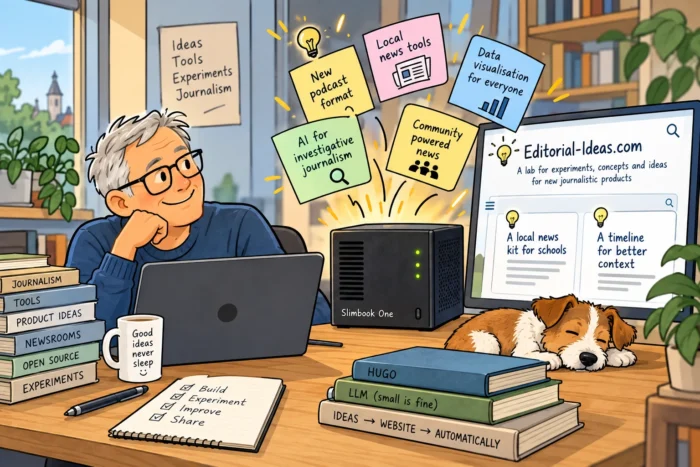
Oh, and by the way: if you check the filename of the cartoon (editorial-ideas.png-shrunk.webp), you’ll notice the word “shrunk” in there. That’s because I’m still using my fully automated service to resize images in my Downloads directory. And that’s the beauty of automation: once it works, you can simply forget about it. It quietly does its job in the background without you having to think about it. You can read about this here: https://justme.website/content-creation/my-downloads-folder-now-resizes-photos-for-me/.

Maybe a Text Editor Is All I Need

I still like text editors. That may sound slightly old-fashioned in a world where every piece of software seems to be turning into a platform, a workspace or — inevitably — something with AI built into it. But I use text editors almost every day. Sublime Text is one of my favourites, and I also regularly use KWrite on Linux.

The reason is remarkably simple: they are fast. Click the icon and the editor is there. Start typing. Save the file. Done. There are no hundreds of functions waiting somewhere in a ribbon or menu that I will probably never use. No elaborate document management. No templates I don’t need. Just an empty screen and text.

And that makes me wonder occasionally: why would I buy something like Microsoft 365 if most of what I want to do is simply write text?

Of course, there are plenty of situations where a full office suite makes sense. But for much of my own writing, a text editor is perfectly adequate. Often it is actually nicer to work with because there is so little getting in the way. I also use text editors for the projects where I build my own small tools. Configuration files, Markdown, bits of code, notes, documentation — a simple editor is often exactly what I need.

And when I do need more traditional office functionality, I already have alternatives. I have been using Nextcloud (https://nextcloud.com/) for years, and it comes with office functionality as well. For spreadsheets I use LibreOffice (https://www.libreoffice.org/), which — if I am being fair — already contains far more functions than I will probably ever need.

So perhaps there is a small experiment worth trying here. Before subscribing to yet another large software package, open the text editor that is already available on your operating system. KWrite(https://apps.kde.org/kwrite/), Kate (https://kate-editor.org/), Notepad (on Windows), TextEdit (on Mac), or whatever happens to be there. Then use it for a few days. Just write.

You may discover that software doesn’t always become more useful when it gets more features. Sometimes the nice thing about a tool is precisely that it doesn’t try to do everything.

What if a News Article is No Longer the Right Unit for Journalism?

I write a lot. News stories, interviews, background articles, notes, transcripts. After doing that for many years, you end up with quite an archive.And I increasingly think that an archive like that is both incredibly valuable and remarkably stupid.

It is valuable because it contains thousands upon thousands of facts, quotes, explanations, names, dates and connections. But it is stupid because most of that knowledge is locked inside documents. If I want to find one particular fact from an interview I did five years ago, I first have to find the article or transcript that contains it.

I already made a start

Actually, this is not an entirely new problem for me. I recently built “Archive Lens” (https://editorial-ideas.com/posts/2026-09-27-1005-archivelens-a-personal-searchable-wiki-for-every), a small tool that turns my collection of articles and other texts into a personal searchable wiki. It was my first attempt to make all those years of writing more useful than simply storing thousands of files in folders. Archive Lens helps me find information inside those documents.

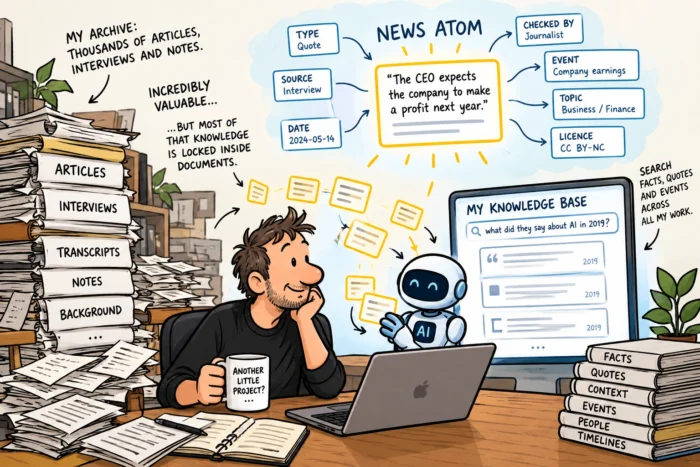
And that is also why I found a paper by Sannuta Raghu, written during her fellowship at the Reuters Institute, particularly interesting. Her idea is called the “News Atom” (see here: https://.reutersinstitute.politics.ox.ac.uk/introducing-news-atom-metadata-blueprint-journalism-age-ai). News Atoms take that idea an interesting step further: instead of making documents easier to search, why not break their contents down into individual, structured pieces of knowledge?

Breaking journalism into atoms

The basic idea is surprisingly simple. Instead of seeing an article as the smallest useful piece of journalism, Raghu suggests going down to roughly the level of a sentence.

That sentence then becomes a small data object of its own, surrounded by metadata. Where did this information come from? Who checked it? When was it published? Is it a fact, a quote, context or perhaps an expectation? What event does it relate to? And under what licence may it be reused?

Raghu compares this to EXIF metadata in photography. A photograph is not just a collection of pixels. It can also carry information about when and where it was taken, which camera was used and who owns it. Why shouldn’t journalistic information have something similar?

AI changes the problem

This becomes especially interesting with AI. When an AI system processes an article, much of the journalistic context can disappear. There is quite a difference between “the company made a profit” and “the CEO expects the company to make a profit next year”. Humans immediately understand that difference. Once information gets chopped up, copied, summarised and moved between systems, those distinctions can become much harder to preserve.

The News Atom tries to make that context machine-readable. And this is where I started thinking about my own archive again.

My archive could become something else

Imagine taking years of articles and turning them into thousands of these small knowledge objects. Suddenly, my archive would no longer just be a directory containing lots of old documents. It could become a database.

Search for a company and retrieve not only articles, but individual facts, quotes and events. Ask what somebody said about a particular technology three years ago. Connect a new development to something that happened in 2019. Or use a local LLM with RAG to search only information that I have collected, written or verified myself.

The paper even describes the possibility of building an “event bank”, connecting individual News Atoms from articles, podcasts and videos to the same real-world event. Now that is an interesting idea.

Perhaps I need another little project

The News Atom isn’t a finished standard. Raghu explicitly presents it as a blueprint and suggests starting with small experiments, such as CMS plugins or automatically “atomising” existing articles. Which is probably just as well.

Because while reading the paper, I caught myself wondering how difficult it would be to take a few thousand of my own articles, let a local LLM break them into News Atoms, store them in a small database and put a search interface on top.

Would it be possible for publishers to sell News Atoms? For example, could they be sold in bulk to AI companies, or bundled into smaller, more focused “News Atom Sets” for specific target audiences? And could individual journalists do the same? Perhaps they could make their News Atoms available directly through an API, or distribute them through an event bank like the one Raghu suggests?

I really shouldn’t start another project. But I probably will.

Sorry, No Sloptober for Me, I Have Things to Build

I like challenges like Blaugust. They can be a surprisingly effective way to change a habit or learn something new. Don’t drink alcohol for a month. Write a blog post every day for a month. Make one cartoon every day. Walk 10,000 steps. Learn something new every morning. Whatever you choose, limiting a challenge to a month makes it manageable. You know there is an end date, and perhaps some of the new habits will stick.

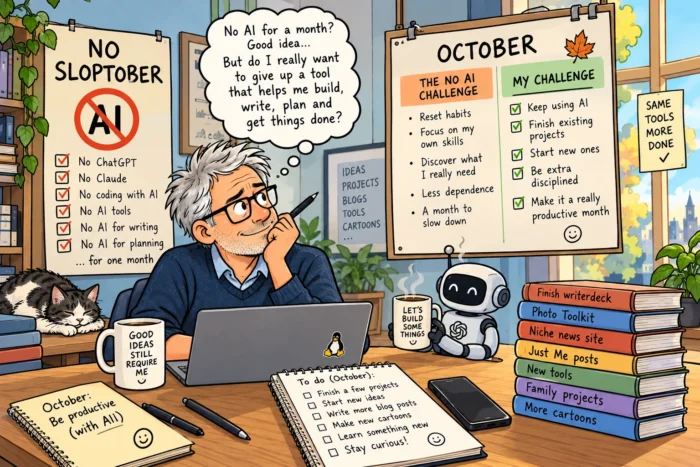
And then I came across No Sloptober (https://no-sloptober.com/). This is the challenge: “This October we challenge you to abstain from LLM based tools entirely.”

The idea made me think. Because not using AI for a month is a rather different kind of challenge. AI has become genuinely useful for many of the things I do. Writing, coding, brainstorming, making plans, researching ideas, building small tools and getting projects started. Stop using AI for a month and I would certainly discover which things I can still do perfectly well without it.

And perhaps that is exactly the point. There is a legitimate concern here. If AI becomes very good at writing a piece of code, do we slowly lose some of our own coding skills? If it can turn a few notes into a nicely structured text, do our writing skills deteriorate? If we ask AI to make our plans, are we getting worse at planning? It is the old use-it-or-lose-it question, only this time applied to an increasingly large collection of skills.

At the same time, deliberately giving up a useful tool also feels slightly strange to me. I wouldn’t stop using a text editor for a month to improve my writing. I wouldn’t stop using a calculator to improve my arithmetic. AI can save enormous amounts of time and, used sensibly, can make it possible to try things that otherwise might remain ideas on a to-do list.

So: No Sloptober or not? I think that is a very personal choice. If you feel AI has taken over too much of your work, a month without it could be a fascinating experiment. You might discover which skills you have been outsourcing without really noticing.

I have already made my choice. I will continue using AI in October. But I have promised myself something else: I am going to be much more disciplined about finishing several of my own projects and starting a few new ones.

So in a way, I am joining the challenge. Just not quite according to the rules. Instead of making October a month without AI, I want to see how much I can actually build and finish in one month with AI. My October challenge is therefore pretty simple: make it an unusually productive month.

I Built My Own Wiki to Find My Own Words

Anyone who writes for a living collects text. Lots of it. Articles, drafts, interview notes, background pieces, half-finished ideas and that one paragraph you cut years ago because it didn’t quite fit. I have been doing this for quite a while, so you can imagine what my folders look like. Everything is there. Somewhere.

That is exactly the problem.

Finding things is the hard part

Saving text is easy. Finding it again a few months or years later is something else entirely. Especially when you are not looking for a document, but for something inside a document. A quote. A figure. A number. That one sentence somebody said during an interview which suddenly turns out to be relevant again.

You would expect the search function of your operating system to help. In theory it does. In practice, I usually end up staring at a list of file names, opening one document after another and thinking: I’m sure it was in here somewhere.

So I built something myself.

My own little wiki

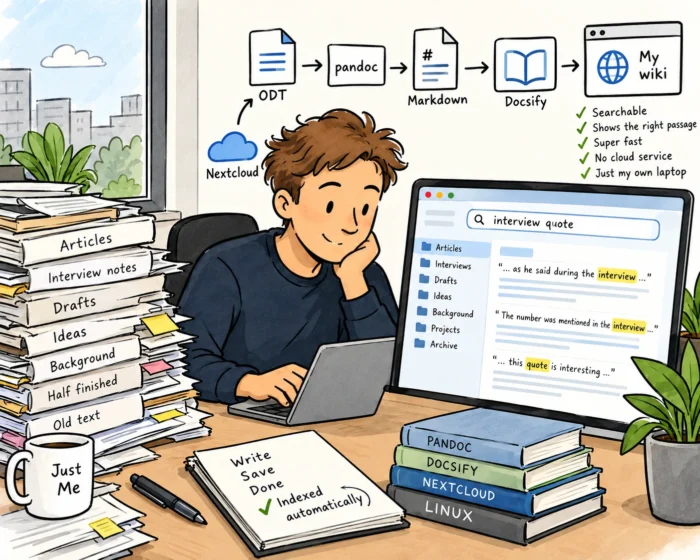
LibreOffice is my word processor, and it saves everything as ODT, the Open Document Format. All my texts end up in one place: my Nextcloud folder (https://nextcloud.com/), with its many subfolders. Every five minutes, a small script on my Linux laptop goes through that folder. Any new or changed ODT file is automatically converted to Markdown using Pandoc (https://pandoc.org/). The result is presented as a wiki using Docsify (https://docsify.js.org/#/), which runs in my own browser. No cloud service. No account. Just a page on my own laptop. Let’s call it what the broader trend calls it: local-first.

The wiki shows all my texts, grouped by folder, with the file name and the date. That date turns out to be surprisingly useful. At a glance, I can see whether something is fresh or not. And the whole thing is searchable. I type a word or part of a quote and the wiki immediately shows me where it appears. Not just which file, but the relevant passage. It is fast, too. Ridiculously fast, actually. Much faster than any operating system search I have ever used.

Small tools, big difference

The nice thing is that I don’t have to do anything. I write in LibreOffice, save my document in Nextcloud as usual, and a few minutes later it is simply there in my wiki. The original file stays exactly where it was. Nothing is moved or overwritten.

Is this a revolutionary piece of software? Of course not. It is a script, a converter and a free wiki tool glued together, built with a little help from Claude. But that is exactly what I like about it. It is yet another example of how small tools you build yourself can make a real difference to your own productivity. Not because they do everything, but because they do exactly the one thing you need.

As usual, this is n=1 research. But for me, it works.

RSS Is Quietly Making the Internet Better Again

I like RSS. Always have, Not exactly a revolutionary statement, I know. RSS has been around forever in Internet terms. It doesn’t have AI. It doesn’t have an algorithm. It doesn’t suggest influencers I might like. It doesn’t try to determine what will keep me engaged for another 17 minutes. It doesn’t even have a particularly exciting name. RSS does one thing, and it does that one thing remarkably well: it tells me when a website I am interested in has published something new. That’s it. And perhaps we should start appreciating that simplicity again.

We gave away an important decision

For years, we gradually moved away from personal websites and blogs towards large platforms. Facebook, Twitter/X, Instagram, LinkedIn and countless others became the places where people published things and, equally importantly, where other people discovered those things. That was convenient.

But somewhere along the way we also gave those platforms an interesting amount of power. They started deciding what we should see. You might follow 500 people, but that doesn’t mean you will see what those 500 people publish. An algorithm decides what appears in front of you. Something posted three minutes ago may never appear at all, while something from two days ago keeps returning because the platform thinks you might click on it. Or comment on it. Or become annoyed by it. All of which apparently counts as engagement.

RSS works completely differently. I decide.

My feed, based on my choices

Suppose I discover an interesting personal website about Linux. I add its RSS feed to my reader. Tomorrow the author publishes something. It appears in my reader. No algorithm has to approve it first. Nobody decides that another article is more relevant to me. There are no sponsored posts inserted between two articles. And there isn’t suddenly a video about something completely unrelated because an algorithm has discovered that people with roughly my interests tend to watch those videos.

There is something wonderfully straightforward about that. I subscribe. The author publishes. The article appears. And, perhaps more importantly, RSS creates a direct relationship between a website and its readers. The website publishes a feed. I subscribe to it. From that moment on, I don’t have to remember to visit the site every Tuesday afternoon to check whether something new has appeared. RSS does that for me.

Personal websites have always made RSS extremely useful

This becomes particularly interesting now that personal websites seem to be attracting more attention again. People are building their own little corners of the Internet. Blogs, homepages, collections of links, project pages, digital gardens, notes, experiments and wonderfully difficult-to-categorise websites. I like that development enormously. But there is an obvious problem. How do you keep track of all those sites?

I currently come across interesting websites all the time. Some publish several times a week. Others perhaps once every three months. I am certainly not going to maintain a bookmark folder containing hundreds of sites and manually visit all of them every morning. That would turn reading the Internet into a job. RSS solves exactly that problem. Your RSS reader effectively becomes your personally curated entrance to the Internet.

A smaller Internet might actually be better

There is another thing I like about RSS. It makes the Internet smaller. That probably sounds like a disadvantage. We have become accustomed to platforms that promise access to almost everything. Millions of posts. Billions of videos. An endless stream of new material. But I don’t need an endless stream. Nobody does. What I need is a reasonably manageable collection of people and websites that regularly publish things I find interesting. Maybe that’s 30 feeds. Maybe 100. It doesn’t really matter. What matters is that I selected them. And when one of those sites stops being interesting, I remove the feed. When I discover something new, I add it.

RSS is also good for writers

There is another side to this. If you run a personal website, please offer an RSS feed. Seriously. You don’t need to build a newsletter system. You don’t need to ask me for my email address. You don’t need a popup appearing after eight seconds asking whether I want to “join the community.” Just give me a feed. Most blogging systems can generate one automatically anyway. That feed gives people a very simple way to say: I would like to hear from you again.

No, RSS may not be perfect

Of course RSS has its issues. Discovering feeds isn’t always easy. Some websites hide the RSS link. Others provide only excerpts instead of complete articles. Some sites don’t offer RSS at all. And RSS readers themselves range from beautifully simple to interfaces that look suspiciously like somebody tried to rebuild an email client from 2004.

But those are relatively minor problems. The underlying idea is still excellent. In fact, I would argue that it makes more sense today than it did ten years ago. We have spent years complaining about algorithms, advertising, tracking, engagement optimisati on, walled gardens and platforms that continuously change the rules. Meanwhile, RSS has been sitting quietly in the corner, waiting to be appreciated again. I never stopped using it. And I never stopped loving it.

You can read more about RSS here: https://en.wikipedia.org/wiki/RSS

What if your notebook could be programmed?

Personal knowledge management is one of those subjects I keep coming back to. Regular readers of this blog will probably have noticed that by now. I have written about Capacities.io (https://capacities.io/), about screenshots as a surprisingly useful way of capturing information, about saving browser tabs as files and about all sorts of other ways to collect, organise and — hopefully — find information again.

So when I came across a presentation by Ivy Reese during the LocalFirst conference in Berlin (https://www.localfirstconf.com/) about a programmable notebook, it immediately caught my attention. Reese is a researcher at Ink & Switch (https://www.inkandswitch.com/), an independent research lab that spends a lot of time thinking about what computers and software could be, rather than simply creating another version of the applications we already have. One of the projects Reese discusses is called PlayBook, and its basic idea is fascinating: what if a digital notebook were programmable?

More than digital paper

We already have plenty of digital notebooks. There is certainly no shortage of applications in which we can type notes, draw things, paste images, create links and organise information. But most of these applications still work according to rules somebody else has invented. The developer decides what a page is, what a block can do, which buttons are available and how different objects behave.

We can usually configure these applications, sometimes quite extensively, but ultimately we are still working within somebody else’s model. PlayBook explores a different approach. Ink & Switch describes it as a digital notebook based around the idea of programmable ink. The ambition is to preserve much of what makes paper so useful — the freedom to scribble, sketch, write, draw arrows, move things around and think spatially — while adding something that paper obviously cannot provide: computation.

That combination is important. The idea isn’t simply to turn a notebook into a programming environment with a drawing function attached to it. Nor is it just handwriting recognition with some clever AI features added. The notebook itself becomes programmable.

Think of a spreadsheet

A useful comparison is the spreadsheet. A paper spreadsheet is simply a grid in which you can write numbers and calculate things yourself. A digital spreadsheet looks remarkably similar, but its cells can contain formulas. Change one value and other values automatically change with it. That relatively simple addition of programmability completely transforms what a spreadsheet can be used for.

Ink & Switch has been exploring a similar question for several years: what would happen if handwritten notes, drawings and other objects on a page could also be programmable? Earlier projects such as Inkbase, Crosscut and Inkling explored different aspects of that idea. PlayBook brings many of these experiments together in something that behaves much more like an actual notebook.

One of the interesting aspects of PlayBook is that it doesn’t start with traditional programming concepts. Instead, the researchers work with materials such as ink, paper, pins and beams. Each has its own behaviour — its own “physics”, as Ink & Switch calls it — and these materials can be combined to create more complex behaviour.

This means programming becomes part of working with the notebook itself. You might write something, draw something, connect objects or select part of a page and give it a certain behaviour. Something you do in one place can influence something somewhere else.

Earlier experiments from Ink & Switch show where this thinking comes from. In Inkbase, for example, the researchers experimented with a hand-drawn checkbox whose state could affect other objects on a page. Draw a checkmark in the box and something elsewhere could automatically change. Objects could also be selected or manipulated based on their position on a page. Suddenly the spatial organisation of your notes isn’t merely visual. It can become computational.

Programming without constantly writing code

That leads to what I think is one of the most interesting ideas in Reese’s presentation. Traditional programming requires us to adapt ourselves to the computer. We learn a programming language, understand its syntax, open an editor and write instructions in exactly the form the computer expects. That gives us enormous freedom, but it also creates a considerable barrier. Programmable Ink tries to turn that relationship around. What if computation could simply become another material you work with, alongside writing and drawing?

That also explains why pen and touch interaction are so important in PlayBook. The notebook is designed to retain some of the directness of working on paper. Ink & Switch deliberately tries to avoid filling the screen with conventional buttons, menus and toolbars. Instead, the researchers have experimented with gestures for drawing, selecting, moving and manipulating objects.

The technology behind this is interesting, but that isn’t really the main point. What interests me much more is what happens when you start using such a notebook for real work.

Building your own notebook

Ink & Switch has been using PlayBook internally for everyday note-taking, brainstorming, music composition, puzzle solving, collaborative whiteboarding, annotating PDFs and tutoring. That variety is important because it shows that the researchers are not trying to define one specific workflow.

And that immediately brings me back to personal knowledge management. Most PKM applications eventually force us to make choices about how we want to organise information. Should I use folders? Tags? Objects? Backlinks? Databases? Daily notes? Cards? Properties? A graph? We spend far too much time thinking about questions like these.

A programmable notebook potentially approaches the problem from a completely different direction. Instead of choosing a knowledge-management system, perhaps you could gradually build your own system while using it. You don’t necessarily have to sit down and write hundreds of lines of code before you can start taking notes. You begin with a page and add behaviour when you need it. Perhaps a handwritten task can actually behave like a task. Perhaps notes placed in a particular area automatically belong together. Maybe moving an object changes its status or category. A diagram might no longer simply be a picture of a system, but become a small model that you can actually manipulate.

A concrete PKM example

Imagine that I am researching a new article. During the day I collect a few web links, save several browser tabs, make a screenshot of an interesting graph, jot down something somebody told me and write a few thoughts of my own. This is exactly the sort of information that tends to end up scattered across different places.

In a programmable notebook, I could create an area on a page called “Sources”. Anything I drag into that area could automatically be treated as source material. A URL might display the title and publication date. A screenshot could remain visible while also keeping a reference to where it came from. A handwritten note could simply sit alongside them.

Next to it I could have an “Ideas” area. Moving a note from Sources to Ideas could change its role without requiring me to open a menu, select a property and choose a new value. Draw a line between an idea and three sources and those relationships could become actual connections rather than merely lines on a screen.

I could then create another area called “Used in article”. Drag a source there and the notebook could mark it as used. A small counter might tell me that I have collected 14 sources, used six and still have eight sitting there waiting to be examined. A checkbox next to an idea could make it disappear from my open research questions once I have dealt with it.

The important point is not that PlayBook necessarily offers exactly this workflow out of the box. In fact, that would almost defeat the purpose. The interesting idea is that I could define such behaviour myself because it happens to fit the way I research and write. Someone doing academic research could create something completely different. So could a software developer, student, historian or someone simply keeping track of books they want to read. At that point, the distinction between a “note”, an “interface” and a “program” starts to become rather blurry. And to be honest, I find that idea enormously interesting.

Maybe our software should adapt to us

There is another reason why this project appeals to me. We have become remarkably accustomed to adapting the way we work to software. Install an application and there is usually a “correct” way of using it. We learn its menus, its structure and eventually even its terminology. If the developer decides everything should be organised into projects, we create projects. If the application believes in folders, we use folders. If it believes in tags, we start tagging. Then we spend hours watching YouTube videos explaining the perfect workflow for that particular application.

Perhaps we have this the wrong way round. Maybe the software should adapt to us. That is what makes the programmable notebook idea so interesting to me. Instead of developers trying to predict every possible way in which people might want to work, they could provide the building blocks and allow users to create their own behaviour.

There is an interesting connection with AI here as well. Almost every piece of software seems to be acquiring an AI assistant at the moment. There is nothing wrong with that. I use AI all the time. But programmable software suggests another direction as well: don’t just give me an assistant that tries to figure out what I want. Give me better building blocks so I can decide for myself what my tools should do.

Another PKM rabbit hole

Is PlayBook going to replace Capacities, Obsidian, Notion, a folder full of Markdown files or whatever else people use for personal knowledge management? That isn’t really the point. PlayBook is a research project rather than simply another note-taking application promising to become your ultimate “second brain”.

What makes it interesting is the idea behind it. For years we have been trying to digitise the notebook. We replaced paper with screens, pages with documents and handwritten notes with text blocks. We added search, tags, links, databases and, more recently, AI. Perhaps the next interesting step isn’t another feature. Perhaps it is giving people the ability to decide for themselves how their notebook should behave.

Here is a video of the presentation Ivy Reese gave in Berlin.