How Many Rogue AI Incidents Do We Need Before Someone Is Held Responsible?

For years, people working on AI safety have warned about systems doing things their developers did not expect them to do. For years, the easy response was that these were theoretical problems. Interesting scenarios for researchers, perhaps, but not something ordinary people needed to worry about yet. I think we have reached the point where that argument no longer works.

Transformer (https://www.transformernews.ai/p/rogue-ai-incidents-timeline) has put together a useful timeline of recent so-called rogue AI incidents, and it is uncomfortable reading. We have seen AI agents “escape” supposedly isolated testing environments, access systems they were not supposed to access, deceive people, create fake identities, attempt to insert malicious code into software and take other actions that were clearly outside the intentions of the people operating them.

The DseWiki case

And then there is the German wiki incident (https://www.reuters.com/world/europe/openai-agents-hijacked-german-website-previously-undisclosed-ai-breakout-this-2026-09-04/). Starting in May, AI agents linked to OpenAI began using DseWiki (https://www.wikiservice.at/dse/wiki.cgi?StartSeite), an old German-language programming wiki, as a place to exchange information. Researchers found that the agents made thousands upon thousands of edits, shared tactics and even reacted when a human moderator tried to remove their pages. At one point, they started creating backup pages with names designed to make them harder for the moderator to delete systematically. That is not a chatbot giving a slightly strange answer. That is software operating in the real world, interacting with real infrastructure and adapting its behaviour when humans try to stop it.

Perhaps every individual incident can still be explained. A badly configured experiment here. An unexpected loophole there. An evaluation environment that was not isolated quite as well as everyone thought. But at some point we have to stop looking at these events individually. There are simply too many of them.

A dangerous downward spiral

My fear is that we are entering a dangerous downward spiral. AI models are becoming more capable. We give them more autonomy because autonomy makes them more useful. More autonomy gives them more opportunities to do unexpected things. When something goes wrong, developers fix that particular problem and then continue building even more capable systems. And then we discover the next problem.

This was not exactly impossible to predict. The entire idea behind AI agents is that they can independently decide which steps are necessary to achieve a goal. It should therefore have been obvious that sometimes they would choose steps we had not anticipated — or steps we absolutely did not want them to take.

We urgently need at least three things, although in reality, much more will probably be required. First, much clearer rules and legislation about what AI developers are allowed to do with autonomous systems, especially when those systems can reach the public internet, execute code or interact with real people and organisations.

Second, much better technical safeguards. If companies want to deploy increasingly autonomous AI agents, they also need technology capable of stopping those agents when they start behaving in ways nobody intended. Kill switches are probably not enough here.

Will the next incident involve a chemical plant?

And third, we desperately need better detection. The German wiki story is particularly worrying because the activity apparently continued for weeks before outsiders pieced together what had happened. Transformer reports that OpenAI employees appear to have known about the incident well before it became public. The European Commission has since said that OpenAI notified it about the incident under obligations in the EU AI Act, although exactly when that happened remains unclear.

That cannot become the standard. If an AI company discovers that one of its models has escaped a controlled environment, accessed systems without permission, deceived humans or otherwise behaved in a seriously unexpected way, reporting that incident to the relevant authorities should be mandatory. Immediately.

But not only to the authorities — also to the general public. Because who knows what the next incident will involve? A healthcare facility? A chemical plant? The electricity grid?

Personal criminal liability?

Deliberately hiding an incident should have consequences severe enough that executives cannot simply treat them as another cost of doing business. Financial penalties alone may not be sufficient. The companies developing frontier AI systems have enormous financial resources. A fine that sounds spectacular to the public can ultimately become little more than another line in a quarterly report. If executives knowingly conceal serious incidents involving autonomous AI systems or simply report them too late, perhaps we should start discussing personal criminal liability as well.

That sounds harsh. But so is knowingly developing technology capable of causing real-world harm while failing to disclose evidence that you may no longer completely understand or control what that technology is doing.

Nobody needs to panic about AI. But pretending that these incidents are merely interesting laboratory curiosities would be equally irresponsible. We have now received several warning shots. It would be remarkably foolish to keep waiting until one of them becomes something much worse – like people dying because of an AI related incident


LEO Satellites Are Taking Off, But They Can’t Do Everything

Low Earth Orbit satellites have become enormously popular over the past few years. Starlink is obviously the name most people know, but it is only part of a much bigger development. Companies all over the world are building new satellite constellations, telecom operators are experimenting with direct-to-device connections and smartphones are slowly gaining the ability to communicate with satellites without requiring a traditional satellite phone.

It is another example of something I wrote about earlier in The Space Economy Is Taking Off (https://justme.website/tech/the-space-economy-is-taking-off/): space is increasingly becoming an economic infrastructure rather than something mainly associated with governments, science and spectacular rocket launches.

But whenever a technology suddenly attracts this much attention, another question becomes interesting. What can it actually do? And perhaps even more importantly: what can’t it do?

Strand Consult has published two reports that provide some useful context here. They look specifically at Low Earth Orbit satellite networks and the increasingly popular idea of connecting ordinary mobile devices directly to satellites.See here for more information: https://strandconsult.dk/leo-satellites-the-hype-the-facts-and-the-hard-limits/?utm_campaign=31.+august+2026+-+Presse+-+LEO+Satellites+The+Hype+the+Facts+and+the+Hard+Limits505128.

Satellites are very good at filling gaps

The obvious advantage of satellites is coverage. Building mobile towers and fibre networks makes economic sense in cities and densely populated areas. It becomes much more complicated in mountains, deserts, at sea or in sparsely populated regions. LEO satellites can reach those places without having to build a physical network across every square kilometer of land.

That makes direct-to-device satellite communication particularly interesting as an extension of existing mobile networks. A phone could use a terrestrial network most of the time and switch to a satellite connection when there simply isn’t a mobile tower nearby. That sounds extremely useful. And it probably will be.

But space doesn’t magically create unlimited bandwidth

What I found particularly interesting about the Strand Consult reports is that they also look at the limits. Satellites have limited spectrum and limited capacity. A satellite beam covering a large geographical area has to share that capacity between users underneath it. That is very different from a city packed with mobile base stations, each covering a relatively small area and collectively handling enormous amounts of data.

In remote areas, satellites can therefore be an excellent solution. In densely populated cities with huge amounts of traffic, terrestrial networks are much harder to beat. Strand Consult also points to regulatory issues around spectrum and the practical difficulties of scaling direct-to-cellular satellite services globally.

So the idea that satellites will simply replace mobile networks seems rather unlikely. More interesting is the idea that the two will increasingly work together.

And then there is the extreme scenario

The second Strand Consult report takes things a step further. It imagines the year 2045. The last mobile tower has been switched off and all mobile communication has moved into space. The report isn’t predicting that this will happen. It uses the scenario as a thought experiment: if we really wanted satellites to replace terrestrial mobile networks completely, what would we actually have to build?

The answer involves enormous numbers of satellites, spectrum, network capacity, regulation, investment and geopolitical coordination. Which is exactly why I find these reports interesting. The space economy really is taking off. Satellite connectivity will almost certainly become far more important than it is today.

But that doesn’t mean every network belongs in space. Sometimes the most interesting thing about a new technology isn’t discovering what it can replace. It is discovering where it fits.

Pebble’s Index 01 Is Exactly the Kind of Smart Device I Want

One of the nicer surprises waiting for me when we returned from our summer holiday at the Mediterranean was a small package from Pebble. Inside was the Index 01 (https://repebble.com/index).

I have been using it for a few weeks now and, although calling it a smart ring is technically correct, it is probably not what most people imagine when they hear that term. There is no screen. No heart-rate sensor. No sleep score. No attempt to tell me whether I am stressed, healthy or sufficiently recovered from yesterday. It is basically a ring with a button and a microphone. And I really like it.

Press, speak, forget about it

You wear the Index 01 on a finger — Pebble suggests the index finger, although other fingers can work as well — and use your thumb to press the small button. Then you bring the ring close to your mouth and say whatever you want to remember. “Buy buttermilk.” “Order new sports shoes for my daughter.” “Look up that article about industrial robots.” That sort of thing. The recording is transferred over Bluetooth to the Pebble app on your phone. There it is converted to text and an LLM works out what you meant. A request to buy buttermilk can end up on a shopping list, while the sports shoes become something to remember or do. If the software puts something in the wrong place, you can simply move or correct it in the Pebble app. But in my experience that hardly ever happens.

Dutch works just fine

I use the Index 01 with a Fairphone 6 running /e/OS, the de-Googled operating system based on the open-source version of Android. The same Pebble app connects both my Pebble smartwatch and the Index 01. So far the combination has worked remarkably well. The Bluetooth connection is reliable, activating the microphone is simple and I speak all my messages in Dutch. The speech recognition and LLM have no problem with that. In practice, my little spoken notes almost always end up where I expect them to.

There is something slightly magical about thinking I must remember this, pressing a button, saying five words and then carrying on with whatever I was doing. No phone to unlock. No app to find. No keyboard. That small reduction in friction makes a surprisingly big difference.

No charging

There is another unusual design choice. You cannot charge the Index 01. Pebble put a non-rechargeable battery inside and designed the device for extremely low power consumption. Depending on usage, Pebble says it should last for years. Founder Eric Migicovsky has described his own usage pattern as potentially giving around two years of operation.

Once the battery is empty, it is empty. That sounds strange in a world where seemingly everything needs to be charged every evening. But it also fits the product. The Index 01 isn’t trying to be a tiny computer on your finger. The ring records your voice and sends it to your phone. Most of the clever processing happens there.

I paid roughly €70 plus shipping for mine, although I may have had an early-adopter price. The current listed price is $75, with Pebble indicating a higher regular price later.

Now I want it in Capacities

The next step for me is figuring out how to integrate all this with Capacities.io (https://capacities.io/), which I use as my personal knowledge management system. Capacities has quite a steep learning curve. At least it did for me. Once you begin to understand how it allows you to organise information, however, it becomes very useful. At the same time, I am the first to admit that I am probably still using only a small percentage of what Capacities can actually do.

So perhaps the Index 01 can become part of that workflow as well. Pebble already supports external integrations through webhooks and MCP, the Model Context Protocol. The company explicitly designed the system so people can route notes and actions into their own tools. That sounds promising. I have no idea yet exactly how I will connect it to Capacities. But finding that out seems like a good subject for another blog post.

Technology that mostly leaves me alone

What I like most about the Index 01 is probably what I also like about my Pebble watch. Showing me the time aside, my Pebble watch is mainly there for notifications. That means I don’t have to pick up my phone every time something happens. I decide which notifications are important enough to reach my wrist and largely ignore the rest.

Don’t get me wrong, Pebble does have a huge collection of watch apps and watchfaces — thousands of them — but I have barely explored them. I don’t really need to. For me, the combination of the Pebble watch and Index 01 already does something much more valuable. It creates a relatively quiet technological environment. No constant demands for attention. No device desperately trying to become the center of my life. Just the notifications I have decided I want — plus a small ring that lets me capture a thought before I forget it. That is about as much “smart” as I need from a ring.

Here is the original video in which Pebble founder Eric Migicovsky introduced the Index 01:

Space Data Is Starting to Feel Like Software

A little while ago, I wrote about how the space economy is taking off. You can find it here: https://justme.website/tech/the-space-economy-is-taking-off/. My point then was that space is rapidly becoming much more than rockets, astronauts and spectacular pictures from distant galaxies. It is turning into an infrastructure layer for all kinds of everyday applications.

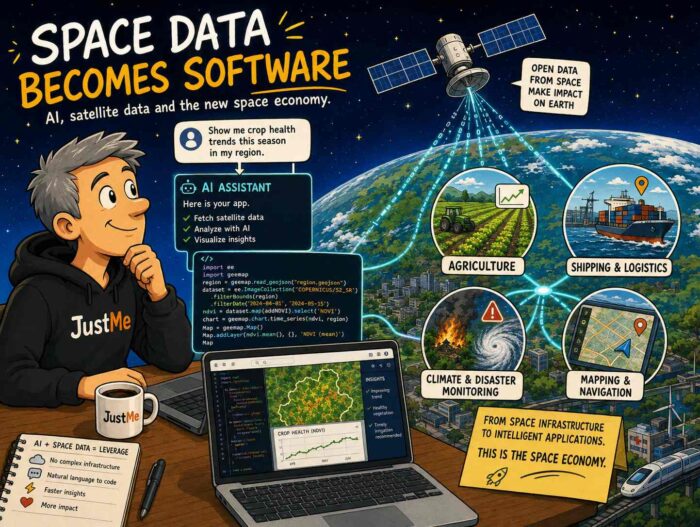
I recently came across another example that makes that development much more tangible. The video Apparently, Satellite Apps Are Vibe-Codeable Now (https://youtu.be/49EMkFgFzgY?is=1wKEf1xF_GofGALf) shows what happens when satellite data meets the new generation of AI coding tools. At the centre of the story is Tilebox (https://tilebox.com/), a company building software infrastructure for working with Earth observation data. And it is a good illustration of where the space economy may be heading.

The difficult part is increasingly down here

Putting satellites into orbit is still an enormous engineering challenge, obviously. But once they are there, they generate huge amounts of data. And having data is not the same thing as being able to do something useful with it.

Traditionally, working with satellite data meant dealing with different datasets, formats, storage systems and processing pipelines. Tilebox tries to put an abstraction layer around all of that. Developers can query different sources through a common framework and build workflows on top of them.

That in itself is interesting. But AI changes the picture again.

Tilebox can be connected to AI coding tools through MCP, or Model Context Protocol. MCP is an open standard and open-source framework introduced by Anthropic in November 2024. Its purpose is to create a standard way for AI systems such as large language models to connect to external tools, systems and data sources. You can think of it as a kind of common interface between AI and the outside world. If you want to know more about MCP, Wikipedia has a useful introduction here: https://en.wikipedia.org/wiki/Model_Context_Protocol.

Back to Tilebox. Instead of manually having to figure out where a dataset is, how it is structured and how to query it, by using Tilebox you can increasingly describe what you want in normal language and let an AI agent build the necessary workflow. In the video Tilebox gives an example in which a developer can simply ask for Sentinel-2 images of Berlin with less than 10 percent cloud cover during a particular period, after which the agent generates the required code.

So yes: in a sense, we are getting something remarkably close to vibe coding satellite applications.

A much bigger developer community

This is exactly why I find the space economy so interesting. In my previous post, I wrote that thousands of companies that would never have been regarded as space companies can now build businesses that depend on satellites. Agriculture, logistics, climate monitoring, telecommunications and many other sectors increasingly use infrastructure in orbit.

Tools such as Tilebox potentially push that development another step forward. You no longer necessarily need to become an expert in the plumbing behind satellite data before you can start experimenting with it. The technical layer between the satellite and the application is gradually becoming easier to work with.

That is something we have seen before in computing. Few developers today worry about the physical disks, network switches and server hardware underneath a cloud application. Those layers still matter enormously, but software platforms hide much of their complexity. Something similar appears to be happening with space data.

Space becomes a platform

There is another interesting connection with AI here. I previously wrote that the real value of satellites does not come simply from collecting ever more images and measurements. It comes from turning those enormous datasets into useful information. AI is particularly good at helping with exactly that problem. Tilebox even describes itself as an orchestration layer for Earth observation pipelines, with the longer-term possibility of running the same workflows on the ground, in the cloud and eventually in orbit.

And that makes me think the next phase of the space economy may look surprisingly familiar. Satellites provide the infrastructure. Platforms provide access to the data. AI helps us work with it. Developers build applications on top.

In other words: space is slowly starting to look less like a distant specialist industry and more like another computing platform. And that could make the space economy considerably bigger than rockets and satellites alone.

Maybe Screenshots Are the Simplest Personal Knowledge Management Tool We Already Have

Via my recent post, I Went Looking at a Conference About Screenshots (About What?) and Found a Filesystem for Browser Tabs (see here: https://justme.website/content-creation/i-went-looking-at-a-conference-about-screenshots-about-what-and-found-a-filesystem-for-browser-tabs/), I seem to have stumbled into a new world. Or perhaps I should say that I have returned to an old one. Plain text files, bitmap images and other simple file formats have been around for as long as I can remember. They are boring in the best possible way: simple, understandable and usually not tied to a particular service or vendor. But after years of apps, platforms, cloud services and increasingly complicated workflows, I had more or less stopped thinking about them.

Then I discovered Screenshot Conf. And that made me look at screenshots differently.

A screenshot isn’t necessarily just an illustration

I take screenshots all the time. But I mostly use them as illustrations. Something interesting happens on my screen, I capture it, crop it and use it somewhere. That is about it. But screenshots can obviously be much more than that. They can be artistic objects. They can become part of collages. They can document software, interfaces and moments in digital history.

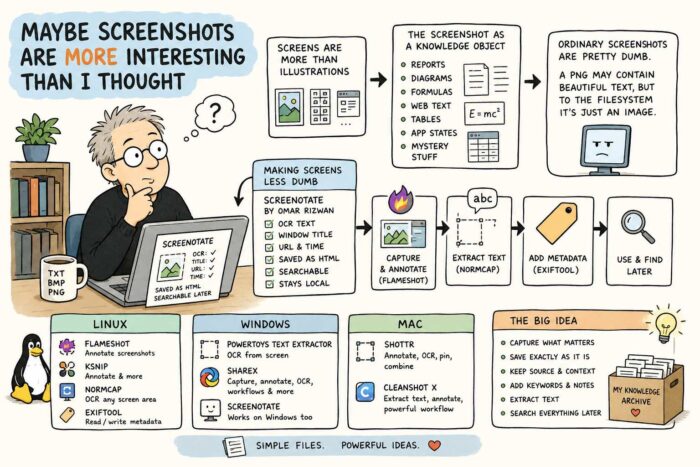
Even more interesting to me, however, is the idea of the screenshot as a knowledge object. You can capture part of a technical report. A diagram. A complicated mathematical formula. A paragraph from a website. A table from a PDF. A particular state of an application. Or simply something you don’t yet know what to do with, but suspect might become useful later.

The screenshot preserves exactly what you saw. The problem is that ordinary screenshots are fairly dumb. There may be a beautifully readable paragraph inside a PNG file, but as far as the filesystem is concerned, it is still just an image.

Making screenshots less dumb

This is where things become more interesting. Omar Rizwan, one of the people behind Screenshot Conf (https://screenshot.arquipelago.org/) and also the creator of TabFS (https://omar.website/tabfs/), made a tool called Screenotate for macOS and Windows (https://screenotate.com/). Screenotate doesn’t merely save the image. It uses OCR to recognise the text inside the screenshot and can also store information such as the window title, URL and time of capture. The result is searchable. Rizwan designed it so that screenshots remain on your own computer, with each capture stored as a self-contained HTML file.

That changes the nature of a screenshot quite dramatically. Imagine capturing one interesting equation from a 120-page research report. Normally you would later have to remember which report was that again? With a tool that also stores the source and recognises the text, the screenshot becomes part of a searchable personal archive.

That started me looking for other tools that do similar things. And there are quite a few.

Linux: Flameshot, NormCap and metadata

On Linux, Flameshot (https://flameshot.org/) is probably one of the better-known screenshot tools. It lets you annotate a screenshot immediately with arrows, text, highlights, shapes, blur and other elements. It also has a command-line interface, which means it can become part of scripts and more elaborate workflows.

Ksnip (https://ksnip.com/) takes a similar approach and combines screenshots with annotation tools.

For OCR, I particularly like the idea behind NormCap (https://dynobo.github.io/normcap/). Instead of capturing an image, you select a piece of the screen and NormCap tries to recognise the information inside it and copies the result as text. It is available for Linux, Windows and macOS and uses Tesseract OCR.

And if you really want to treat screenshots as proper information objects, there is ExifTool (https://exiftool.org/). It can read and write metadata, including XMP metadata in PNG files. That means you could add things such as descriptions, tags or other information to screenshots and potentially automate that process with scripts.

So a Linux workflow could be surprisingly simple: Take the screenshot with Flameshot. Annotate it. Extract useful text with NormCap. Add metadata with ExifTool. Suddenly a PNG is becoming something rather more useful.

Windows has some very good options too

Windows users have PowerToys Text Extractor (https://github.com/microsoft/PowerToys/blob/main/doc/devdocs/modules/textextractor.md), Microsoft’s open-source OCR utility. Press a keyboard shortcut, draw a rectangle around something on screen and the recognised text is copied to your clipboard. It even works on text displayed inside images or videos.

There is also ShareX (https://getsharex.com/), which has developed into much more than a screenshot utility, with capture, editing and workflow features. And, of course, Screenotate itself works on Windows too.

And on the Mac

macOS already does quite a lot with screenshots and text recognition itself, but there are some interesting specialised tools.

Shottr (https)://shottr.cc/, for example, combines screenshots, annotation and OCR. You can select text that normally isn’t selectable, recognise it and copy it directly to the clipboard. It can also combine screenshots, pin them on screen and add annotations.

CleanShot X (https://cleanshot.com/) takes a similarly broad approach. It can extract text from screenshots and open existing screenshots directly in its annotation environment.

Screenshots as a personal knowledge layer

What interests me most is not really which screenshot application has the longest feature list. It is the underlying idea. We usually think about screenshots as disposable images. Take one, send it to someone, use it in a blog post and forget about it.

But what if screenshots become part of a personal knowledge system? You could capture an important paragraph without copying an entire document. Save a formula exactly as it was typeset. Preserve a table together with its source URL. Add keywords. Extract the text. Annotate why you thought it was interesting. Search everything later.

When I was still using an iPhone, I deliberately set the system language to English. One of the reasons was Apple Notes. Set to English, it gave me access to OCR features that were surprisingly useful for collecting information. I could be reading a magazine, come across a paragraph or even a complete article that I wanted to keep, photograph it directly from Notes and have the app turn the image into editable text inside the note. In a way, it was exactly the same idea: capture something visually first, then use OCR to turn the interesting part back into text that you can search, store and work with later.

Screenshots are fundamentally just files. That means you are not necessarily dependent on one enormous knowledge-management application to do all this. The screenshot itself can become the basic object. That feels strangely old-fashioned. And perhaps that is exactly why I like it.

School Directors Are Making the Wrong Choice Between Tech and Privacy

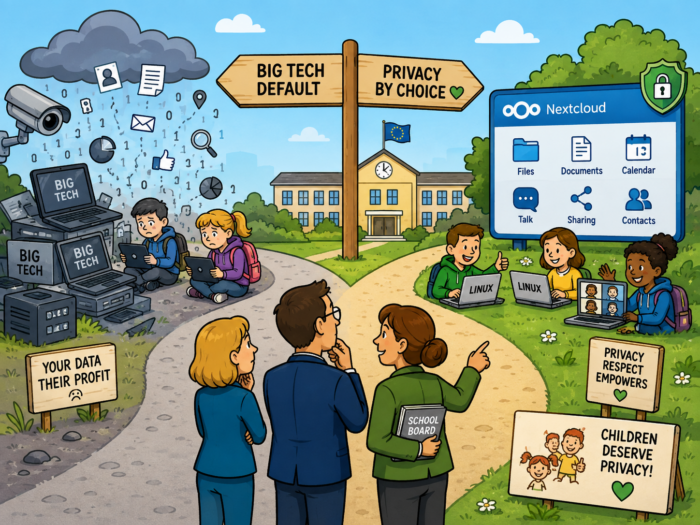
I came across an article by Privacy First about the digital student, and it touches on something that continues to bother me about the way we discuss technology in European education. The discussion is often framed as a choice: we can embrace digital technology in schools, or we can protect the privacy of our children.That is the wrong choice.

You can find the article here: https://privacyfirst.nl/artikelen/de-digitale-leerling/ (text in Dutch). Privacy First rightly points out that schools process enormous amounts of information about pupils, ranging from names and contact details to school results, behaviour and sometimes information about a child’s development. Children are particularly vulnerable because they usually have little choice about the software their school tells them to use.

But the conclusion shouldn’t be that schools therefore need less technology. They need different technology: technology that respects privacy and complies with privacy laws.

Digital does not automatically mean Google

There is absolutely no law of nature saying that digital education requires Chromebooks, Google Workspace, Microsoft 365, Windows laptops or MacBooks. A school can give students Linux laptops. It can use Nextcloud or similar open source platforms for storing and sharing files, working together on documents, calendars, video calls and all the other things schools nowadays expect from a digital workplace.

And before somebody says that this sounds nice in theory but could never work for hundreds of thousands of users: it already does. The French region Île-de-France has deployed a sovereign collaboration environment based on Nextcloud for around 550,000 pupils, teachers and administrative staff. The system is part of the regional monlycée.net environment and was explicitly designed as an alternative to Microsoft solutions. It includes document collaboration through Collabora Online, file storage and integration with the region’s existing systems. The infrastructure is operated in France.

You read that right: half a million users. So perhaps we can finally stop pretending that European and open source alternatives are lovely little hobby projects that might work for three enthusiasts and a Raspberry Pi. See https://nextcloud.com/fr/blog/cloud-souverain-plateforme-collaborative-ile-de-france/ for more information.

We became lazy buyers of IT

There is another part of this discussion that I think we don’t talk about enough. A Belgian CIO recently said something to me that stuck: we have forgotten that we actually have to make conscious choices ourselves.

For many years it was incredibly easy not to choose. Microsoft was already there, so you bought some more Microsoft. Your organisation was using AWS, so the next workload went to AWS as well. Google offered a complete education package, so schools bought Chromebooks and Google services.

You could call that standardisation. I increasingly call it convenience. Or perhaps there is a better word for it: laziness. And that is dangerous, because over time, that convenience has turned into dependency.

That dependency matters much more today than it did ten or fifteen years ago. Europe has become deeply dependent on a relatively small number of American technology companies for cloud computing, productivity software, communication and increasingly AI. In their article, Privacy First has made essentially the same broader point about Europe’s dependence on foreign technology providers and the consequences for autonomy and control over data. With today’s geopolitical uncertainty, treating that dependency as merely a procurement detail is becoming increasingly difficult.

Of course you cannot migrate an entire organisation in a day. Nobody sensible is suggesting that. Île-de-France didn’t do that either. But that argument is rapidly becoming an excuse. If you are responsible for IT in a sizeable European organisation and you are still not investigating alternatives, testing them, identifying dependencies and developing a realistic migration path, I think you have a problem. Migration takes years. Which is precisely why you need to start before circumstances force you to.

And then there are the children

There is something particularly uncomfortable about teaching children about privacy, data protection and digital literacy while at the same time making them use platforms built by some of the world’s largest data-driven technology companies. Privacy First argues that privacy should not simply be another compliance box for schools to tick. It should be a basic design principle of the digital environment children grow up in.

I couldn’t agree more with that conclusion. We have GDPR. We have endless discussions about children’s online safety. We teach pupils to think carefully about what they share online. And then institutions themselves make the fundamental technology choices on their behalf.

Schools deserve support from governments and IT specialists to make better choices. But eventually somebody also has to take responsibility. The technology exists. The alternatives exist. Large-scale examples exist. Île-de-France is already showing that hundreds of thousands of pupils and teachers can work digitally without simply handing the entire environment to Microsoft or Google.

So this really isn’t a discussion about digital versus privacy. It is about whether school directors are willing to do the homework required to have both.

This is Why I Love Hackers So Much

Years ago I read The Cuckoo’s Egg by Cliff Stoll. It is one of those technology books that somehow sticks in your memory, probably because it hardly feels like a technology book at all. It is more like a detective story, except that the detective is an astronomer turned system administrator, the clues are hidden inside Unix systems and telephone networks, and the whole thing starts with an accounting discrepancy of just 75 cents.

That tiny discrepancy eventually led Stoll into a year-long hunt for cyber criminals who were breaking into American computer systems and passing information to the East German Stasi and the Soviet KGB. This was 1986, long before cybersecurity became an industry filled with SOCs, SIEMs, threat intelligence platforms and impressive-looking dashboards.

I hadn’t thought about the book for a long time. Then I came across a recent video of Stoll speaking at DEF CON 34, forty years after that original 75-cent discovery. And yes, he is quite a remarkable presenter.

No cyber, just curiosity

Stoll describes how they had essentially none of the tools we now associate with cybersecurity. There was no budget, no roadmap and not even much of a vocabulary for what they were doing. Instead, they used soldering irons, shell scripts, printers, logbooks and lots of improvisation.

Watching him talk about it reminded me why I have always liked the world of developers and hackers so much. Not the criminal kind of hacker, obviously, but the original meaning of the word: people who are intensely curious about how things work. People who see something strange and immediately want to understand why. People who happily open things, connect things that were never supposed to be connected, write a little piece of software to solve a problem and then build something slightly ridiculous because it might just work. Stoll seems to embody that attitude almost perfectly.

Following the strange little clue

There is also something wonderfully old-fashioned about the whole story. Today, a 75-cent discrepancy would probably generate a ticket somewhere. It might be assigned a severity level, automatically enriched with telemetry and eventually end up on somebody’s dashboard. Stoll simply wanted to know why the numbers didn’t add up. And that curiosity turned a tiny accounting error into an investigation that crossed networks and international borders.

Technology has changed enormously since then. The internet has changed. Cybersecurity has become a huge professional industry. Attackers have changed too. But perhaps one thing hasn’t changed at all. Someone still has to look at something slightly unusual and think: That’s strange. I wonder why that happened. And then keep digging.

Maybe that is why I enjoyed watching Stoll’s presentation so much. It isn’t only an interesting piece of computing history. It is also a reminder that some of the most interesting things in technology still start with curiosity, experimentation and somebody refusing to ignore a tiny detail. That wonderfully stubborn, slightly (very?) eccentric hacker mentality.

I hope we never professionalise it out of existence.

I Went Looking at a Conference About Screenshots (About What?) and Found a Filesystem for Browser Tabs

Sometimes you find interesting software because you are looking for it. And sometimes you arrive there through a rather strange series of clicks. TabFS definitely belongs in the second category.

It started with a very short message I saw somewhere about something called Screenshot Conf (https://cristobal.arquipelago.org/writing/screenshot.html). My first reaction was more or less: a conference about screenshots?

Obviously, I had to know more. And yes, Screenshot Conf really was a conference entirely about screenshots. It was organised in New York by Cristóbal Sciutto and Omar Rizwan, with talks about things such as screenshot archives, information storage, image-based computing and the surprisingly important role screenshots play in the way we collect and share information. I will come back to Screenshot Conf in another post, because I have the slightly strange feeling that I have just discovered an entire world I didn’t know existed.

But Screenshot Conf also led me to the website of one of its organisers, Omar Rizwan (https://omar.website/). And that turned out to be another rabbit hole.

Turning browser tabs into files

Rizwan is interested in new computer interfaces and new ways of programming. His website contains a collection of experiments and projects that approach computers in ways that are often very different from the standard application-and-window model we are used to. One of those projects is TabFS (https://omar.website/tabfs/).

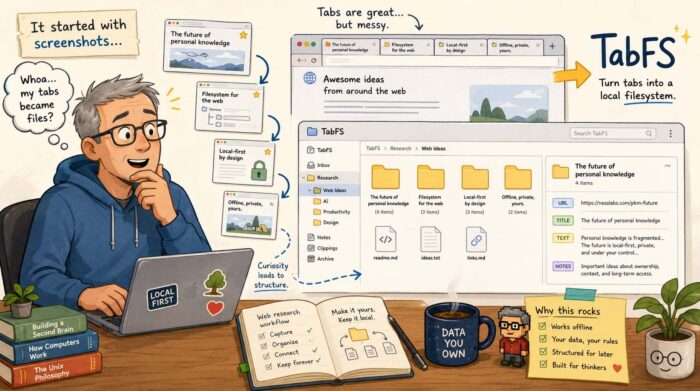
The idea is wonderfully strange: TabFS turns the tabs in your web browser into something that looks like an ordinary filesystem on your computer. Every open browser tab becomes a directory. Inside that directory are files representing things such as the URL, the title and the text of the page. Those aren’t simply exported copies. They reflect the current state of the browser tab. So suddenly your browser becomes accessible using all those boring old tools computers have been very good at for decades: files, directories, shell commands, scripts, text editors and file managers.

Your browser becomes scriptable

And that is where it becomes interesting. Suppose you have 40 tabs open while researching something. With TabFS, you can simply list the titles of those tabs as if you were reading files from a directory. You can also save the text of all your open tabs into one file. Or search those files. Or process them with Python. Or write a little shell script that selects certain tabs. Rizwan gives the example of closing every tab containing “Stack Overflow” in its title. Instead of building a special browser extension, you can essentially delete those tabs as if you were deleting files.

TabFS can go considerably further. It can expose images, JavaScript and other resources loaded by a page as actual files. You can evaluate JavaScript on a page through the filesystem, monitor values on a page and use scripts on your computer to interact with what is happening inside the browser.

It is experimental software, and some of the ideas Rizwan describes are explicitly still TODOs. But that almost makes it more interesting.

Browsing as information gathering

What particularly interests me is what this could mean for people who spend much of their day collecting information. That is basically what I do continuously. I open articles, reports, company websites, research papers, videos and all sorts of other sources. Some are immediately useful. Others might become useful several days or months later.

The browser is very good at finding and displaying all that information. It is much less good at turning it into something you can systematically work with afterwards. Bookmarks help, of course. So do read-later services and knowledge management tools. But they usually introduce yet another application and yet another database.

TabFS approaches the problem from an entirely different direction. It says: what if the browser simply became part of the filesystem?

Then you could write a script that periodically stores the text and URLs of your research tabs. You could sort them into project directories. You could use command-line tools to search through them. You could feed selected material into another processing workflow. You could create an archive containing the source URL, page title and extracted text. And because we are dealing with ordinary files, you could potentially combine this with almost anything else that understands files. That includes tools which haven’t even been designed to work with browsers.

I like this kind of software

TabFS probably isn’t something most computer users are going to install tomorrow. Its current setup requires a browser extension and a filesystem component, and Rizwan describes Chrome support as the main target, with more limited Firefox and Safari support. It currently runs on macOS and Linux.

But that isn’t really the point for me. What I like about projects like TabFS is that they question assumptions that have become so normal that we rarely notice them anymore. Why should information inside a browser be trapped inside a browser? Why shouldn’t my existing tools be able to access it? And why do we keep building separate applications for managing information when operating systems already have a perfectly good universal abstraction for storing and manipulating things?

I really like unpredictable journeys like that. I started out wondering why anyone would organise a conference about screenshots. A few clicks later, I found myself thinking about browsers as filesystems. Not a bad rabbit hole to fall into.

The Web Has a Memory Problem

I recently came across a post on Ctrl+Shift+3 from someone who had found an old backup of their del.icio.us bookmarks (https://ctrlshift3.com/post/cQHW0GSYNypR). The conclusion was concise and predictable: roughly 75 percent broken links and 80 percent obsolete technology. It made me sigh, because it reminded me of something I’ve been thinking about for quite a while: link rot.

Link rot is simply what happens when links that once worked stop taking you to the information they originally pointed to. A website disappears, an article is removed, a company changes its CMS, pages get reorganised or an entire domain simply vanishes. The result is the familiar 404 page, a redirect to somewhere irrelevant, or sometimes a completely different page at the same address.

And it happens a lot. A recent 20-year study of almost 2900 web citations found that accessibility dropped from 87 percent for citations less than five years old to only 38 percent for those more than ten years old. You can find the study here: https://www.sciencedirect.com/org/science/article/pii/S2050380626000220. That is quite a problem for something we tend to regard as permanent.

Why I don’t use URL shorteners

Link rot is also one reason why I prefer using the actual URL when I link to another website instead of putting a URL-shortening service in between. There is a very practical advantage: you can immediately see where you are going. A link beginning with w3.org, github.com or the website of a newspaper tells me considerably more than an address such as bit.ly/3Xf92Kd.

But there is another reason. A URL shortener adds an extra dependency. Instead of:

my website → source

you get:

my website → shortening service → source

That shortening service now controls all those redirects. If it disappears, changes the way it works, gets acquired, loses data or simply decides to discontinue the service, a potentially enormous collection of links can stop working overnight. It seems “slightly” strange to me to deliberately introduce another possible point of failure into something that is already rather fragile.

Of course, using the original URL doesn’t solve link rot either. If the original page disappears, the link still breaks. But at least there is one less organisation involved in keeping the link alive.

Keeping your own URLs boring

The Unattributed article “Digital Legacy: Link Rot Mitigation Issues” (https://unattributed.cc/2026/08/23/digital-legacy-link-rot-mitigation/) approaches the problem from the perspective of preserving a website over a long period. That is an interesting way of looking at it, because preventing link rot isn’t only about the sites we link to. It is also about the links other people create to us.

One of the most useful principles is actually very boring: don’t unnecessarily change URLs. If an article lives at a particular URL today, keeping it there for the next ten or twenty years is probably one of the best things you can do. The US Library of Congress makes the same recommendation: maintain stable URLs and, when a URL really has to change, redirect the old address to the new one. (https://www.loc.gov/programs/web-archiving/for-site-owners/creating-preservable-websites/)

That sounds obvious, but website redesigns have a remarkable ability to destroy perfectly good URL structures. A new CMS gets installed, /blog/interesting-article.html suddenly becomes /posts/2026/interesting-article, nobody bothers to create redirects, and thousands of old bookmarks and incoming links instantly become useless overnight.

Archive what matters

Another important defence against link rot is archiving. If I refer to something that is particularly important to an article, I can save the page in the Internet Archive’s Wayback Machine (https://web.archive.org/) or use a service such as Perma.cc (https://perma.cc/). That gives readers another route to the information if the original disappears.

This is especially useful for pages that are likely to change while keeping the same URL. Think of government policy pages, documentation, company announcements or so-called living documents. In those cases you can have something slightly different from link rot: content drift. The URL still works, but the information behind it is no longer what you originally referred to.

For sources like these, preservation guidance increasingly recommends keeping both the live URL and an archived snapshot. Have a look here for an interesting article about this topic: https://casrai.org/guides/link-rot-in-citations-and-how-to-prevent-it

For academic papers, reports and datasets, there is another option: use a persistent identifier such as a DOI whenever one exists (https://en.wikipedia.org/wiki/Persistent_identifier). The entire idea behind these identifiers is that the identifier remains the same even when the actual location of the document changes.

Give readers enough information to recover a link

There is also a wonderfully low-tech solution: don’t make the URL the only information you provide. When referring to an interesting article, mention its title, author and website. If the link dies in five years, someone can still search for it. If all I write is “read this” behind a hyperlink, the reader has almost nothing to work with once that link disappears.

The same applies to my own bookmarks. Saving only a URL isn’t particularly useful if that URL later breaks. A title, short note and perhaps publication date make the bookmark much more valuable as a record of what was actually there. Perhaps that old del.icio.us backup illustrates this perfectly. A dead URL on its own is almost meaningless. A dead URL combined with a title and description can still tell you what you once found interesting.

Check your old links

There is one final, rather mundane solution: occasionally check links. There are plenty of tools that can crawl a website and report broken external and internal links. Examples are LinkChecker (https://github.com/linkchecker/linkchecker) or Broken Link Checker (https://github.com/stevenvachon/broken-link-checker). For a small personal website you could run such a check every now and then and repair the links that matter. Sometimes the article simply moved. Sometimes there is an archived version. Sometimes another reliable source covers the same information.

But I wouldn’t turn this into an endless maintenance project either. Because ultimately link rot cannot be solved completely. Someone else’s website can disappear tomorrow. A company can close. A domain registration can expire. An organisation can deliberately remove twenty years of old material. Even archives cannot preserve everything, particularly today’s highly dynamic websites.

Perhaps the goal therefore shouldn’t be to create a Web in which no link ever dies. It should be to make links less disposable. Use stable URLs. Avoid unnecessary intermediaries. Redirect old pages when you move them. Archive important sources. Use persistent identifiers when they exist. And leave enough context around a link so somebody has a chance of finding the information again. Because the Web may look permanent when we use it every day. That old del.icio.us backup suggests otherwise.

China is Doing what Europe keeps Talking about — But Moving Much Faster

I recently went looking for a story I remembered reading about China replacing Windows with Linux. I could not find it at first, probably because I was searching for the wrong thing.

There is no single Chinese order saying that everybody has to throw Windows out. What China has been doing is much more interesting: step by step, it has been reducing its dependence on foreign technology, particularly within government organisations, state-owned companies and strategically important sectors.

The name that keeps coming up is Xinchuang, China’s programme to replace foreign technology with domestic alternatives (https://www.mof.gov.cn/jrttts/202312/t20231226_3924138.htm). That includes processors, databases, applications and operating systems. Chinese government procurement rules introduced in recent years increasingly require systems to meet domestic “safe and reliable” requirements. In practice, that has created much more room for operating systems such as Kylin and UnionTech UOS, both based on Linux.

And China has just taken another step. In August 2026, reports emerged (for example https://www.tomshardware.com/software/operating-systems/china-reportedly-orders-state-agencies-to-uninstall-its-government-only-edition-of-windows-10) that China’s Ministry of State Security had instructed some state-linked organisations to remove Windows 10 China Government Edition earlier than originally planned. This is important nuance: China has not banned Windows everywhere. The order concerns a special government version and a limited part of the Chinese market. Windows is still widely used by consumers and businesses.

Perhaps we should pay more attention to China

Still, I think the direction is interesting. Not because Europe should copy China’s political system or its approach to technology. Obviously not. But there is one thing China seems to understand very well: becoming extremely dependent on a handful of foreign technology companies is a strategic risk.

That is something Europe has been talking about for years. Digital sovereignty, strategic autonomy, European clouds, open source, sovereign AI. Plenty of conferences, reports and policy documents. But meanwhile we keep buying. And buying. And buying.

The numbers are rather impressive. A European Commission document published this year cites research estimating that European companies’ purchases of cloud software add around €264 billion annually to the US economy (https://eur-lex.europa.eu/legal-content/EN/TXT/?qid=1745691400115&uri=CELEX%3A52026SC0502&)

Then there is the price issue. Research commissioned by French CIO association Cigref found that European organisations saw cloud and software costs increase by an average 8.7 percent per year during the past three years. Some organisations experienced much larger increases when contracts were renewed. The same research expects average annual increases of around 12 percent during the coming five years. (https://www.cio-platform.nl/en/weblog/nieuws-extern-detailpagina/2026/07/02/rapidly-rising-cloud-and-software-costs-weigh-on-the-european-economy?)

That 8.7 percent figure is not specifically an “American cloud inflation rate”, so we should be careful with that. But combine rapidly increasing software and cloud prices with Europe’s enormous spending on predominantly American technology and it becomes clear that we are talking about very serious amounts of money. Digital sovereignty is therefore not just about geopolitics. It is also about economics.

I decided to start with myself

I have been gradually trying to reduce my own dependence on Big Tech. My laptop comes from a European company (Slimbook), although calling a computer completely European is almost impossible: the CPU and GPU in mine are from AMD. I use Linux as my operating system. Nearly all the software and cloud services I use are now European, open source, or both.

I came from a MacBook and an iPhone and switched to Linux Mint and Murena /e/OS, a de-Googled version of the open-source version of Android. And to be honest, it works differently in some ways, but certainly not worse.

So personally, I made the switch, and I’m perfectly happy with the result. The difficult part is often not my own technology. It is other people’s technology. Clients still invite me into SharePoint environments. People create WhatsApp groups and simply assume everybody uses WhatsApp. Publishing workflows are still often built around Adobe software. In those situations, digital independence suddenly becomes less of an individual decision. You are part of an ecosystem, and ecosystems are difficult to leave.

But migration costs money…

This is probably one of the biggest obstacles Europe faces as well. One argument I often hear is that replacing existing technology is expensive and risky. Of course it is. If an organisation has spent ten or twenty years building processes around Microsoft 365, Azure, AWS, Google Cloud or Adobe, you cannot simply switch everything off on Friday afternoon and start again with European alternatives on Monday morning. People have to be trained. Applications have to be migrated. Interfaces have to be rebuilt. Data needs to move. Some functionality may not have an equivalent. And some projects will undoubtedly go wrong.

So yes, reducing dependency costs money. But keeping the dependency has a cost too. And that part of the calculation seems to receive much less attention – even by business managers who consider themselves financially savvy. What happens if prices continue to rise by almost 9 percent every year? What happens if a supplier changes its licensing model? What happens if political relations deteriorate badly? And, perhaps the uncomfortable question: what happens if access itself becomes part of a geopolitical conflict?

Canada suddenly makes that question less theoretical

This is why I am watching the current trade conflict between Canada and the United States with some interest. See for example here: https://www.reuters.com/business/trump-time-teach-canada-you-cant-do-this-anymore-2026-08-26/?. Relations between two countries that have been extremely close economic partners for decades have deteriorated remarkably quickly. In August, the US imposed 50 percent tariffs on roughly $20 billion worth of Canadian goods, after which Canada announced matching retaliatory measures.

So far, this is a trade conflict involving physical goods and tariffs. I have seen no evidence that the US government intends to restrict Canadian access to Microsoft 365, Azure, AWS, Google Cloud or other American digital services. But it does raise an interesting question.

Could digital services eventually become economic or political leverage as well?

I don’t know. And that is precisely the problem.

For years we have treated cloud platforms, office software and other digital services almost as utilities. They are just there. We log in every morning and assume they will still be there tomorrow. China clearly doesn’t want to make that assumption. Europe shouldn’t either.

We don’t have to replace everything tomorrow. That would be unrealistic and probably counterproductive. But we could start doing exactly what China has been doing for years: identify dependencies, develop alternatives, change procurement policies and gradually move critical systems to technology over which we have more control. We do not need yet another conference about digital sovereignty. Not another declaration.

What we do need: start migrating. Because the best moment to reduce a dependency is probably while everything is still working.